6 Best Legal Transcription Software Tools in 2026

Quick Summary
This guide compares six of the best legal transcription software tools in 2026: WhisperTranscribe, Rev, Verbit, SpeakWrite, Trint, and Happy Scribe. Read on to compare their accuracy, security, features, and pricing to find the right fit. Visit the WhisperTranscribe blog for more practical tips.
What Makes Legal Transcription Different?
A missed word in a deposition transcript isn’t just an inconvenience because it can entirely derail a case. Legal transcription demands a level of accuracy, security, and consistency that general transcription tools often can’t deliver.
In legal work, the small details carry weight. A misheard name, missing timestamp, wrong speaker label, or poorly handled file can create confusion later. That is why legal teams need tools built for more than basic speech-to-text conversion.
To help you make the right choice, this WhisperTranscribe guide compares six of the best legal transcription software tools in 2026.
Why Listen to Us?
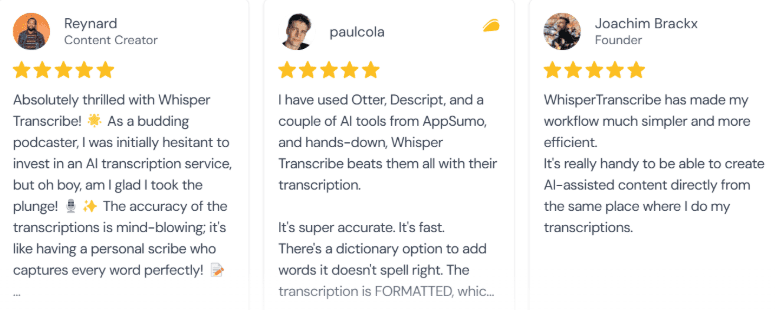
At WhisperTranscribe, we build AI-powered tools that transform audio into accurate transcripts and ready-to-use content. We work with thousands of professionals across legal, journalism, research, and content production, and we understand what separates a reliable transcription tool from one that creates more work than it saves.
What Is Legal Transcription Software?
Legal transcription software converts audio and video recordings of legal proceedings, including depositions, client interviews, court hearings, and attorney dictation, into accurate written text. Unlike general transcription tools, the best legal solutions are built with the accuracy standards, data security certifications, and formatting requirements that legal workflows demand.
Modern tools range from AI-powered platforms that deliver transcripts in minutes to human-verified services that guarantee near-perfect accuracy for court-ready documents.
Why Legal Transcription Software Is Important
Preserves Case Accuracy: Legal proceedings hinge on exact wording. Transcription software captures every word so nothing is misrepresented or omitted from the record.
Saves Billable Time: Attorneys and paralegals who transcribe manually lose hours that could be spent on case work. Automated transcription recovers that time at scale.
Creates Searchable Records: Digital transcripts let legal teams search by keyword across large volumes of recordings, making case preparation faster and more thorough.
Supports Compliance: Certified transcription tools help firms meet documentation standards required for admissible evidence, court filings, and regulatory compliance.
Enables Content Repurposing: Beyond legal records, transcripts can be turned into client summaries, internal briefs, and other documentation, maximizing the value of every recording.
The Best Legal Transcription Software at a Glance
Software | Best For | Core Model Type | Price Point |
WhisperTranscribe | Automated case documentation & speed | Advanced AI (Local Storage) | From $39.99/mo |
Rev | Verified deposition transcripts | Hybrid (AI + Human) | $0.25/min (AI) / $1.99/min (Human) |
Verbit | Enterprise court systems & compliance | Hybrid (AI + Human) | From $24/mo (Custom Enterprise) |
SpeakWrite | Strict zero-AI legal policies | 100% Human Typists | Pay-as-you-go per word |
Trint | Collaborative trial research & timelines | Collaborative AI | From €78/seat/month |
Happy Scribe | Multilingual evidence & translation | AI + Optional Human | From $17/mo |
1. WhisperTranscribe
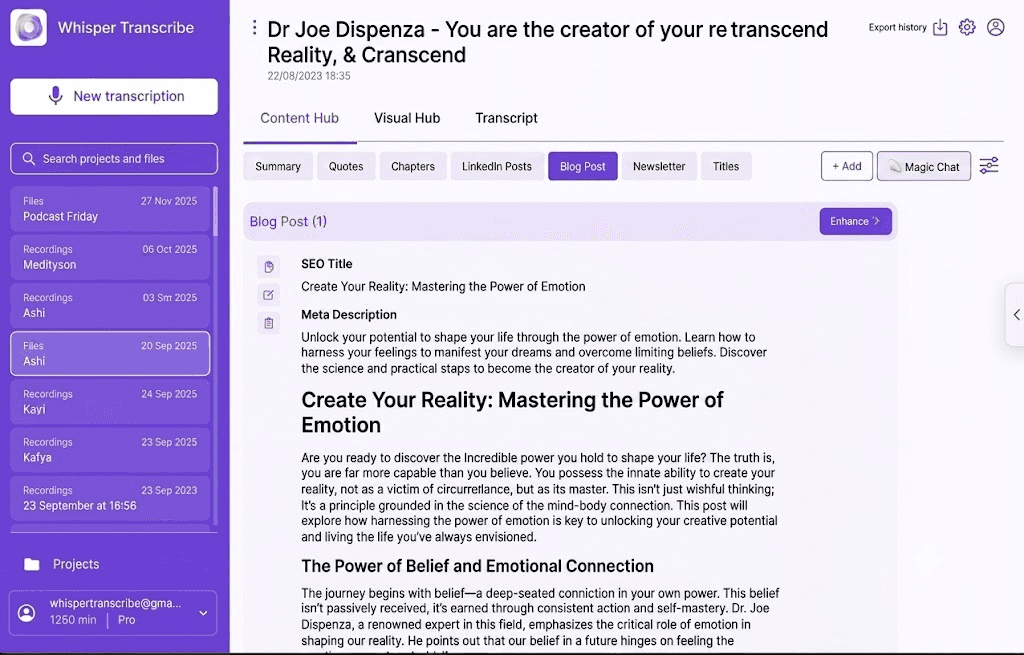
WhisperTranscribe is an AI-powered transcription and content generation platform built on OpenAI’s Whisper model. It transcribes audio and video with accuracy, then automatically generates case summaries, action items, structural legal briefs, and documentation directly from the text timeline.
For solo attorneys, small firms, and legal content teams who want to move faster without sacrificing accuracy, WhisperTranscribe offers a practical alternative to services that stop at the transcript and leave the rest of the work to you.
Key Features
Transcription Accuracy: Converts audio and video to highly accurate text, handling accents, background noise, and multi-speaker recordings.
Speaker Detection: Automatically identifies and labels each speaker, useful for depositions, interviews, and multi-party calls.
Magic Chat: Ask questions directly about your transcript to pull out key details without re-reading the whole document.
Content Generation: Turns one recording into a wide range of content types, summaries, action items, briefs, and more.
Export Options: Download transcripts in SRT, VTT, TXT, and Word formats for easy filing and sharing.
On-premise Option: Available for firms with sensitive data that cannot leave their own systems.
Pricing
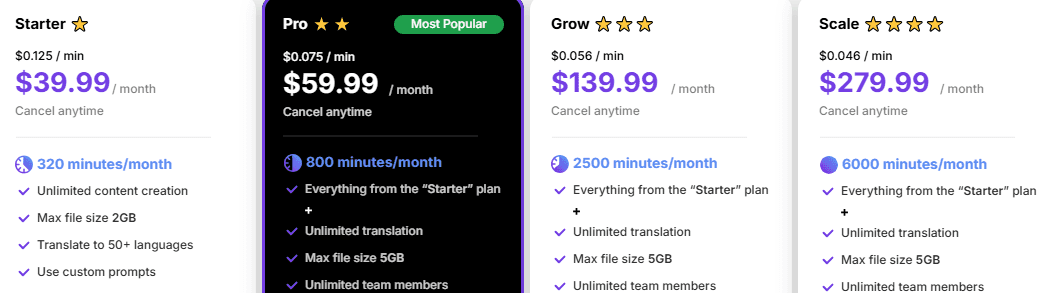
WhisperTranscribe offers a 60-minute free trial with no credit card required.
Paid plans offers:
Starter ($39.99/month): 320 minutes, 2GB max files, core features.
Pro ($59.99/month): 800 minutes, team access, all features included.
Grow ($139.99/month): 2,500 minutes, priority support.
Scale ($279.99/month): 6,000 minutes, priority support, custom templates
Pros
| Cons
|
Best For: Solo attorneys, small firms, and legal content teams who need fast, accurate transcription plus automated documentation from a single workflow.
2. Rev
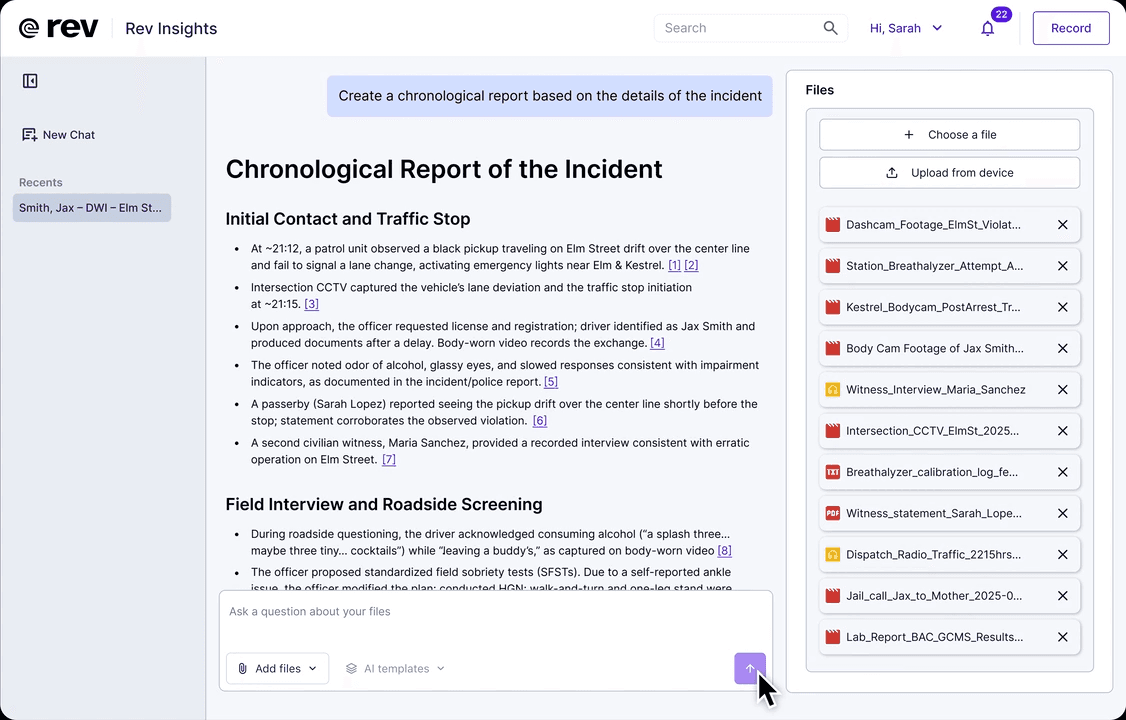
When a transcript needs to hold up in court or meet compliance standards, Rev is one of the strongest options available. It combines high-accuracy AI transcription with an optional human transcription service that guarantees near-perfect results, all from a single platform.
Following its acquisition of SmartDepo in 2025, Rev has deepened its focus on legal workflows, adding AI-assisted deposition and legal testimony analysis tools specifically built for law firms.
Key Features
AI Transcription Accuracy: Delivers highly accurate transcription on clean audio through its Reverb ASR model.
Human Transcription: Routes files to professional transcriptionists who guarantee verified accuracy with fast turnaround.
Legal Tools: SmartDepo integration adds AI-assisted deposition analysis and legal testimony review.
Captions and Subtitles: Generates SRT and VTT files for video evidence and court presentations.
Hybrid Workflow: Manage AI and human transcription jobs from one unified platform.
Pricing
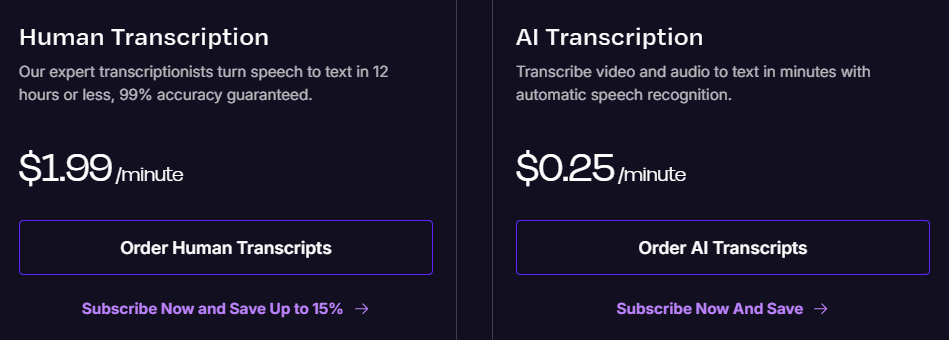
AI Pay-As-You-Go: $0.25 per audio minute.
Human Transcription: $1.99 per audio minute.
Volume discounts available for the enterprise plan.
Pros
| Cons
|
Best For: Legal professionals, compliance teams, and law firms that need verified, court-ready transcripts with a guaranteed accuracy standard.
3. Verbit
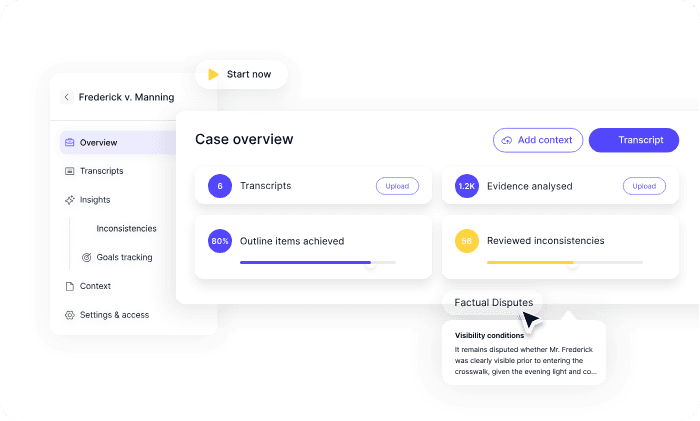
Verbit targets large-scale institutions and public court systems with an automated transcription engine backed by professional human proofreaders. The platform features native enterprise compliance architectures designed to plug directly into existing internal tech stacks without compromising data privacy laws.
Key Features
Hybrid AI and Human Transcription: Combines automated speech recognition with human review for verified accuracy on demanding recordings.
Compliance Certifications: SOC 2, HIPAA, GDPR, VPAT, and HECVAT compliant for regulated legal environments.
Speaker Identification: Labels and separates multiple speakers across depositions, hearings, and multi-party discussions.
Live Captioning: Real-time transcription for court proceedings and legal events via RTMP streaming.
Custom Vocabulary: Domain-trained models recognize legal terminology and firm-specific language.
Pricing
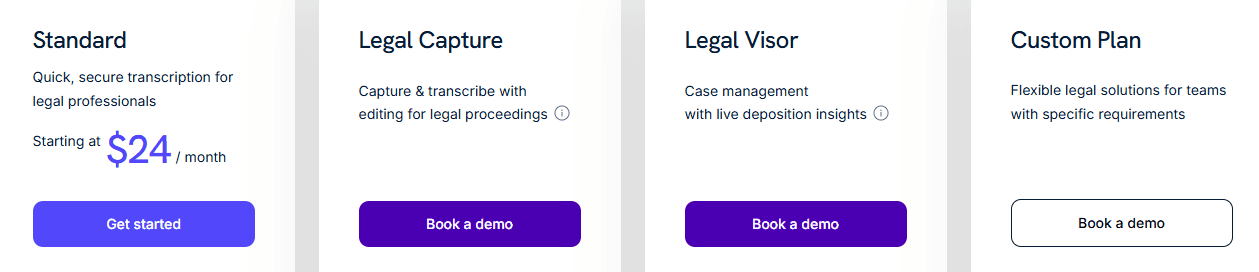
Standard AI Tier: $24.00/month
Legal Capture and Legal Visor: Custom-priced enterprise plans with demos, court-ready transcripts, live insights, and case management features.
Pros
| Cons
|
Best For: Courts, large law firms, and enterprise legal teams that need HIPAA-compliant, human-verified transcription at scale.
4. SpeakWrite
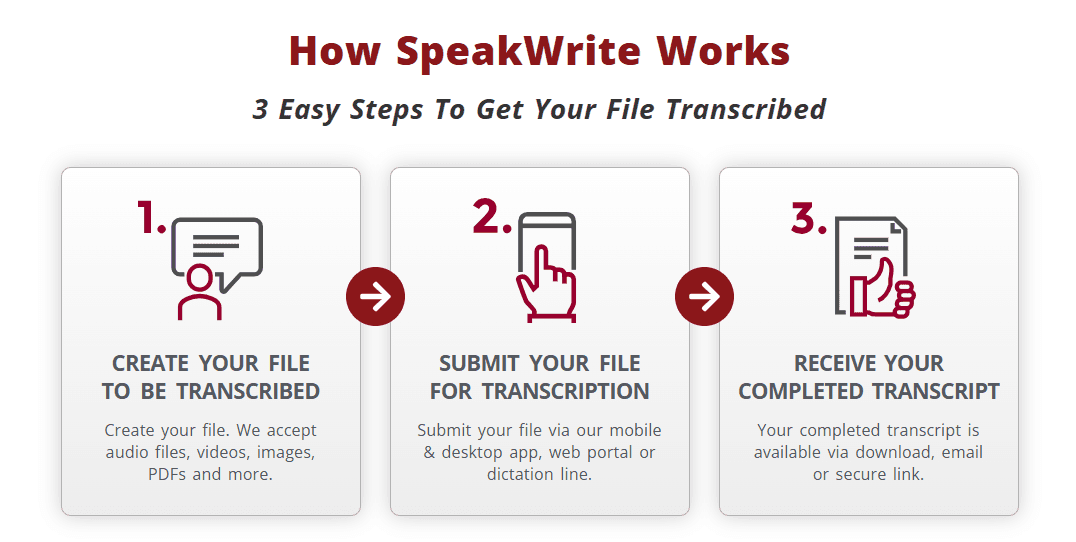
Some legal environments completely prohibit the use of AI. SpeakWrite is built specifically for these situations, connecting legal professionals with a round-the-clock network of trained, background-checked human typists across the US and Canada.
With zero AI in the processing pipeline, every document is manually typed, reviewed, and backed by a near-perfect accuracy guarantee. Legal teams can securely submit audio via phone dictation, mobile app, desktop app, or web portal, with most files returned within a few hours.
Key Features
Human-Only Transcription: Every transcript is produced by a trained, background-checked human typist with no AI processing.
Near-Perfect Accuracy Guarantee: Promises highly accurate transcription on every file regardless of audio conditions.
Round-the-Clock Availability: Transcriptionists are available at any time, including weekends and holidays.
Multi-Format Submission: Submit audio via toll-free phone line, mobile app, desktop app, or web portal.
PhotoNotes: Insert photos directly into dictations, useful for crime scene or evidence documentation.
Pricing
Pay-as-you-go with no contracts, no monthly fees, and no minimums, you only pay for completed work.
Pros
| Cons
|
Best For: Law firms and legal professionals who require human-verified transcripts, strict confidentiality standards, and fast turnaround without relying on AI.
5. Trint
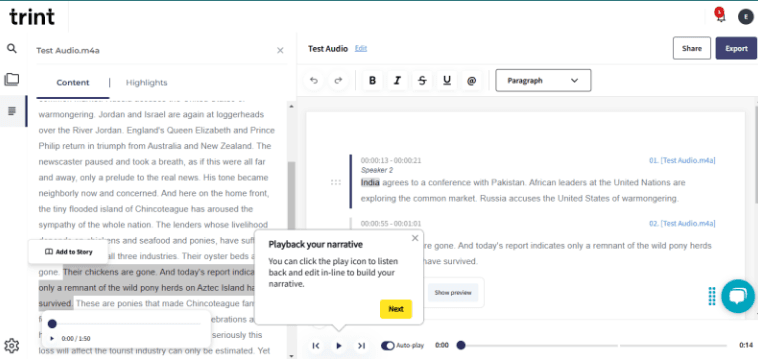
Trint was built by journalists, and its feature set reflects that. Its core strength is a collaborative transcript editor that lets multiple users search, annotate, highlight, and extract quotes from recordings simultaneously.
For legal researchers, journalists covering trials, and documentation teams who spend hours pulling specific moments from large volumes of recorded content, Trint’s search-and-collaborate workflow cuts that time significantly.
Key Features
Collaborative Editing: Multiple users can review, annotate, and edit transcripts simultaneously in real time.
Full-text Search: Search across all transcripts by keyword to locate specific quotes or moments instantly.
Story Builder: Assemble narratives from multiple recordings, useful for building case timelines and research reports.
AI Summaries: Automatically generates summaries and highlights key moments from transcripts.
Translation: Translates transcripts into a broad range of languages for multilingual documentation and captioning.
Pricing

Pro: €85/seat/month (for individuals)
Team: €78/seat/month (for small groups)
Business: Custom pricing (for larger organizations)
Pros
| Cons
|
Best For: Legal researchers, journalists covering legal proceedings, and documentation teams who need collaborative transcript editing and powerful search across large volumes of recordings.
6. Happy Scribe

Happy Scribe supports AI transcription across a broader range of languages than any other tool on this list, and pairs it with optional human review for cases where accuracy cannot be compromised. For international law firms, immigration attorneys, and legal teams working with multilingual witnesses or foreign-language evidence, it provides solid foundational language coverage.
Its clean built-in editor makes refining transcripts straightforward before export, and the platform integrates with Adobe Premiere for video-heavy legal documentation workflows.
Key Features
Broad Language Support: AI transcription across a wider range of languages than most competitors, ideal for multilingual legal work.
Subtitle Editor: Built-in editor for refining and exporting captions as SRT or VTT files.
Speaker Identification: Labels and timestamps different speakers across multi-party legal recordings.
Team Collaboration: Multiple users can review and edit transcripts together in the same workspace.
Video Tool Integration: Connects with Adobe Premiere and other production tools for video evidence workflows.
Pricing
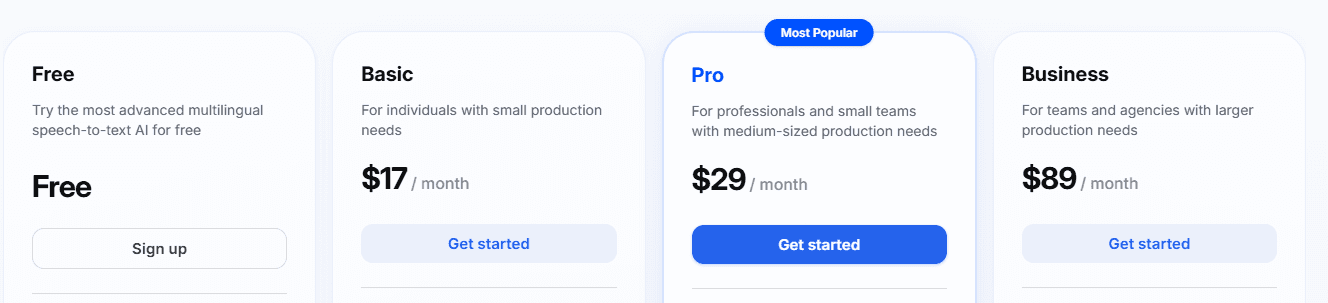
Free Tier: Limited usage with basic features
Basic Plan: $17.00/month
Pro Plan: $29.00/month
Business Tier: $89.00/month
Human transcription available at pay-as-you-go rates
Pros
| Cons
|
Best For: International law firms, immigration attorneys, and legal teams who regularly work with audio in multiple languages and need multilingual transcription and subtitle export in one workflow.
Get Accurate Legal Transcription with WhisperTranscribe
Choosing the wrong transcription tool puts your workflows at risk. In high-stakes legal environments, generic software simply cannot match the rigid security compliance and multi-speaker clarity that court-ready documentation demands.
WhisperTranscribe solves this by delivering 95% word accuracy optimized for complex legal dictations, depositions, and hearings. Its advanced AI easily navigates dense legal terminology and multi-speaker cross-examinations, cutting manual editing times in half while keeping your sensitive data fully secure.
Try WhisperTranscribe for free today to instantly streamline your firm’s document preparation.