
Free Podcast Shownotes Generator
Create professional show notes that engage listeners and boost discoverability.
How to generate a podcast description

Step 1: Add names
Add your name and the name of the speaker. We will automatically add this to the different show-note templates! If you have multiple guests, you can just add them with a comma in between speakers.

Step 2: Describe the episode
Describe the main discussion points you have had during the episode. This will help us to create an SEO optimised description for your podcast!

Step 3: Add timestamps
To improve usability, we highly recommend adding clickable timestamps to your podcast. That will help you listeners find the sections that are most relevant for them. You can either do this manually, or use our desktop app for it.
Why you should always add a description to your podcast
Benefits of having podcast show notes:

1. Improve your podcast SEO
Show notes help search engines understand what your podcast is about, allowing them to display your episodes to people searching for specific topics on Google. Well-crafted show notes are a key part of your podcast SEO optimization and will help you grow your audience organically.
1. Improve your podcast SEO
Show notes help search engines understand what your podcast is about, allowing them to display your episodes to people searching for specific topics on Google. Well-crafted show notes are a key part of your podcast SEO optimization and will help you grow your audience organically.
2. Capture your audience's attention
Use your show notes to draw listeners in and increase the likelihood that they'll hit play. By highlighting the most compelling moments and key takeaways, you make it easy for both your audience and guests to share podcast highlights—helping you reach even more listeners.
2. Capture your audience's attention
Use your show notes to draw listeners in and increase the likelihood that they'll hit play. By highlighting the most compelling moments and key takeaways, you make it easy for both your audience and guests to share podcast highlights—helping you reach even more listeners.
3. Grow your podcast
By highlighting the most relevant parts in your shownotes, you can make it easy for your audience or your guest to share some of the highlights of your podcast. This will help you grow your audience!
3. Grow your podcast
By highlighting the most relevant parts in your shownotes, you can make it easy for your audience or your guest to share some of the highlights of your podcast. This will help you grow your audience!
4. Monetize your podcast
Your show note section is a great way to monetize your podcast. You can highlight any sponsors of your show and add your affiliate links to their websites. You can of course also include calls to action to highlight your other social channels and further engage with your audience.
4. Monetize your podcast
Your show note section is a great way to monetize your podcast. You can highlight any sponsors of your show and add your affiliate links to their websites. You can of course also include calls to action to highlight your other social channels and further engage with your audience.
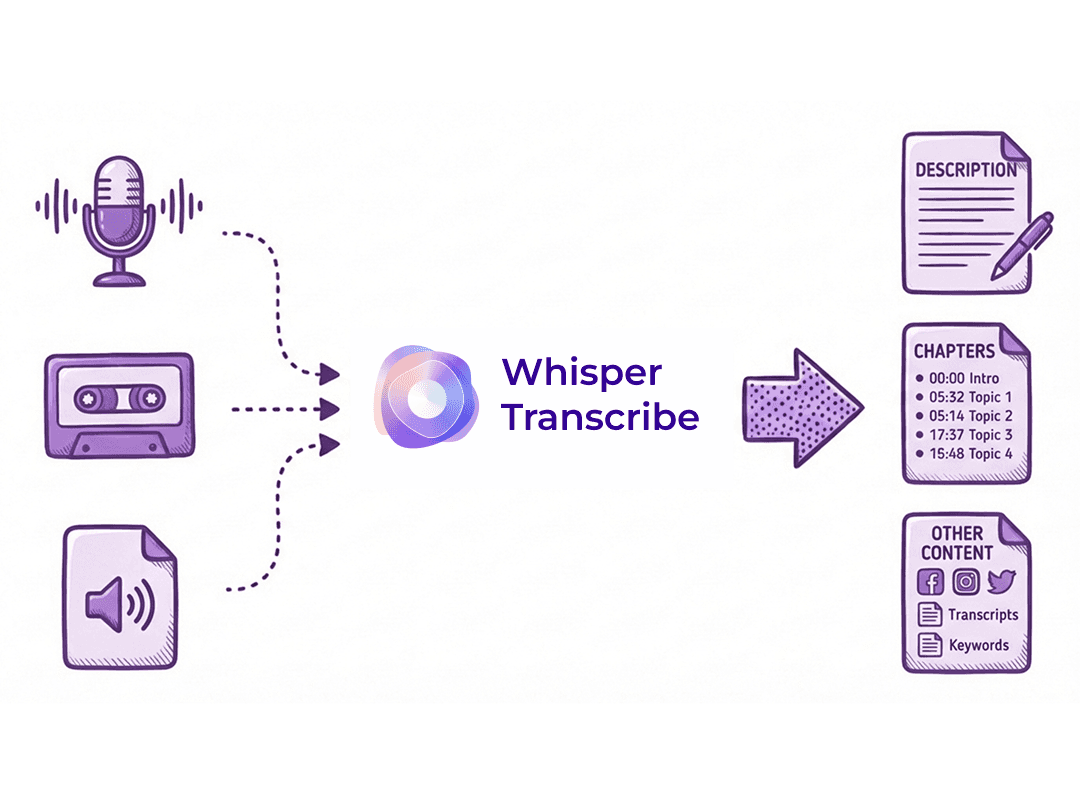
Generate Podcast Descriptions with WhisperTranscribe on full autopilot
Transcribe your audio with AI
This free podcast description generator is a good starting point to get a first draft of your show-notes. However, it still requires you to fill in some blanks. Test out our app for free to get a full description including timestamps, interesting quotes and more!
With the help of the OpenAI Whisper model, you can transcribe your audio in over 55 languages within seconds. Simply upload a file to the app, paste a URL or find your podcast in our library of over 2,5 million podcasts. Once you have added your file, the WhisperTranscribe app, will provide you with a 95% accurate transcript in less than 60 seconds.
More than just a transcript
Get publish ready content from your audio with WhisperTranscribe in minutes

Newsletter
Generate a newsletter from your podcast in seconds to help you grow your audience.
Newsletter
Generate a newsletter from your podcast in seconds to help you grow your audience.


Social Media Post Generator
Automatically generate social media posts in your own tone of voice.

Podcast Subtitles
Get your transcript in 55+ languages in minutes. Download the transcript as SRT or VTT.
Podcast Subtitles
Get your transcript in 55+ languages in minutes. Download the transcript as SRT or VTT.

Quotes
Automatically extract the best quotes from your audio. Get engaging, inspiring, funny or motivational quotes in seconds.

Free podcast name generator
Don't have a podcast name yet? Try out our free podcast name generator. No sign-up required
Don't just take our word for it.
What our customers say:


FAQ
Is WhisperTranscribe for free?
How does the App work?
What languages do you support?
Can I translate my audio?
How long does it take to create a transcript?
Who owns the transcript and the content created from it?
Will my data be used to train the AI models?
What upload formats do you accept?
Can I transcribe any audio on the internet?
What is the file size limit?
FAQ
Is WhisperTranscribe for free?
How does the App work?
What languages do you support?
Can I translate my audio?
How long does it take to create a transcript?
Who owns the transcript and the content created from it?
Will my data be used to train the AI models?
What upload formats do you accept?
Can I transcribe any audio on the internet?
What is the file size limit?
Want to try it?
Create podcast descriptions, chapters and other content from your audio for free now. No credit card required or any other strings attached. Join 12k+ podcasters who are saving time with our tool every week!


Free Tools
Free Tools