Best Video to Text Converter: We Compare 6 Tools

Quick Summary
This guide compares six of the best video to text converters in 2026: WhisperTranscribe, Descript, Sonix, Transkriptor, Kapwing, and Happy Scribe. Whether you need subtitles, searchable transcripts, or a full content repurposing workflow, use this guide to find the right fit. Then explore the WhisperTranscribe blog for more practical tips on transcription and content creation.
From Video to Text in Minutes
A good video-to-text converter does more than create transcripts. It unlocks the information hidden in every recording, turning speech into searchable, editable text you can use across your entire content workflow.
However, not every tool handles this the same way. Some are built for subtitle generation, others for meeting documentation, content repurposing, or research. Picking the wrong one means missing features that matter and paying for ones that don't.
To help you choose, this WhisperTranscribe guide compares six of the best video to text converters for speed and accuracy.
Why Listen to Us?
At WhisperTranscribe, we build AI-powered tools that convert audio and video into accurate transcripts and ready-to-use content assets. Having helped creators, marketers, and professionals get more value from their recordings, we understand what separates a great video to text converter from one that leaves the hard work to you.
What Is a Video to Text Converter?
A video to text converter is a tool that extracts spoken audio from a video file and converts it into written text automatically. Most modern tools use AI-powered speech recognition to produce transcripts that are searchable, editable, and exportable in a range of formats.
Beyond basic transcription, the best tools go further, generating summaries, subtitles, social media content, and other assets from the same recording, turning a single video into a complete content workflow.
Why Does It Matter?
Saves hours of manual work: Transcribing video by hand is slow and error-prone. Automated converters handle the heavy lifting so you can focus on what matters.
Improves discoverability: Search engines index text, not video. Transcripts make your content findable through organic search.
Enables content repurposing: A single video transcript can become a blog post, social snippet, newsletter, or show notes, maximizing the return on every recording.
Improves accessibility: Subtitles and captions make your content available to deaf and hard-of-hearing audiences, non-native speakers, and viewers watching without sound.
Creates searchable records: Transcripts let you search across large libraries of video content by keyword, useful for researchers, journalists, and teams managing documentation.
Our Picks for the Best Video to Text Converters
WhisperTranscribe
Descript
Sonix
Transkriptor
Kapwing
Happy Scribe
1. WhisperTranscribe
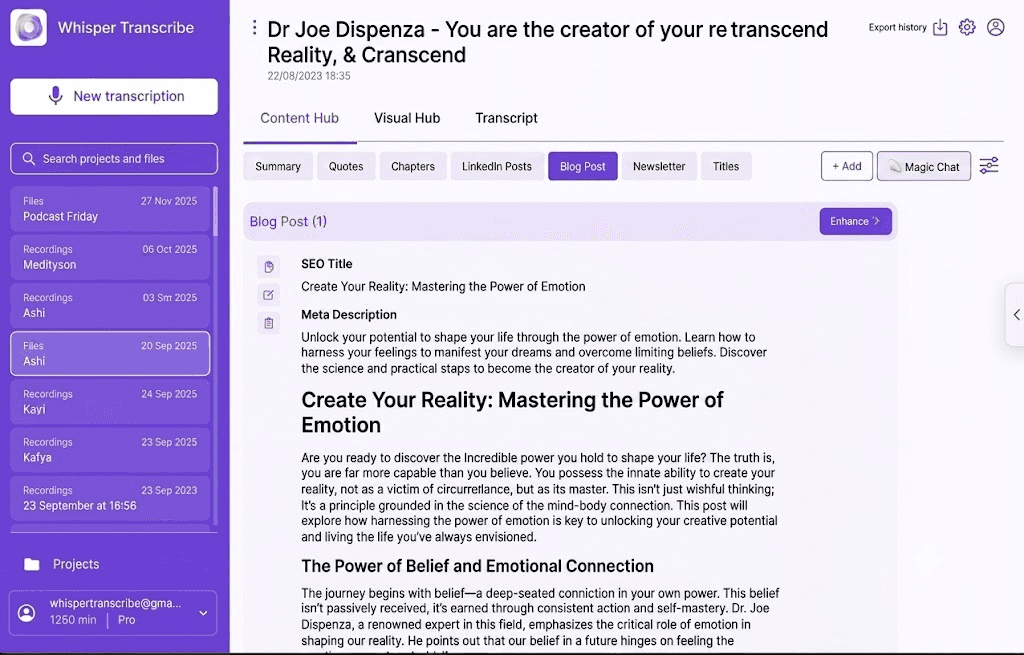
Many video to text converters focus primarily on text transcription. WhisperTranscribe goes further by using OpenAI’s Whisper model to convert video files into highly precise text timelines. From there, the Content Hub automatically generates a wide range of content assets from that single file.
WhisperTranscribe is built for content creators, marketers, and professionals who want maximum value from their videos without spending hours on manual repurposing. The platform instantly turns a single recording into a complete content workflow.
Key Features
Transcription Accuracy: Converts video to highly accurate text with 95% accuracy, handling accents, background noise, and multi-speaker recordings.
Speaker Detection: Automatically identifies and labels each speaker throughout the recording.
Magic Chat: Ask questions directly about your transcript to pull out key insights without re-watching the video.
Content Generation: Turns one video into a wide range of content types like blog posts, summaries, show notes, social posts, and more.
Export Options: Download transcripts in SRT, VTT, TXT, and Word formats using our Subtitle Generator.
Source Flexibility: Accepts direct uploads, YouTube links, Vimeo links, and podcast RSS feeds.
Privacy and Ownership: You retain full ownership of all content, and your data is never used to train AI models.
Desktop Application Availability: Available as a native app for Mac and Windows.
Pricing
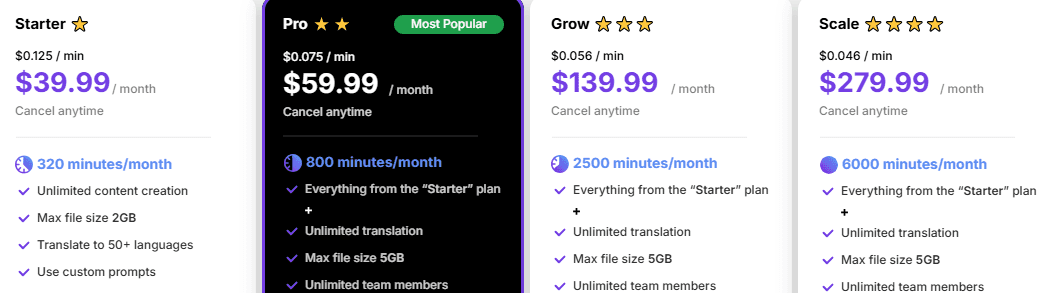
Free Trial: $0
Starter: $39.99/month
Pro: $59.99/month
Grow: $139.99/month
Scale: $279.99/month
Pros
| Cons
|
Best For: Creators, podcasters, and marketers who need fast transcription paired with automated marketing asset generation.
2. Descript
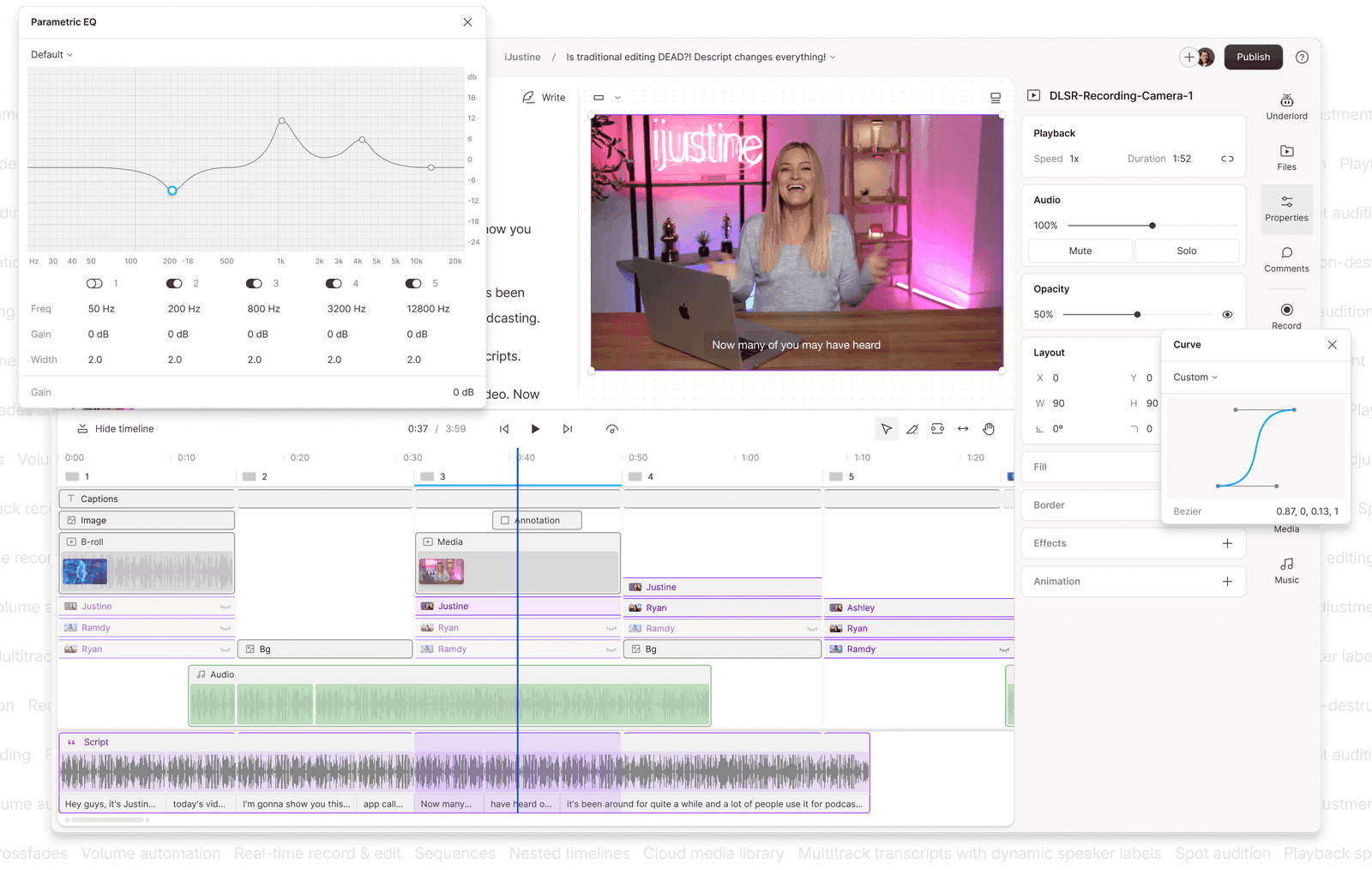
Descript allows you to edit video by editing text. When you delete a sentence from the transcript, that section disappears from the recording automatically. This text-based workflow radically speeds up production for podcasts, interviews, and talking-head videos without requiring prior editing experience.
Beyond transcription, Descript bundles audio cleanup, filler word removal, screen recording, voice cloning, and short-form clip generation into one platform. This makes it a strong all-in-one option for spoken-word content production.
Key Features
Text-Based Editing: Edit video and audio directly through the transcript, no timeline scrubbing needed.
Studio Sound: AI audio enhancement that removes background noise and improves overall recording quality.
Overdub: Voice cloning tool that generates new audio from typed text using a replica of your own voice.
AI Clip Finder: Automatically identifies the most shareable moments from longer recordings for short-form content.
Screen Recording: Built-in screen recorder for tutorials, demos, and training content.
Pricing

Hobbyist: $16/month
Creator: $24/month
Business: $50/month
Enterprise: Custom pricing
Pros
| Cons
|
Best For: Podcasters, YouTubers, and content teams who want to edit video by editing text without learning traditional timeline-based editing tools.
3. Sonix
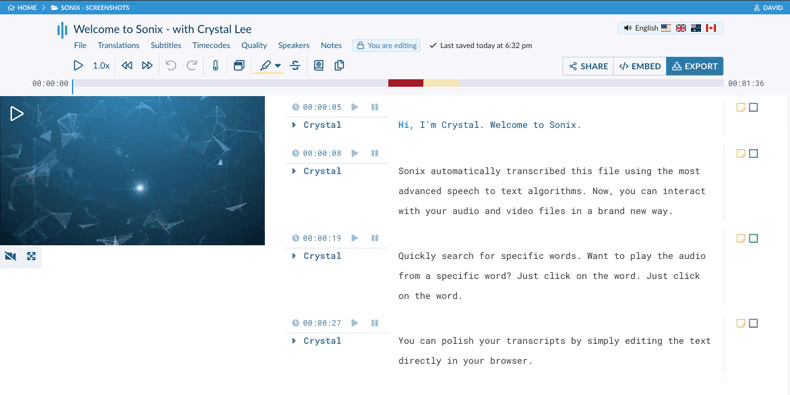
Sonix is a transcription platform used across media, research, legal, and content production. It converts audio and video to precisely timestamped, speaker-attributed text directly in the browser, with no software download required. Every transcript is searchable, editable, and ready to collaborate on from the moment it lands.
What sets Sonix apart is its clean in-browser editor and a broad set of integrations, making it a solid fit for teams that need transcription embedded into a wider workflow.
Key Features
Automated Transcription: Converts audio and video to accurate, timestamped text entirely in the browser.
In-browser Editor: Search, review, and refine transcripts without downloading anything.
Speaker Attribution: Tags every word to the correct speaker for easy reference and analysis.
Subtitles and Captions: Generates subtitle files for video content with SRT and VTT export.
Integrations: Connects with Adobe Audition, Zapier, Google Drive, and Dropbox.
Pricing
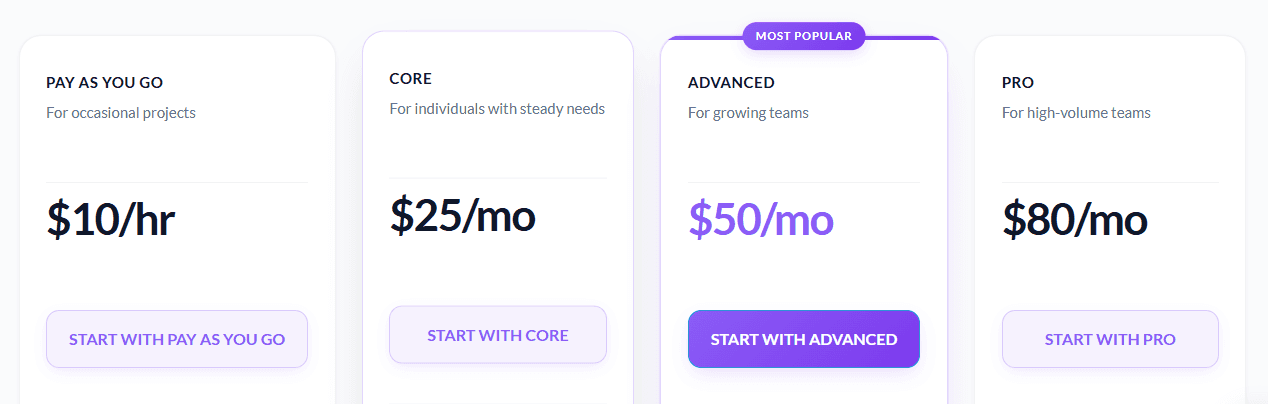
Pay-as-you-go: $10/hour
Core: $25/month
Advanced: $50/month
Pro: $80/month
Pros
| Cons
|
Best For: Researchers, journalists, media professionals, and multilingual teams who need fast, accurate video transcription with strong search, collaboration, and workflow integration.
4. Transkriptor
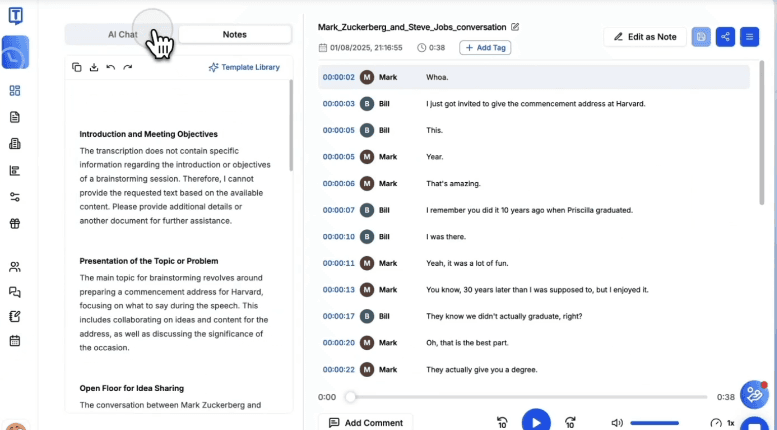
Transkriptor is a straightforward AI transcription tool built for users who need reliable video-to-text conversion without a steep learning curve. It supports a broad range of languages and integrates natively with Zoom, Google Meet, and Microsoft Teams.
The tool produces clean transcripts with automated speaker separation and flexible export options. Users consistently praise its ease of use and accuracy across accents and dialects, as well as the time it saves on research, documentation, and meeting follow-ups.
Key Features
Automatic Transcription: Converts uploaded video and audio files to text quickly, with speaker separation included.
AI Summaries: Generates meeting summaries and action items directly from transcripts.
Broad Language Support: Covers a wide range of languages for transcription and translation.
Export Formats: Download transcripts as TXT, SRT, or Word files.
Mobile App: Available on Android and iOS for transcription outside the desktop workflow.
Pricing
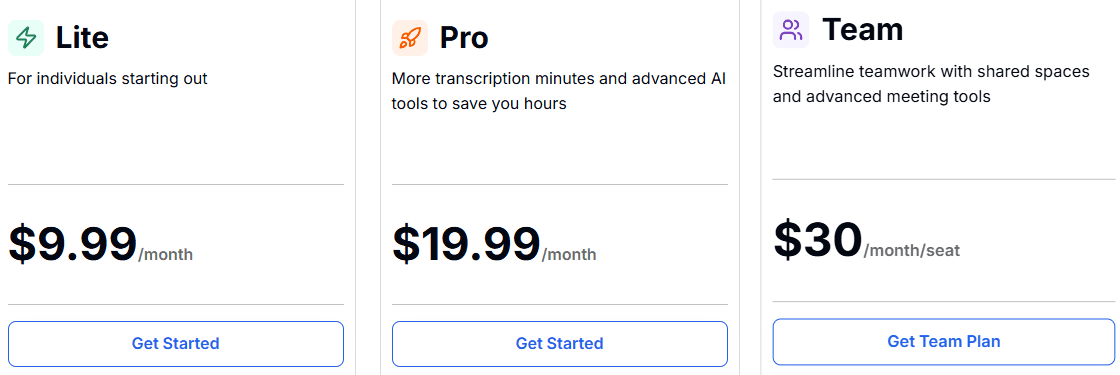
Lite plan: $9.99/month
Pro plan: $19.99/month
Team plan: $30/month/seat
Pros
| Cons
|
Best For: Students, educators, and cross-functional teams who want quick meeting minutes and lecture summaries.
5. Kapwing

Kapwing is a browser-based video editor with AI-powered transcription and subtitle generation built directly into the editing workflow. It's built for social media managers, content creators, and marketing teams who need to go from raw video to captioned, platform-ready content quickly, without jumping between separate tools.
The platform automatically removes silences and filler words while generating multi language captions. It also turns long videos into short clips optimized for social platforms, all from a single browser tab.
Key Features
Auto-Subtitles: AI-generated captions across multiple languages with customizable fonts and styles.
Smart Cut: Automatically removes silences, filler words, and dead air from talking-head videos.
Repurpose Tool: Converts long-form video into short clips optimized for social media platforms.
Collaborative Editing: Multiple team members can work on the same project simultaneously in real time.
Browser-Based: No download required, works across Windows, iOS, and Android devices.
Pricing
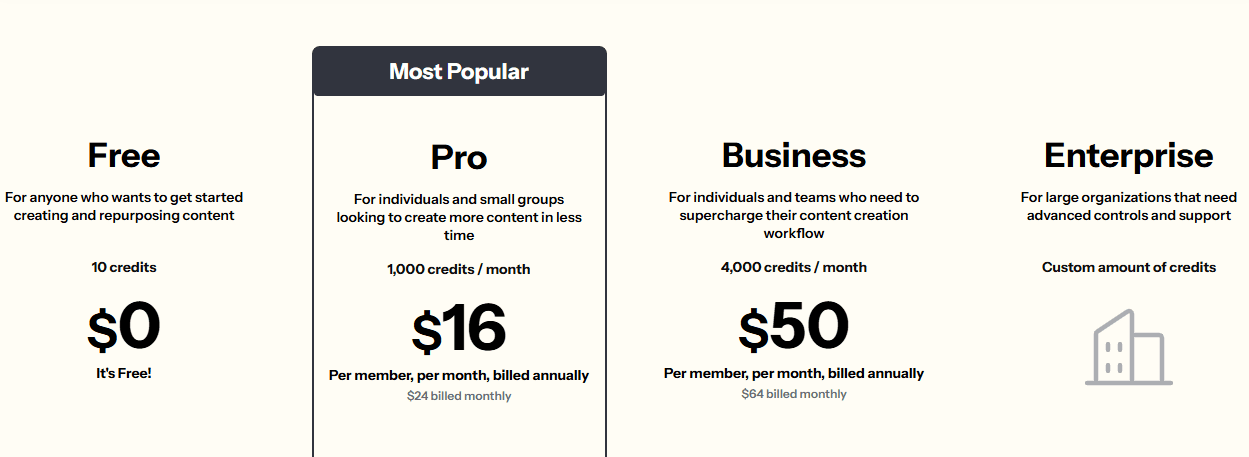
Free Plan: $0 with watermark and export limitations
Pro Plan: $16/month billed annually ($24/month on monthly billing)
Business Plan: $50/month billed annually ($64/month on monthly billing)
Enterprise: Custom pricing
Pros
| Cons
|
Best For: Social media managers and digital marketers needing rapid subtitle styling and clip-trimming workflows.
6. Happy Scribe

Happy Scribe supports AI transcription across more languages than most tools on this list and combines that with a clean built-in editor for refining transcripts and subtitles before export. For video teams working across international markets, the ability to go from raw footage to published captions in multiple languages, without switching platforms.
It's a practical, no-frills choice for media producers, journalists, and international content teams who need reliable multilingual transcription and subtitle workflows in one place.
Key Features
Human Transcription: Optional human review available for higher accuracy at pay-as-you-go rates.
Subtitle Editor: Built-in editor for refining and exporting captions as SRT or VTT files.
Speaker Identification: Labels and timestamps different speakers across multi-person recordings.
Team Collaboration: Multiple users can review and edit transcripts together in the same workspace.
Video Tool Integration: Connects with Adobe Premiere and other video production tools.
Pricing

Free Plan: Limited usage
Basic Plan: $17/month
Pro Plan: $29/month
Business Plan: $89/month
Human transcription available at pay-as-you-go rates
Pros
| Cons
|
Best For: International video producers and media translation teams focused on multi-language caption accuracy.
Maximize Video Content Value Using WhisperTranscribe
Leaving your videos untranscribed limits your reach, visibility, and accessibility. While basic tools provide raw text files, they still leave you with hours of manual editing and formatting before you can use the data.
WhisperTranscribe solves this by combining high precision AI transcription with an automated marketing Content Hub. The platform instantly turns your video into accurate text and automatically generates optimized blog posts, show notes, and social media assets from the recording.
Stop wasting time on manual formatting. Try WhisperTranscribe for free today