Cómo transcribir audios de árabe (2 métodos eficaces)

Resumen rápido
Esta guía explica dos formas de transcribir audios en árabe: un método manual y otro con IA usando WhisperTranscribe. Aprenderás los pasos para ambos, además de consejos para mejorar la precisión con dialectos arabes, acentos y audio con idiomas mezclados habituales en notas de voz. Para más guías de transcripción, visita el blog de WhisperTranscribe.
u00bfTe cuesta transcribir notas de voz en u00e1rabe a texto u00fatil?
El audio en u00e1rabe de WhatsApp, reuniones, entrevistas, pu00f3dcasts y llamadas de soporte suele contener informaciu00f3n valiosa, pero es difu00edcil de buscar, traducir, subtitular o reutilizar hasta que se transcribe.
Transcribir en u00e1rabe puede ser complicado debido a los dialectos regionales, la alternancia de cu00f3digos, el ruido de fondo y los hablantes ru00e1pidos. Y aunque la transcripciu00f3n manual funciona para grabaciones cortas, se vuelve lenta con archivos mu00e1s largos o dialectos desconocidos.
En esta guu00eda, aprenderu00e1s a transcribir mensajes de audio en u00e1rabe manualmente o con WhisperTranscribe, ademu00e1s de tu00e9cnicas para mejorar la precisiu00f3n en dialectos, habla con mezcla de idiomas y grabaciones largas.
u00bfPor quu00e9 escucharnos?
En WhisperTranscribe ayudamos a creadores, investigadores y equipos a transcribir audio y video en mu00e1s de 55 idiomas, incluido el u00e1rabe. Entendemos los desafu00edos de la transcripciu00f3n de u00e1rabe, especu00edficamente: la variedaddialectal, la escritura de derecha a izquierda y la dificultad de la mayoru00eda de las herramientas con el u00e1rabe estu00e1ndar moderno frente a las variedades regionales. Esta guu00eda se basa en esa experiencia.
u00bfPor quu00e9 transcribir mensajes de audio en u00e1rabe?
La transcripciu00f3n convierte el u00e1rabe hablado en texto escrito que puedes leer, editar y reutilizar. Para los mensajes de audio en u00e1rabe, esto significa convertir notas de voz, llamadas grabadas, entrevistas o videoclips en texto de fu00e1cil uso.
Por quu00e9 es importante:
Accesibilidad: Las transcripciones escritas hacen que el contenido de audio sea accesible para personas con problemas de audiciu00f3n o que prefieren leer antes que escuchar.
Traducciu00f3n: Necesitas un texto en u00e1rabe preciso antes de poder traducirlo de forma fiable al espau00f1ol o a cualquier otro idioma.
Investigaciu00f3n y documentaciu00f3n: Periodistas, acadu00e9micos y profesionales del derecho a menudo necesitan registros escritos de audio para informes, publicaciones o expedientes judiciales.
Reutilizaciu00f3n de contenidos: Los presentadores de pu00f3dcasts, YouTubers y equipos de medios pueden convertir el audio en u00e1rabe en entradas de blog, subtu00edtulos, boletines informativos y contenido para redes sociales.
Bu00fasqueda ru00e1pida: El texto es fu00e1cil de buscar y consultar. El audio no se puede buscar fu00e1cilmente ni utilizar como referencia.
A continuaciu00f3n, veremos cu00f3mo transcribir mensajes de audio en u00e1rabe mediante dos mu00e9todos diferentes.
Guu00eda paso a paso para transcribir mensajes de audio en u00e1rabe
Mu00e9todo 1: Cu00f3mo transcribir mensajes de audio en u00e1rabe de forma manual
Si solo necesitas transcribir un mensaje de voz en u00e1rabe y dominas el idioma, puedes hacerlo manualmente sin herramientas. Solo sigue estos pasos:
Paso 1: Organiza tu audio y prepara tu espacio de trabajo
Empieza por localizar el mensaje de audio en u00e1rabe que deseas transcribir. Puede ser una nota de voz de WhatsApp, un archivo de audio descargado, un videoclip o una llamada grabada. Guu00e1rdalo en un lugar de fu00e1cil acceso para reproducirlo.
Antes de empezar, organiza tu espacio:
Usa auriculares para mayor claridad. Esto es vital en u00e1rabe, donde sonidos similares como u062d, u0647 y u0639 se pueden confundir con facilidad.
Trabaja en ordenador para tener el reproductor de audio y el documento de texto abiertos uno al lado del otro.
Utiliza una distribuciu00f3n de teclado en u00e1rabe o un teclado en pantalla si vas a escribir la transcripciu00f3n en caracteres u00e1rabes.
Una configuraciu00f3n adecuada ayuda a reducir errores y mejora notablemente la precisiu00f3n.
Paso 2: Escucha el audio completo primero
Antes de escribir nada, reproduce el audio de principio a fin sin detenerlo. Esto te ayuda a comprender todo el contexto antes de comenzar con la transcripciu00f3n.
Presta mucha atenciu00f3n a:
Quu00e9 dialecto u00e1rabe se habla: u00e1rabe estu00e1ndar moderno (Fusha), egipcio, del Golfo, levantino, du00e1rija marroquu00ed u otra variedad.
El ritmo de habla y la claridad
Cualquier cambio de idioma bilingu00fce entre el u00e1rabe y otros idiomas, como el inglu00e9s
El ruido de fondo que pueda dificultar la comprensiu00f3n de ciertas palabras
Identificar el dialecto al inicio mejora la precisiu00f3n. El u00e1rabe del Golfo, por ejemplo, usa vocabulario y pronunciaciu00f3n diferentes al u00e1rabe egipcio. Conocer el dialecto de antemano te ayuda a transcribir con mayor exactitud.
Paso 3: Transcribe en secciones cortas
Comienza desde el principio y transcribe en pequeu00f1os bloques. Reproduce unos segundos, pausa y escribe lo que escuchas. Repite este proceso.
Trabaja en secciones cortas en lugar de intentar seguir el ritmo en tiempo real. Por ejemplo, si el hablante dice una frase como "u0628u0635u0631u0627u062du0629u062c u0627u0644u0645u0634u0643u0644u0629 u0643u0627u0646u062a u0641u064a u0627u0644u062au0645u0627u0635u0644" (sinceramente, el problema fue la comunicaciu00f3n), escru00edbela antes de continuar. No intentes retener varias frases a la vez.
Es normal reproducir algunas partes varias veces. Rasgos del u00e1rabe como consonantes enfu00e1ticas, vocales largas y el habla enlazada pueden dificultar la identificaciu00f3n de palabras individuales.
Paso 4: Elige entre transcribir en alfabeto u00e1rabe o transliterar
Para este paso, tienes dos opciones:
Transcribir en alfabeto u00e1rabe (u0627u0644u062du0631u0648u0641 u0627u0644u0639u0631u0628u064au0629): Es la opciu00f3n mu00e1s precisa para uso formal, investigaciu00f3n o traducciu00f3n. Conserva las palabras y la estructura original.
Transliterar a caracteres latinos: Se escribe la versiu00f3n fonu00e9tica como u201chabibiu201d o u201cmarhabau201d en lugar de u062du0628u064au0628u064a o u0645u0631u062du0628u0627. Puede ser mu00e1s ru00e1pido si no usas teclado u00e1rabe, pero reduce la precisiu00f3n y dificulta su uso posterior.
Para cualquier fin mu00e1s allu00e1 de notas personales, transcribir en caracteres u00e1rabes suele ser la mejor opciu00f3n.
Paso 5: Revisa, corrige y formatea
Vuelve a escuchar el audio y compu00e1ralo con tu texto. Corrige palabras omitidas, revisa la puntuaciu00f3n y divide los textos largos en pu00e1rrafos fu00e1ciles de leer.
Si la transcripciu00f3n se va a traducir o compartir, revu00edsala a fondo. Los tu00e9rminos erru00f3neos en u00e1rabe pueden alterar el significado y causar errores en la traducciu00f3n final.
Limitaciones de transcribir mensajes de audio en u00e1rabe de forma manual
La transcripciu00f3n manual sirve para unos pocos mensajes cortos, pero tiene lu00edmites reales, especialmente con el idioma u00e1rabe.
Los dialectos causan problemas de precisiu00f3n: No existe un u00fanico "u00e1rabe hablado estu00e1ndar". Los dialectos regionales varu00edan en vocabulario, pronunciaciu00f3n y gramu00e1tica. Si no estu00e1s familiarizado con el dialecto del audio, la transcripciu00f3n manual seru00e1 muy compleja.
Es un proceso lento: Incluso una nota de voz de solo dos minutos puede requerir de 15 a 20 minutos de trabajo manual al considerar pausas, escritura, correcciones y formato.
La escritura en teclado u00e1rabe au00f1ade fricciu00f3n: Escribir con caracteres u00e1rabes suele ser mu00e1s lento para la mayoru00eda de personas que no lo usan a diario.
El cambio de idioma lo complica todo: Muchos hablantes de u00e1rabe mezclan idiomas en mitad de una frase. Registrar u00e1rabe, inglu00e9s o espau00f1ol en el mismo texto exige cambiar ru00e1pidamente de mu00e9todo de entrada.
No es escalable: Transcribir un solo mensaje es fu00e1cil de manejar. Hacerlo para decenas de notas de voz, entrevistas completas o episodios de pu00f3dcast se vuelve inviable.
Si solo requieres procesar unos pocos mensajes y dominas el u00e1rabe, el enfoque manual puede ser viable. Pero si buscas rapidez, coherencia y capacidad para gestionar grandes volu00famenes, usar una herramienta de transcripciu00f3n es la opciu00f3n lu00f3gica.
Mu00e9todo 2: Cu00f3mo transcribir mensajes de audio en u00e1rabe usando WhisperTranscribe
WhisperTranscribe simplifica todo el proceso de trabajo con u00e1rabe. Utiliza el modelo Whisper de OpenAI para convertir el u00e1rabe hablado en texto, gestionando diferentes dialectos, acentos y calidades de audio sin que tengas que escribir nada a mano.
Asu00ed es como se usa.
Paso 1: Descarga e instala WhisperTranscribe
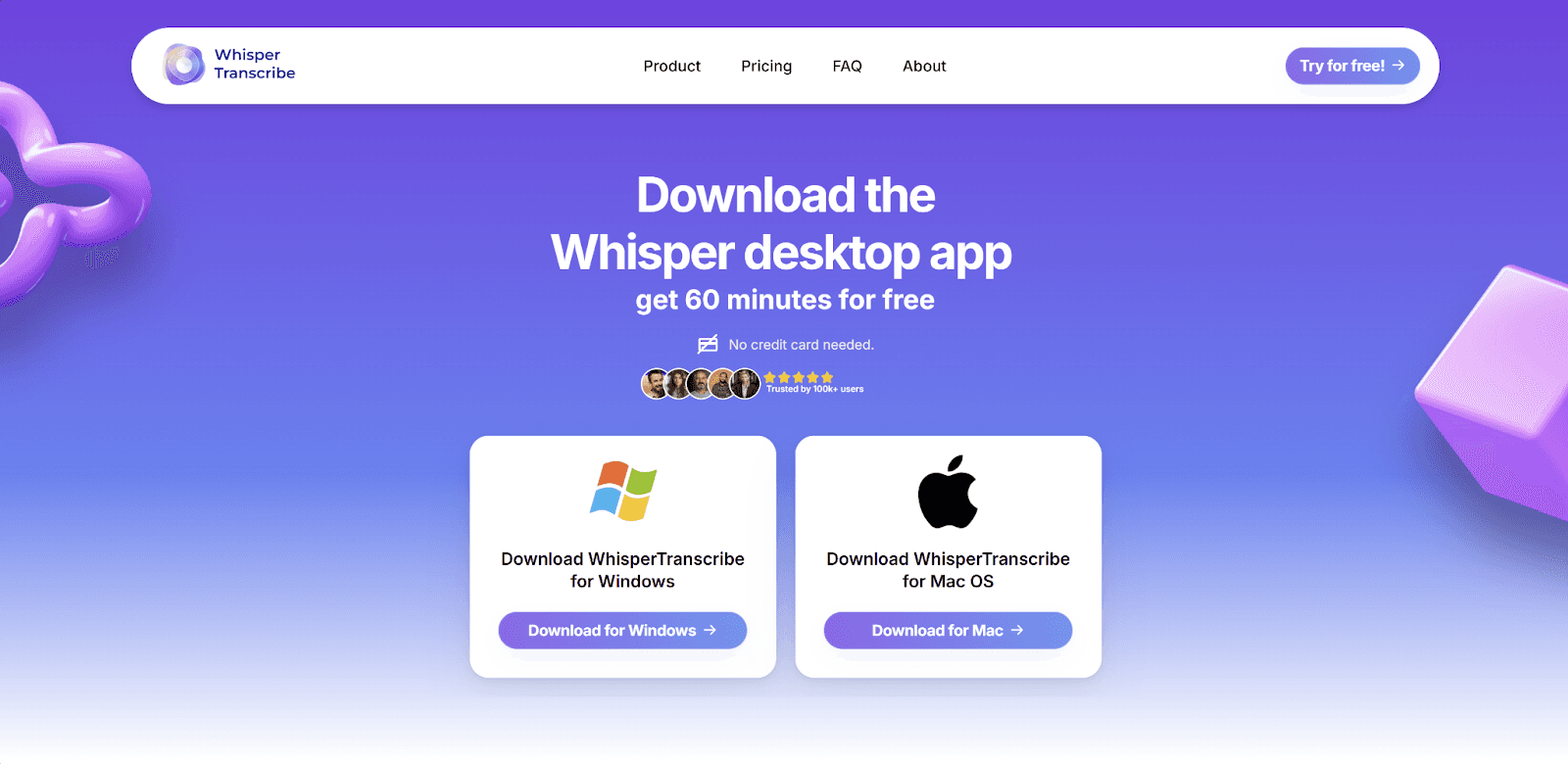
Visita whispertranscribe.com y haz clic en "Probar gratis". Descarga la versiu00f3n adaptada a tu sistema, sea Mac o Windows, y sigue los pasos de instalaciu00f3n. Abre la app, crea tu cuenta y estaru00e1s listo para comenzar.
Paso 2: Sube tu archivo de audio en u00e1rabe
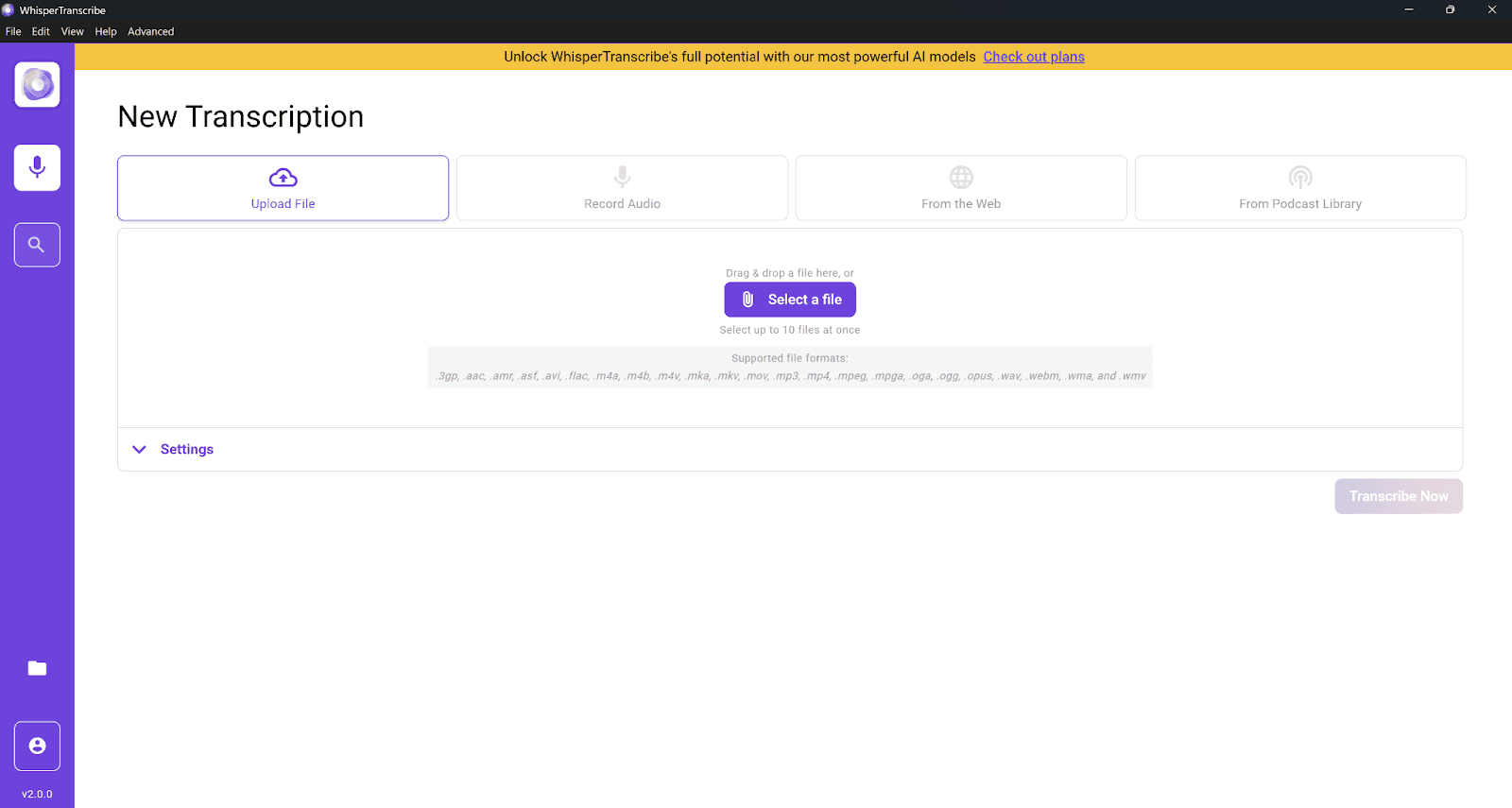
Puedes subir archivos de audio o video en formatos populares como MP3, MP4, WAV y M4A. Tienes dos vu00edas:
Subida directa: Si el audio estu00e1 en tu dispositivo, usa la opciu00f3n "Subir archivo" para importarlo directamente.
Importar desde una URL: Si el audio estu00e1 en un video de YouTube, feed de pu00f3dcast u otra fuente web, pega el enlace en la opciu00f3n "Desde la Web".
Para notas de voz de WhatsApp, guarda primero el archivo en tu dispositivo y luego su00fabelo. El proceso de carga funciona igual para archivos de cualquier tamau00f1o.
Paso 3: Configura tus opciones de transcripciu00f3n
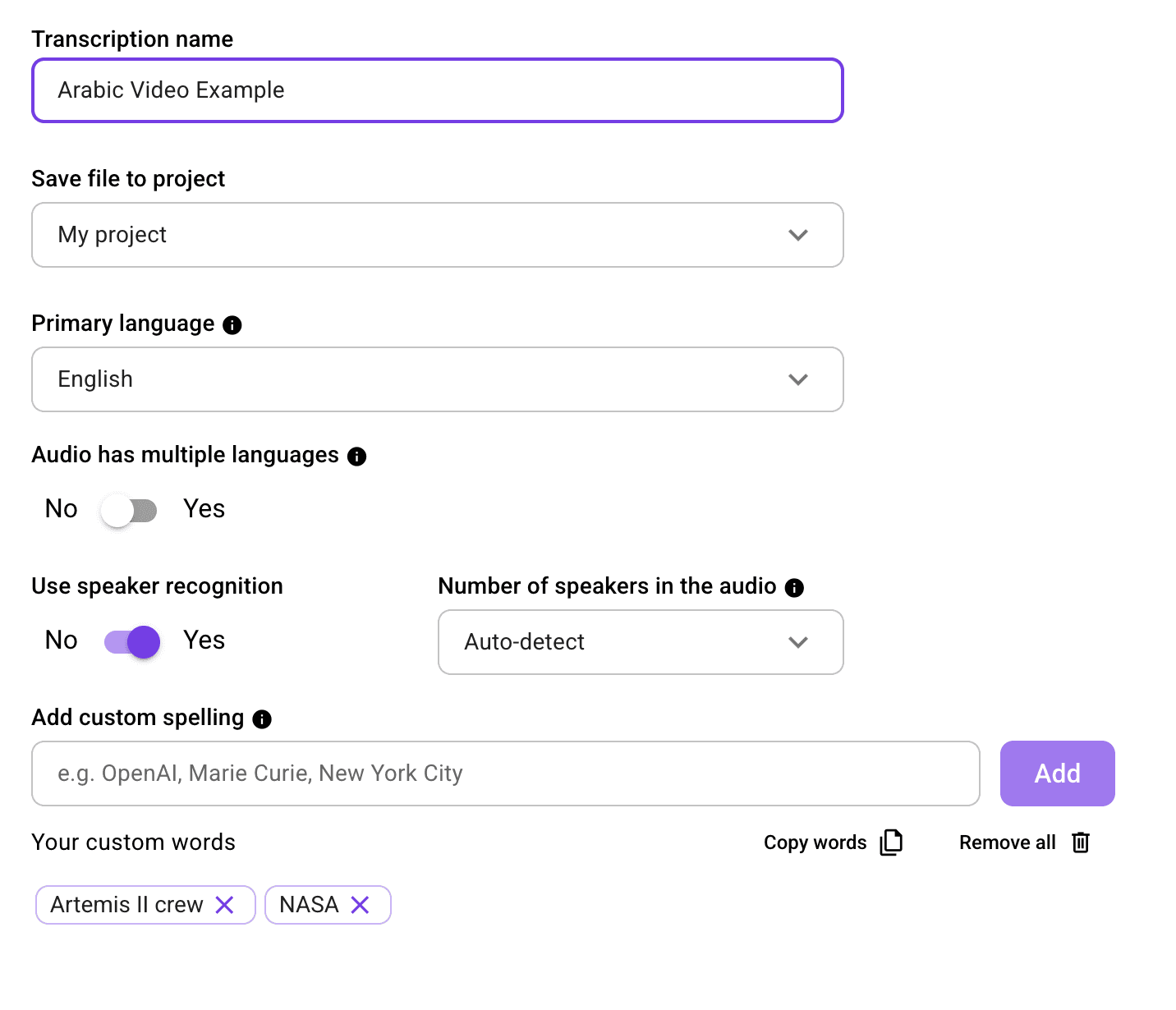
Antes de que WhisperTranscribe procese tu audio, define un par de ajustes fu00e1ciles:
Asigna un nombre a tu transcripciu00f3n para tenerla localizada.
Selecciona u00e1rabe como idioma principal. WhisperTranscribe ofrece soporte completo para el u00e1rabe entre sus mu00e1s de 55 idiomas.
Activa la detecciu00f3n multiidioma si los hablantes alternan el u00e1rabe con otras lenguas. La herramienta puede identificar hasta cinco idiomas diferentes en una sola grabaciu00f3n.
Activa el reconocimiento de hablantes si participan varias voces en el audio.
Definir esto te llevaru00e1 solo unos segundos y mejoraru00e1 notablemente el resultado.
Paso 4: Inicia la transcripciu00f3n con IA
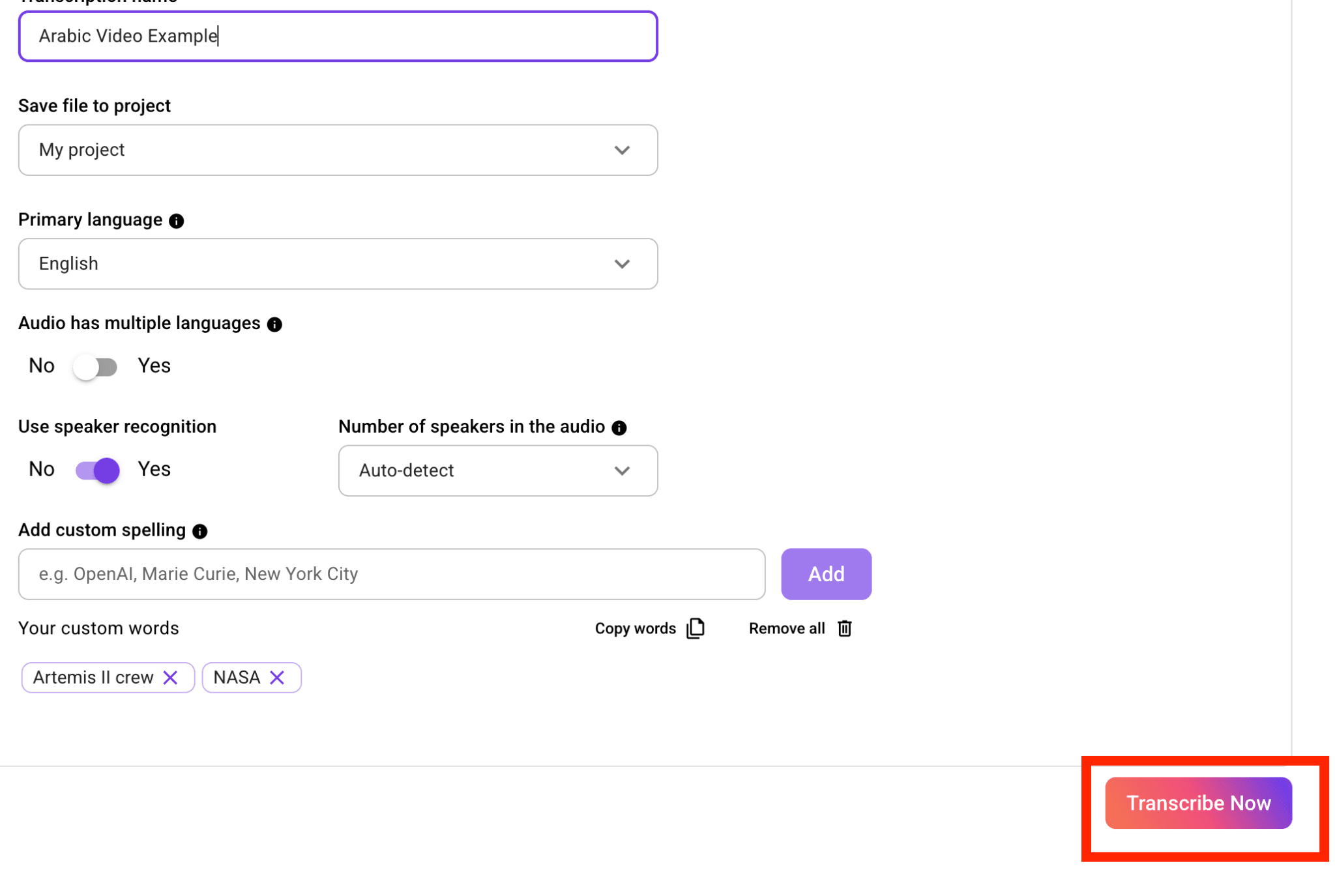
Haz clic en "Transcribir ahora" y deja que WhisperTranscribe procese tu archivo. El motor de IA convertiru00e1 el u00e1rabe hablado en texto, generando un primer borrador de inmediato.
La herramienta procesa gran variedad de dialectos y acentos, rindiendo de forma excelente incluso con ruidos de fondo, voces superpuestas o grabaciones de baja calidad hechas por telu00e9fono. Puedes seguir con otras tareas mientras trabaja.
Paso 5: Revisa y edita con el editor integrado
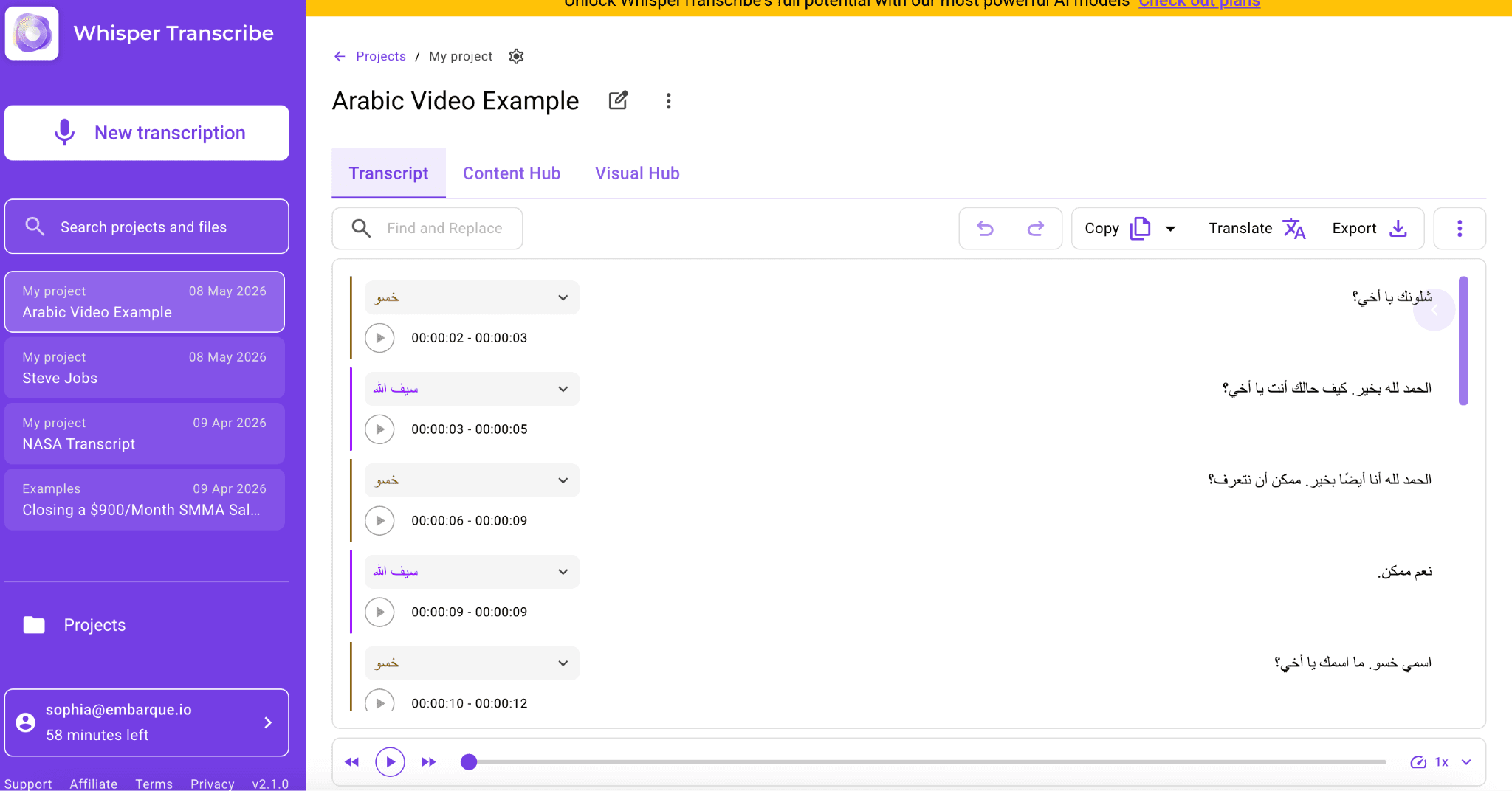
Cuando finalice, la transcripciu00f3n se abriru00e1 en el editor interactivo de WhisperTranscribe. Podru00e1s leer el texto en paralelo al audio, corregir detalles y dar el formato final.
Dado que la IA se encarga de todo el trabajo pesado del borrador, solo tendru00e1s que pulir el texto, ahorrando mucho tiempo. Las transcripciones de u00e1rabe suelen requerir ajustes muy mu00ednimos, principalmente en zonas con dialectos muy fuertes o habla acelerada.
Paso 6: Traduce, exporta y distribuye tu contenido
WhisperTranscribe tambiu00e9n incluye opciones avanzadas de traducciu00f3n y creaciu00f3n automatizada de contenidos.
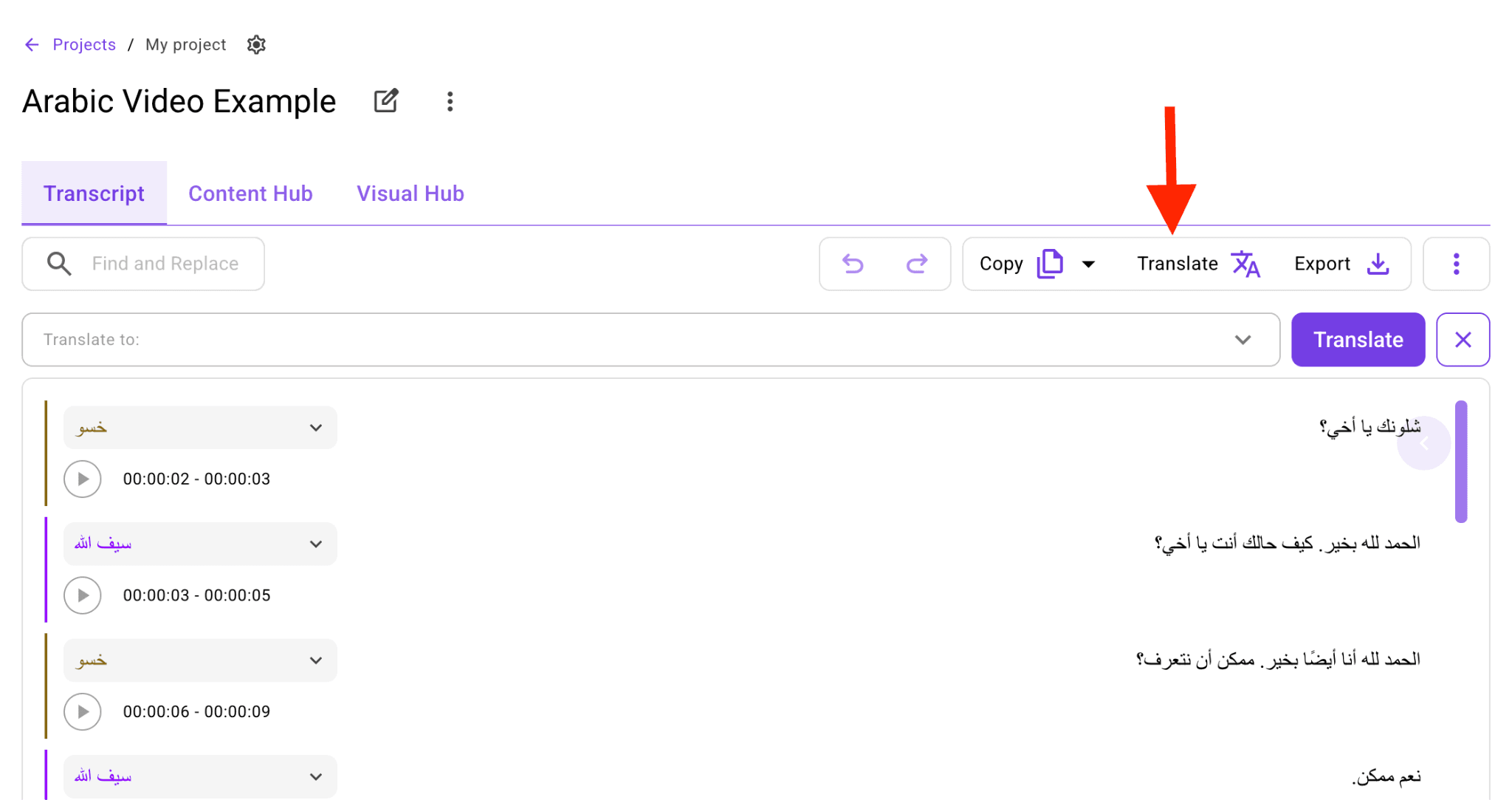
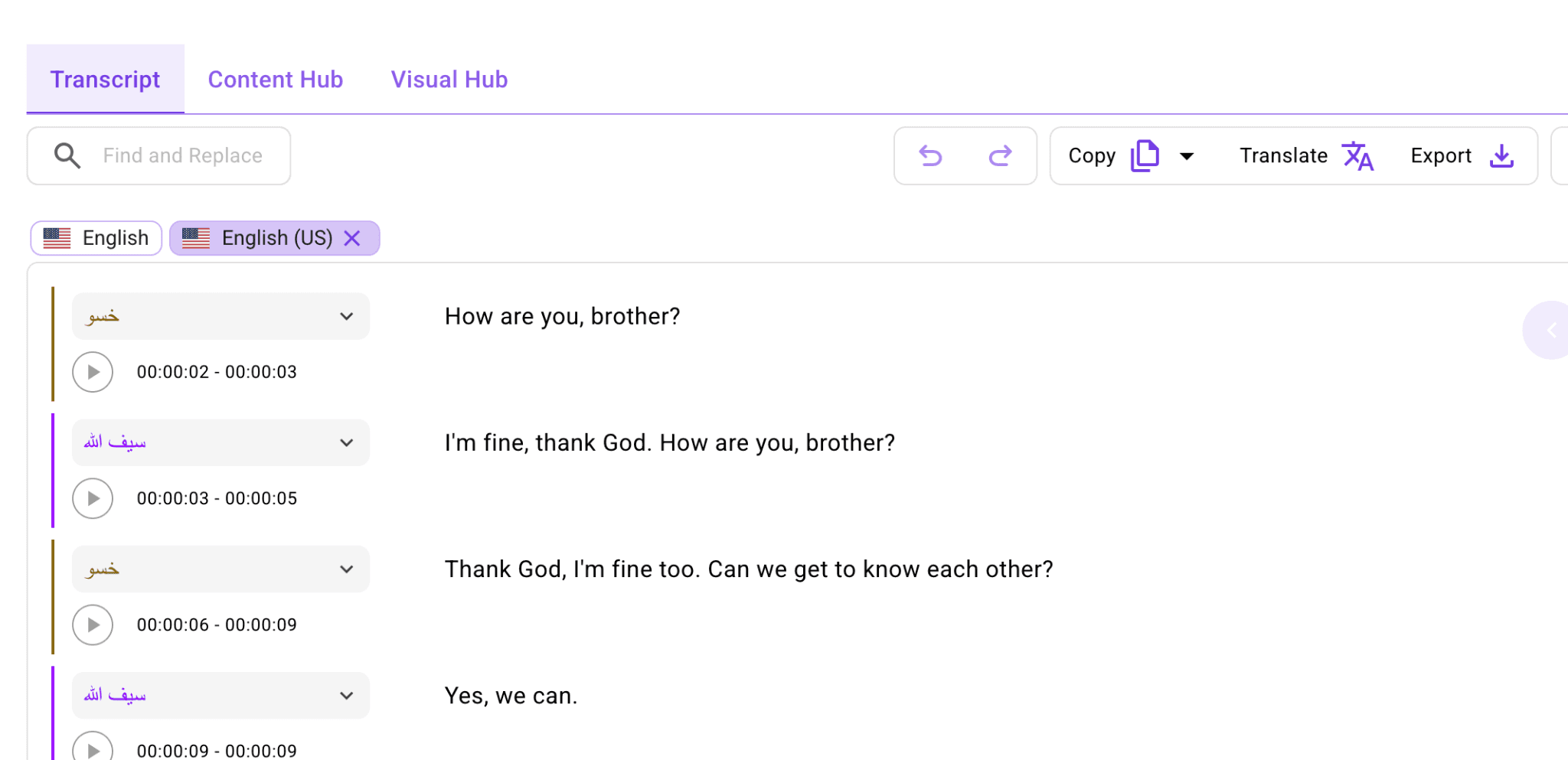
Si necesitas traducir tu texto en u00e1rabe al espau00f1ol, solo haz clic en "Traducir" y elige el idioma destino. Admite la traducciu00f3n a mu00e1s de 99 idiomas con sincronizaciu00f3n de tiempos exacta para subtu00edtulos.
Tambiu00e9n puedes transformar fu00e1cilmente tu transcripciu00f3n en una variedad de formatos: resu00famenes, artu00edculos de blog, publicaciones para redes sociales, informes y notas de pu00f3dcast, todo desde la pestau00f1a Content Hub, ayudu00e1ndote a distribuir tu contenido eficazmente.
Usa Magic Chat para hacer preguntas sobre el audio sin tener que leerlo entero. Por ejemplo: u201cu00bfCuu00e1les fueron los puntos clave?u201d o u201cResume esto en tres puntosu201d.
Para terminar, exporta tu transcripciu00f3n en formatos Word, texto plano, subtu00edtulos SRT o archivos VTT segu00fan tus necesidades especu00edficas.
Consejos clave para la transcripciu00f3n de audios en u00e1rabe
Usa la mejor calidad de audio posible: Los audios limpios y sin ruidos generan mejores textos. Si estu00e1 en tu mano, solicita un archivo mu00e1s nu00edtido. Esto es clave en u00e1rabe, donde breves variaciones de pronunciaciu00f3n cambian el sentido por completo, en especial en notas de voz de WhatsApp.
Detecta el dialecto de antemano: El u00e1rabe no se habla de una sola forma. Variedades del Golfo, egipcio, levantino o magrebu00ed cambian mucho en modismos y vocabulario. Conocerlo previamente te ayudaru00e1 a corregir el texto con mayor criterio y solucionar posibles fallos automu00e1ticos.
Usa alfabeto u00e1rabe para usos profesionales: La transliteraciu00f3n sirve para notas directas, pero los caracteres u00e1rabes son la norma en medios, traducciu00f3n y subtu00edtulos. Ademu00e1s garantizan la total compatibilidad con las funciones de WhisperTranscribe.
Revisa bien los tramos con mezcla de idiomas: Es frecuente alternar el u00e1rabe con inglu00e9s o francu00e9s en entornos profesionales o informales. Estas secciones mixtas son propensas a errores de transcripciu00f3n automatizada, por lo que conviene revisarlas al detalle.
Reutiliza tu transcripciu00f3n tras editarla: Una vez pulido el texto en u00e1rabe, su00e1cale partido. Tradu00facelo, crea resu00famenes ru00e1pidos, genera subtu00edtulos o publica artu00edculos derivados. Aquu00ed es donde las funciones de Content Hub y Magic Chat de WhisperTranscribe te ahorraru00e1n horas de trabajo.
Transcribe notas de voz en u00e1rabe de forma eficiente con WhisperTranscribe
Transcribir u00e1rabe a mano sirve para cosas puntuales, pero se vuelve improductivo y complejo ante distintos dialectos, entornos bilingu00fces o al manejar numerosos audios en el du00eda a du00eda.
WhisperTranscribe automatiza este proceso completamente, gestionando el habla combinada y diferentes acentos. Con un solo archivo podru00e1s transcribir, traducir a mu00e1s de 99 idiomas y preparar posts para tu blog, resu00famenes y subtu00edtulos al instante.
Prueba WhisperTranscribe gratis, sin tarjetas ni compromisos.