Notre comparatif des 10 meilleurs logiciels de transcription IA pour entreprises
Résumé rapide
Ce guide de WhisperTranscribe examine les meilleurs logiciels de transcription IA pour les entreprises. Il compare 10 outils selon la précision de la transcription, le support linguistique, les intégrations, les tarifs et les flux de travail professionnels, incluant des plateformes comme WhisperTranscribe, Otter.ai, Trint, Descript et Fireflies.ai.
Nos meilleurs choix incluent :
WhisperTranscribe : Idéal pour la transcription audio et le recyclage de contenu dans plus de 57 formats différents
Otter.ai : Le meilleur logiciel pour la transcription de réunions en direct et les résumés par IA
Trint : Conçu pour le montage collaboratif et les flux de travail multimédias
Descript : Recommandé pour le montage de podcasts et de vidéos via des scripts textuels
Fireflies.ai : Parfait pour les équipes commerciales recherchant une IA de réunion connectée aux CRM
Pour découvrir d'autres tests de ce type, visitez le blog de WhisperTranscribe.
À la recherche du meilleur logiciel de transcription IA pour votre entreprise ?
La plupart des conversations professionnelles sont enregistrées mais rarement exploitées. Les entretiens, webinaires, appels commerciaux et réunions finissent souvent stockés sous forme de fichiers audio difficiles à consulter lorsqu'on recherche des informations précises.
Lorsque les équipes ont besoin d’informations, elles perdent souvent un temps précieux à parcourir les enregistrements ou à se fier à des notes incomplètes. Un bon outil de transcription automatique change la donne. Il convertit les conversations en texte éditable et indexable, facilitant la recherche de moments clés, le partage d'informations et la création de contenu.
Ce guide de WhisperTranscribe analyse les 10 meilleurs outils de transcription IA pour les entreprises, en se basant sur la précision, les langues supportées, les intégrations, les tarifs et l'expérience utilisateur.
Pourquoi nous faire confiance ?
Chez WhisperTranscribe, nous nous concentrons sur la transcription IA rapide et précise. Notre plateforme aide des milliers d'utilisateurs à transformer leurs fichiers audio et vidéo en scripts fiables et en nouveaux contenus. En travaillant chaque jour dans ce domaine, nous savons faire la différence entre un outil de transcription fiable et un service de mauvaise qualité.
Qu'est-ce qu'un logiciel de transcription IA pour les entreprises ?
Un logiciel de transcription IA convertit les réunions enregistrées, entretiens, webinaires, appels et vidéos en texte grâce à des modèles de reconnaissance vocale avancés comme Whisper d’OpenAI.
Ces outils génèrent des transcriptions textuelles après l'enregistrement, gérant le multi-locuteur et les bruits de fond. Beaucoup d'entre eux proposent également l'identification des locuteurs, la traduction, l'export de sous-titres et des bibliothèques de fichiers indexables.
Comment choisir le meilleur logiciel de transcription IA pour professionnel
Les outils de transcription automatique s'adaptent à différents flux de travail, du compte rendu de réunion à la production de contenus multimédias.
Avant de choisir votre plateforme de transcription, évaluez les critères suivants :
La précision de la transcription face aux bruits de fond, aux accents et aux multiples interlocuteurs
Le support multilingue pour les équipes internationales et la traduction de vidéos
Les fonctionnalités collaboratives pour réviser et éditer les textes à plusieurs
Les intégrations avec vos outils (CRM, visioconférence, stockage cloud)
Les formats d'exportation disponibles comme DOCX, TXT, SRT ou VTT
Les fonctionnalités de productivité (générateur de résumés, création de sous-titres, rédaction de contenu par IA)
Analysez ces options en fonction de vos besoins pour choisir l'outil idéal qui complétera parfaitement la manière dont votre équipe enregistre, édite et utilise ses contenus textuels.
Les 10 meilleurs logiciels de transcription IA pour les entreprises
Ce tableau comparatif présente les 10 outils de transcription automatique analysés dans ce guide.
Outil | Idéal pour | Plateformes disponibles | Langues | Essai gratuit |
WhisperTranscribe | Transcription + création de contenu par IA | Windows, Mac | Plus de 55 pour la transcription, plus de 99 pour la traduction | Oui (60 min) |
Otter.ai | Transcription en direct & résumés de réunion | Web, iOS, Android, Desktop (Mac & Windows) | 6 langues de transcription | Oui (300 min/mois) |
Trint | Rédaction collaborative de scripts | Web, iOS, Android, Desktop (Mac & Windows) | Plus de 40 pour la transcription, plus de 70 pour la traduction | Limité |
Descript | Montage audio/vidéo basé sur le texte | Web, Mac, Windows | Plus de 20 langues | Oui (version gratuite) |
Rev | Transcription hybride (Humaine + IA) | Web, iOS, Android | Plus de 35 langues Plus de 15 pour la traduction | Non |
Sonix | Rapidité & diversité linguistique | Web uniquement | Plus de 40 langues de transcription et traduction | Oui (30 min) |
Fireflies.ai | IA de réunion + synchronisation CRM | Web, iOS, Android, Desktop | Plusieurs langues | Oui |
Happy Scribe | Sous-titres & traduction par IA + humains | Web uniquement | Plus de 60 langues de traduction Plus de 120 langues de transcription | Oui (limité) |
Notta | Transcription de réunion en temps réel | Web, iOS, Android | Plus de 50 langues de traduction Plus de 42 langues de transcription | Oui (version gratuite) |
Castmagic | Recyclage de contenu audio par IA | Web, iOS (bêta) | Plusieurs langues | Oui (essai de 7 jours) |
1. WhisperTranscribe
WhisperTranscribe est une plateforme de transcription IA et de création de contenu conçue pour les professionnels qui exigent des textes précis et rapidement exploitables.
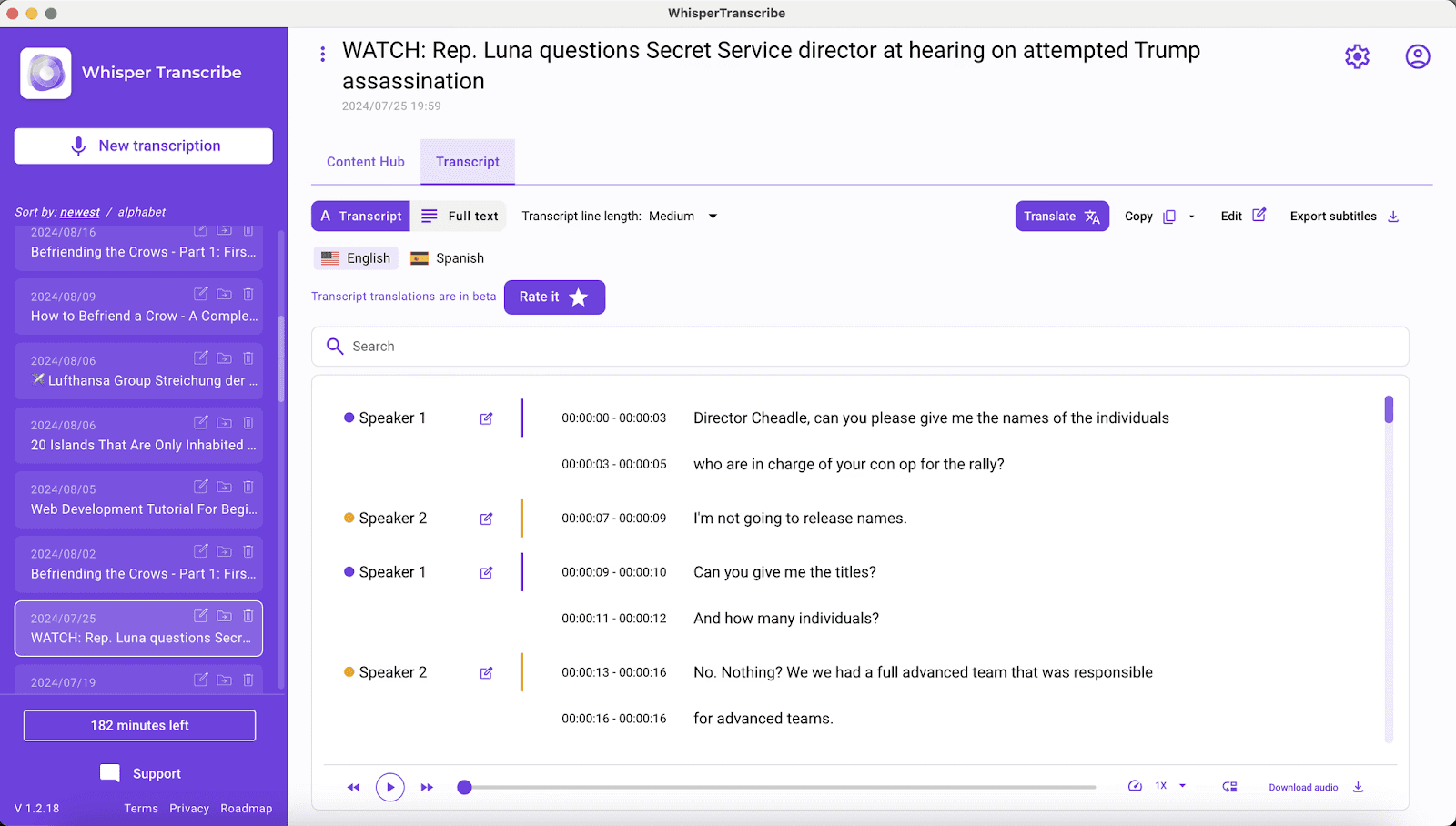
Grâce au modèle Whisper de OpenAI, l'outil convertit vos fichiers audio et vidéo en transcriptions écrites fiables avec une précision d'environ 95 %, même avec des bruits ambiants ou des accents marqués. Le service prend en charge plus de 55 langues pour la transcription et plus de 99 langues pour la traduction.
Au-delà de la simple conversion voix-texte, WhisperTranscribe transforme un seul enregistrement en articles de blog, résumés, comptes rendus de réunion, publications pour réseaux sociaux, newsletters et plus de 57 autres formats de contenu. Son outil de chat intelligent « Magic Chat » vous permet d’interroger directement le texte pour extraire des citations ou des synthèses sans perdre de temps.
WhisperTranscribe est disponible en version web et application de bureau pour Mac et Windows, assurant un stockage local pour garder un contrôle total sur vos données d'entreprise.
Fonctionnalités clés
Transcription précise à ~95 % : Gère parfaitement le bruit de fond, les voix qui se chevauchent et les accents.
Identification automatique des locuteurs : Identifie et labellise chaque intervenant lors de vos réunions ou interviews.
Multilingue (55+ langues en transcription, 99+ en traduction) : Idéal pour l'international et la traduction de vidéos de vos flux de travail.
Magic Chat : Posez des questions directement à votre texte pour obtenir des résumés ou des détails spécifiques instantanément.
Plus de 57 formats de contenu : Transformez un fichier audio en articles web, notes d'épisodes, posts LinkedIn réutilisables, etc.
Exports flexibles : Téléchargez vos textes sous formats Word, TXT, SRT ou VTT selon vos besoins.
Gestion de fichiers volumineux : Supporte les fichiers jusqu'à 5 Go et traite jusqu'à 10 enregistrements en simultané.
Tarifs
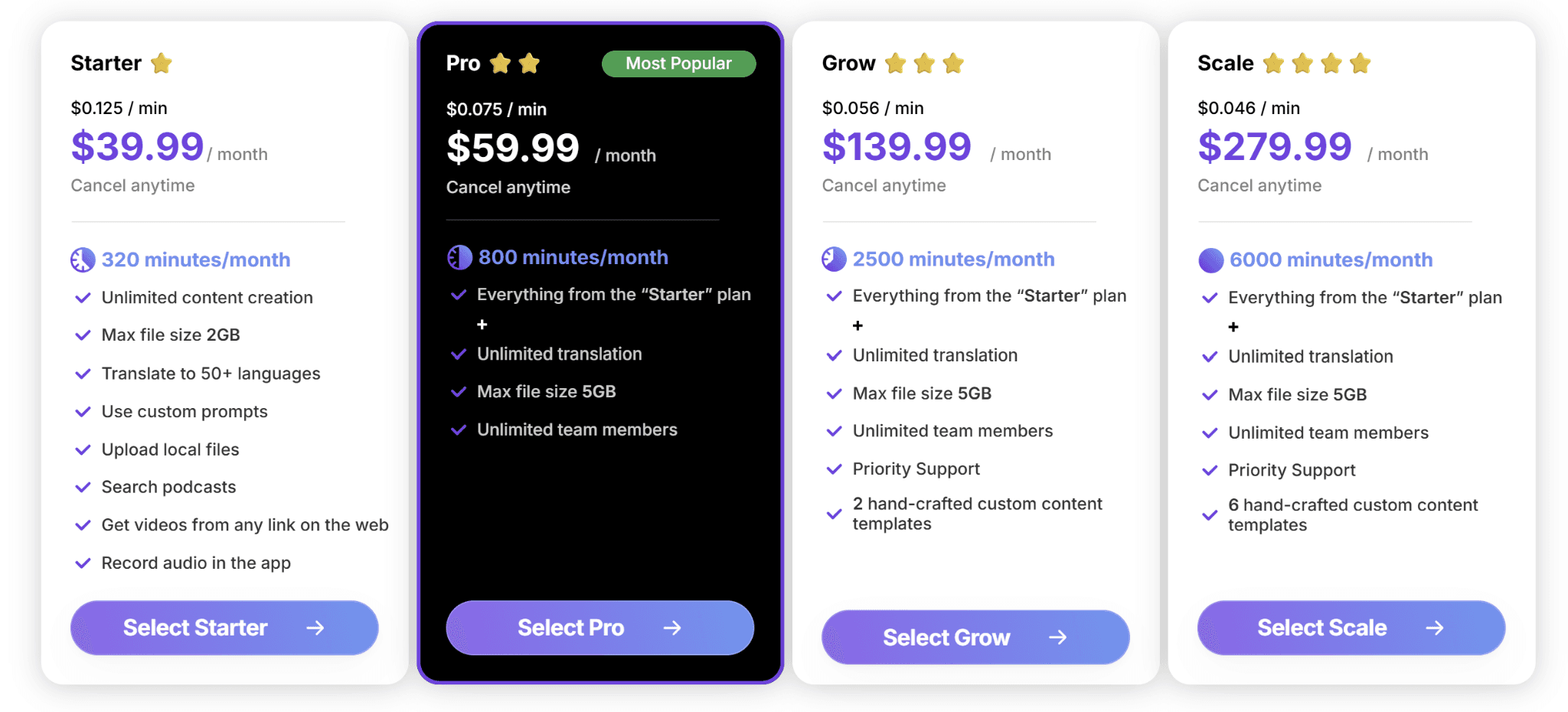
WhisperTranscribe propose un essai gratuit de 60 minutes de transcription sans carte bancaire requise. Nos forfaits premium sont disponibles sur notre page de tarifs.
Starter ($39.99/mois) : 320 minutes, fichiers de 2 Go max, fonctionnalités essentielles.
Pro ($59.99/mois) : 800 minutes de transcription, accès équipe, toutes les fonctionnalités incluses.
Grow ($139.99/mois) : 2 500 minutes, support client prioritaire.
Scale ($279.99/mois) : 6 000 minutes, support premium, templates de contenu personnalisés.
Chaque abonnement offre la création illimitée de contenus par IA et la traduction multilingue. Une option de paiement à l'usage (pay-as-you-go) est également disponible à partir de $9 par heure pour vos besoins ponctuels.
Avantages
| Inconvénients
|
2. Otter.ai
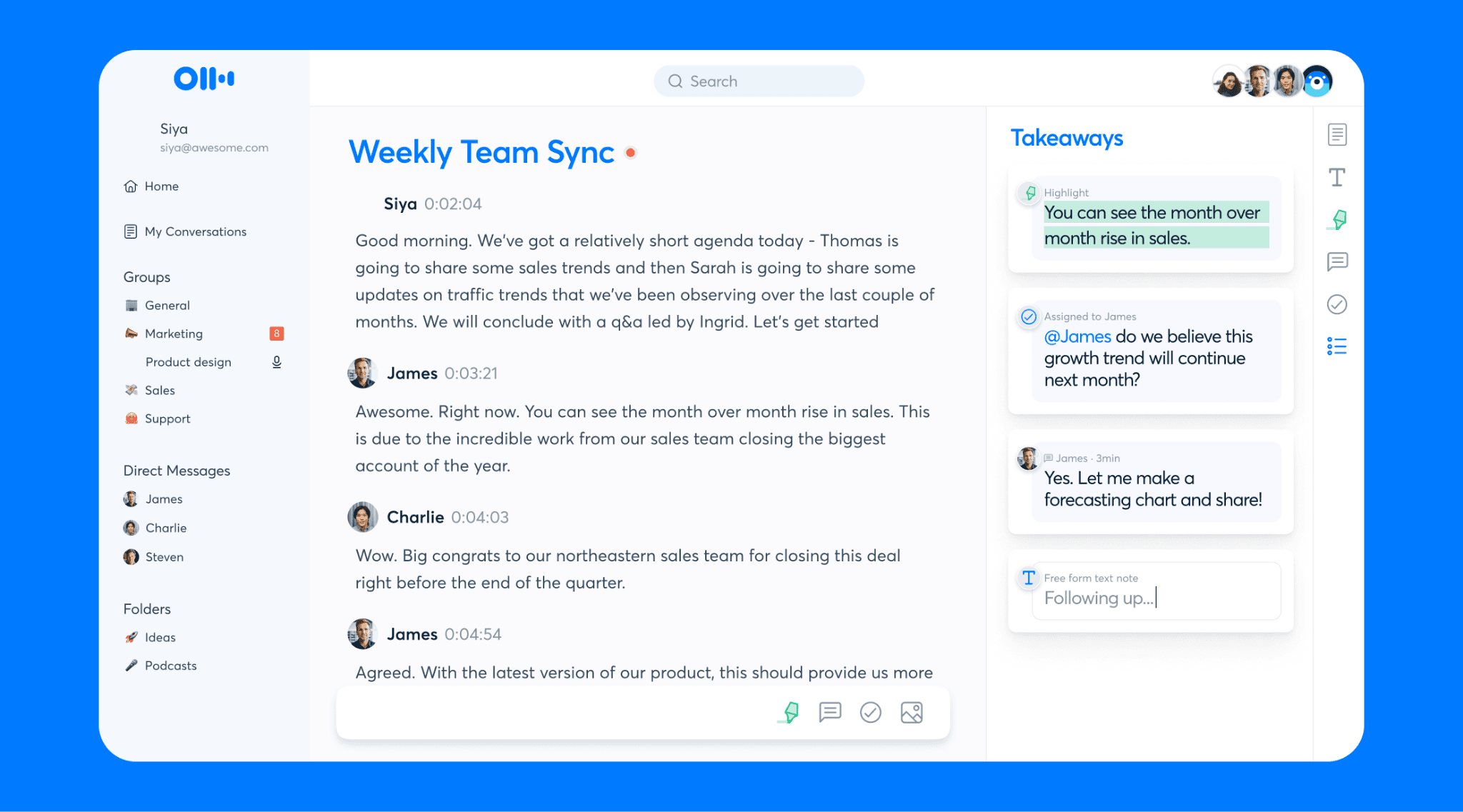
Otter.ai est un outil incontournable pour enregistrer et transcrire les réunions sur Zoom, Google Meet ou Microsoft Teams. La plateforme rejoint vos visioconférences sous forme de bot, enregistre l'audio et génère un texte structuré et éditable dès la fin de l'appel.
Fonctionnalités clés
Résumés de réunions automatiques : Traduit les conversations en plans d'action et décisions clés.
Chat IA vocal interactif : Interrogez l'intelligence artificielle sur l'ensemble de votre historique de réunions.
Synchronisation agenda : Se connecte automatiquement à vos événements prévus pour les transcrire sans action requise.
Tarifs
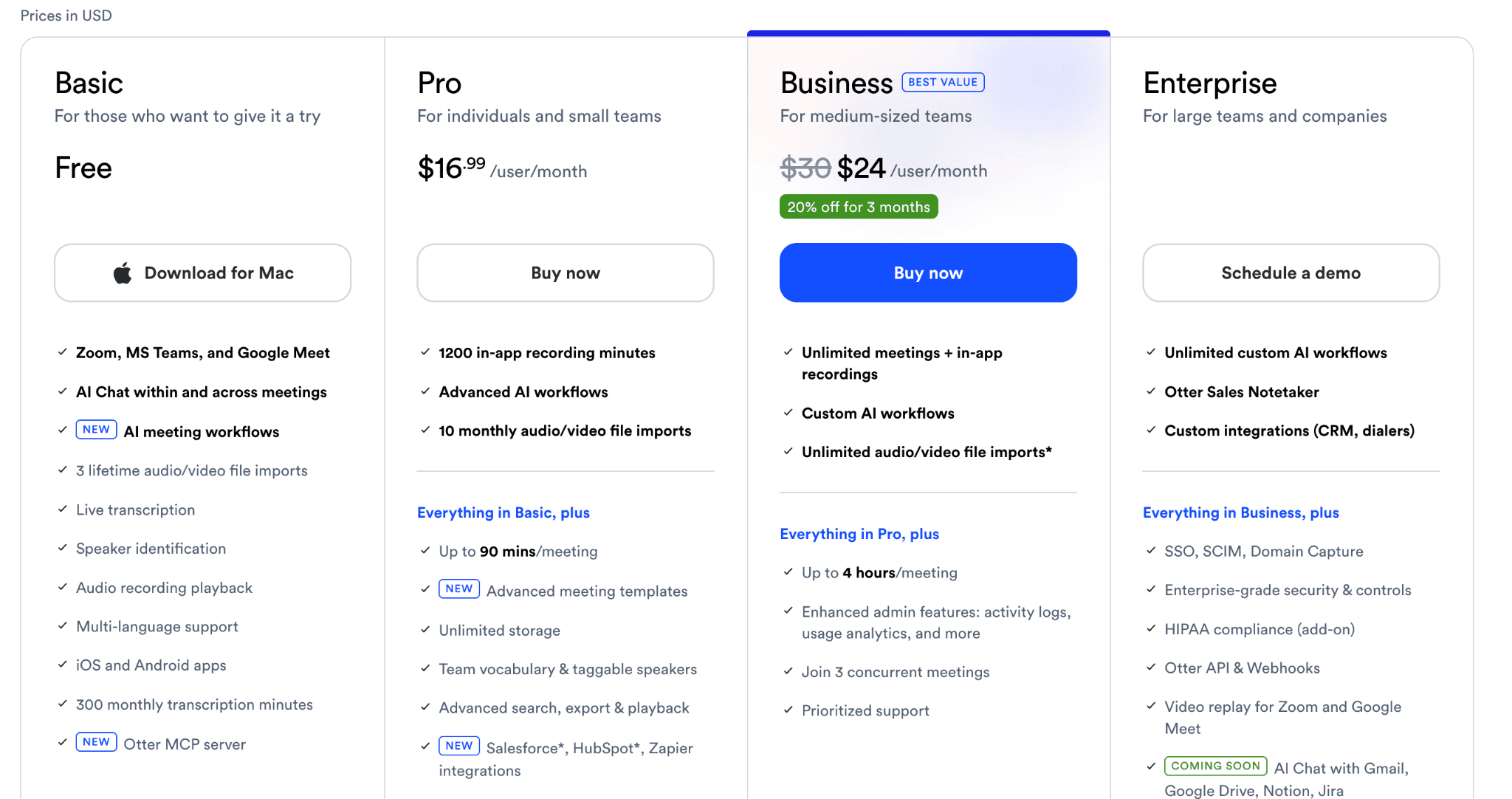
Basic : Gratuit, jusqu'à 300 minutes par mois.
Pro : $16.99/utilisateur/mois pour 1 200 minutes et un espace de stockage illimité.
Business : $24/utilisateur/mois pour un nombre illimité de réunions.
Enterprise : Tarification personnalisée avec des options administratives avancées.
Avantages
| Inconvénients
|
3. Trint
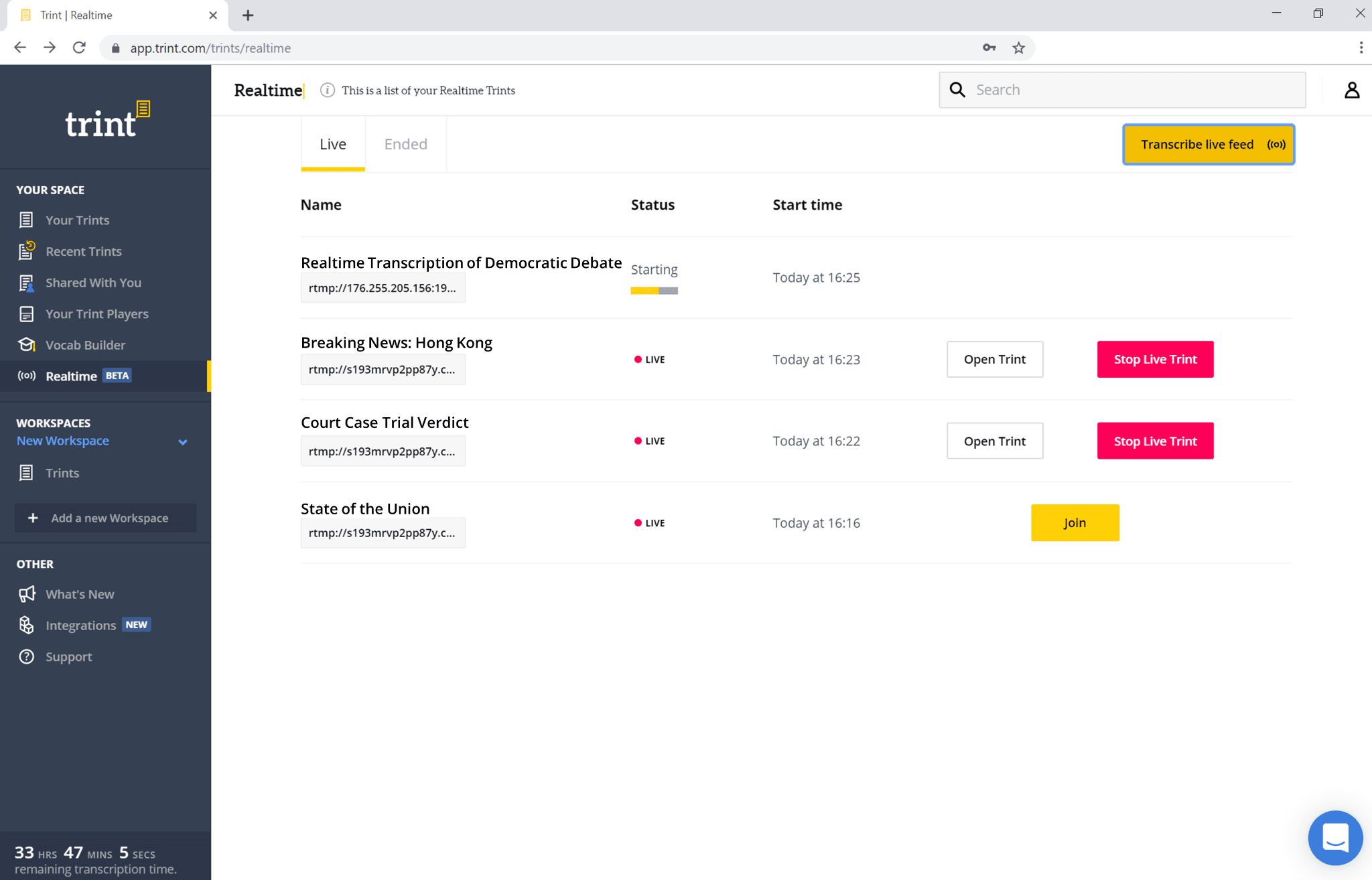
Trint est une solution de transcription IA pensée pour les rédactions professionnelles, les journalistes et les équipes éditoriales. Ce logiciel prend en charge plus de 40 langues et propose un espace collaboratif sécurisé pour corriger et publier des rapports textuels de vos formats audio.
Fonctionnalités clés
Éditeur partagé : Permet de corriger, annoter et surligner le texte à plusieurs et en temps réel.
Story Builder : Assemblez des extraits textuels de différentes interviews pour structurer un seul rapport.
Haut niveau de sécurité : Certification ISO 27001 avec hébergement conforme RGPD.
Tarifs
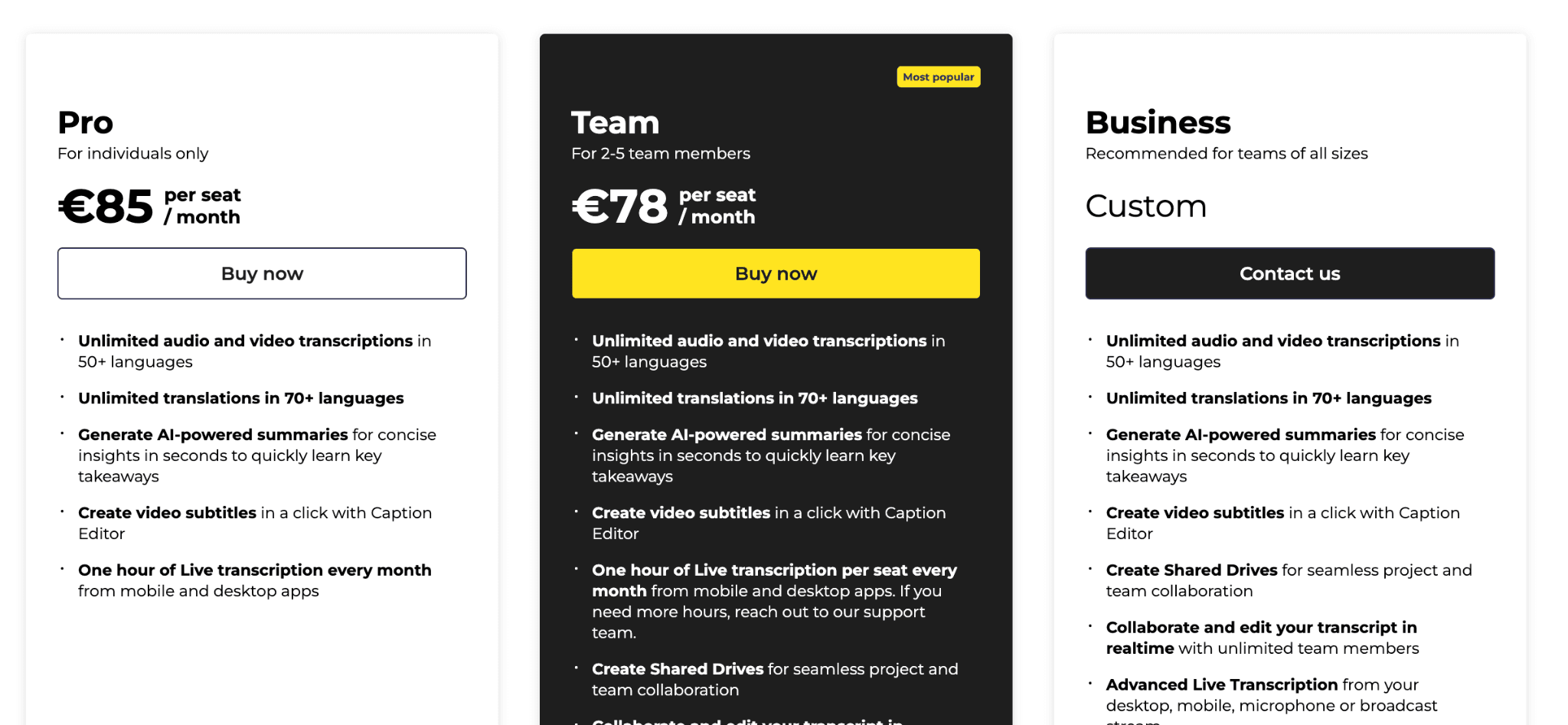
Pro : €85/utilisateur/mois (facturé annuellement)
Team : €78/utilisateur/mois (2 à 5 utilisateurs, facturation annuelle)
Business : Sur devis pour les grandes entreprises
Avantages
| Inconvénients
|
4. Descript
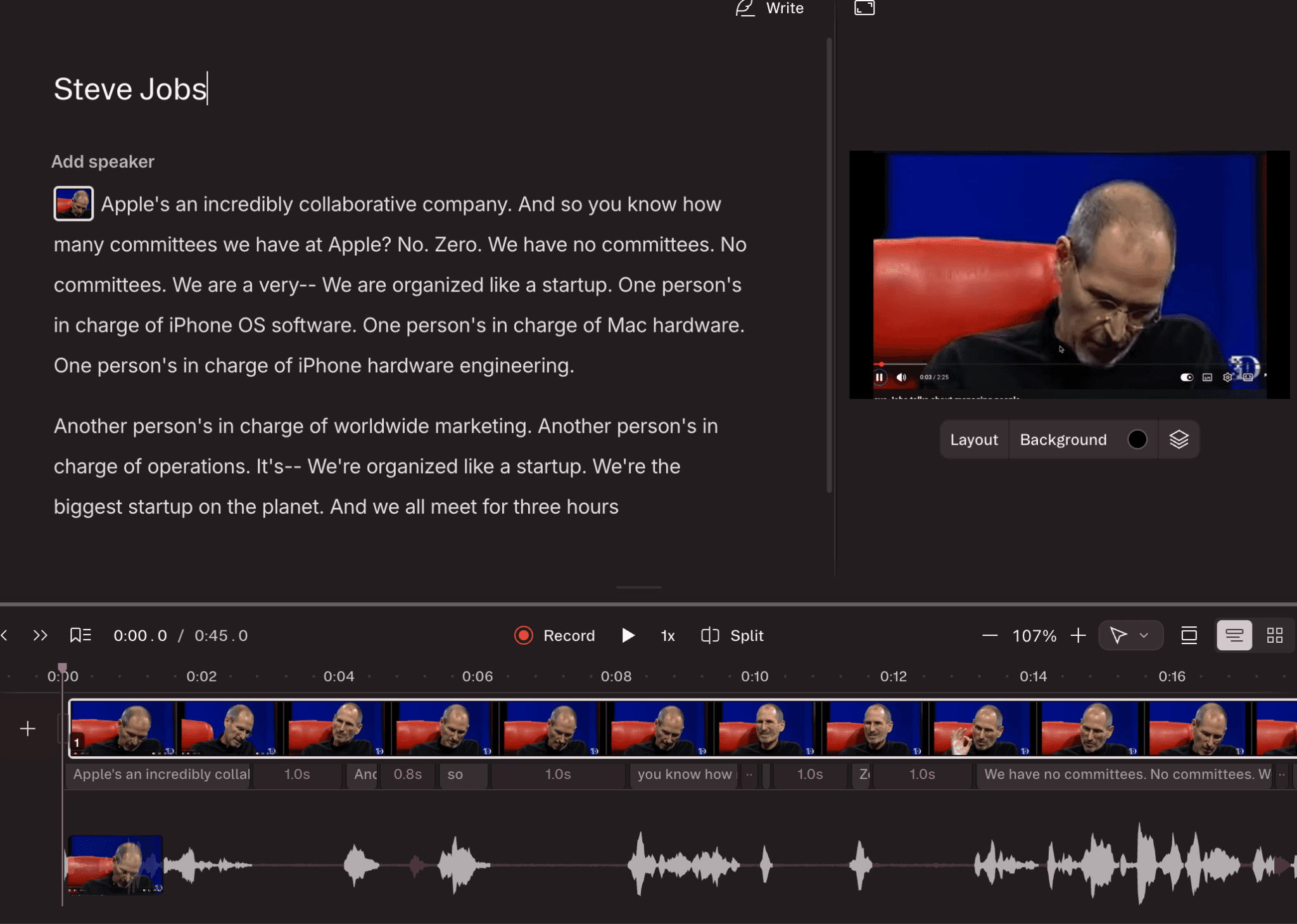
Descript fusionne la transcription audio en texte et le montage vidéo. Idéal pour éditer un podcast ou créer des tutoriels vidéos, il révolutionne la production de contenu car toute modification du texte écrit applique la modification correspondante sur la piste audio ou vidéo.
Fonctionnalités clés
Édition par le texte : Montez vos fichiers multimédias en coupant directement les phrases textuelles.
Suppression des tics de langage : Efface automatiquement les « euh » et autres hésitations vocales.
Traduction : Supporte la transcription et traduction écrite dans plus de 30 langues.
Tarifs
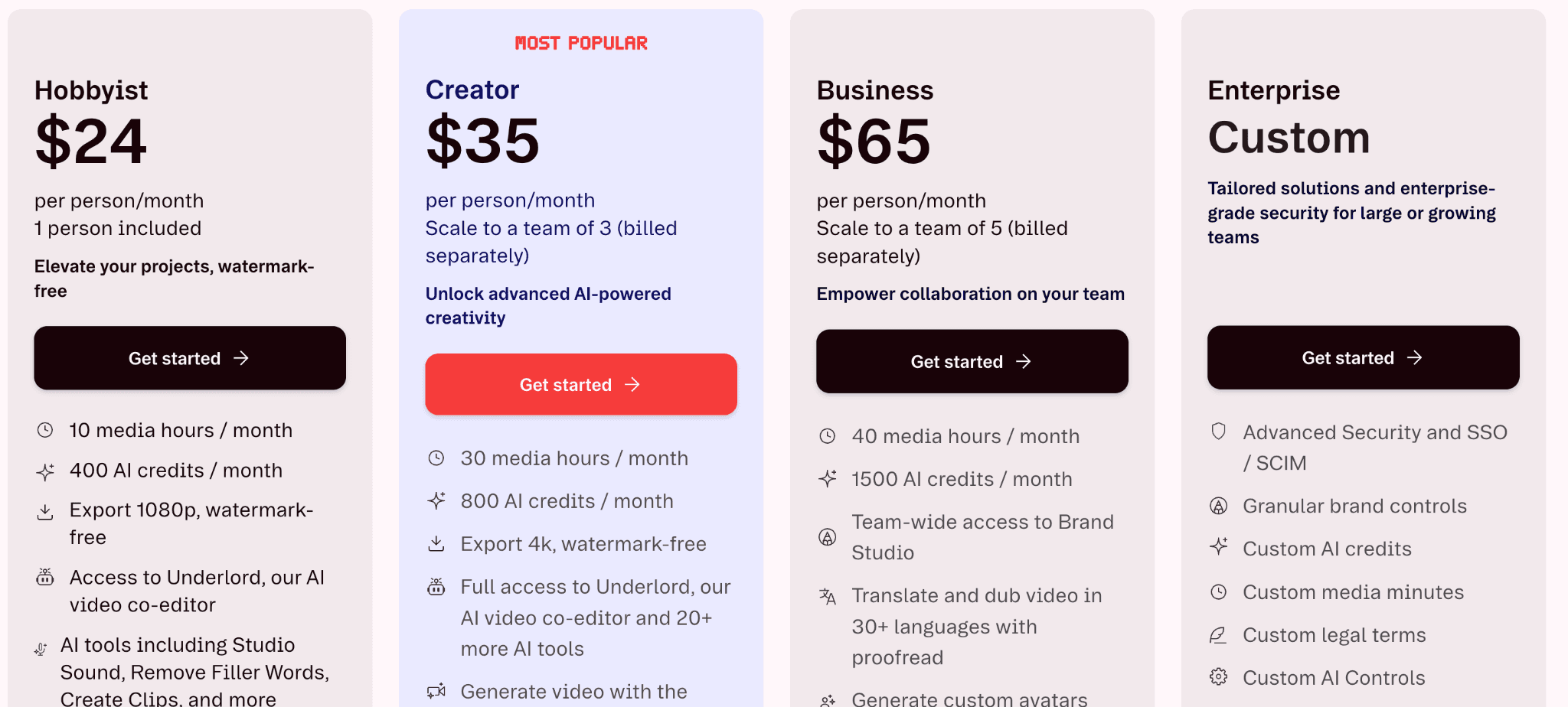
Gratuit : 1 heure de fichiers par mois, 100 crédits IA, export 720p.
Hobbyist ($24/mois) : 10 heures, export Full HD 1080p.
Creator ($35/mois) : 30 heures de fichiers, 800 crédits IA, export 4K.
Business ($65/mois) : 40 heures de fichiers, 1 500 crédits IA, traduction et doublage de vidéos (30+ langues).
Avantages
| Inconvénients
|
5. Rev
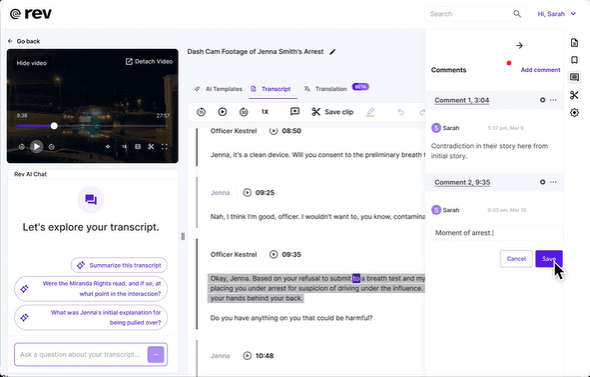
Rev est une plateforme de transcription juridique largement utilisée par les cabinets d'avocats et les équipes légales pour la transcription de dépositions, d'entretiens et d'audiences de tribunal. Elle propose à la fois un service de transcription par IA ultra rapide et un service de relecture par un transcripteur humain professionnel pour vos documents sensibles.
Fonctionnalités clés
Application mobile dédiée : Enregistrez et lancez la conversion voix-texte directement depuis votre smartphone.
Transcription multilingue : Plus de 35 langues de transcription avec option de relecture humaine.
Accès API : Intégrez facilement le moteur de transcription Rev à vos solutions logicielles d'entreprise.
h4 id="230">Tarifs
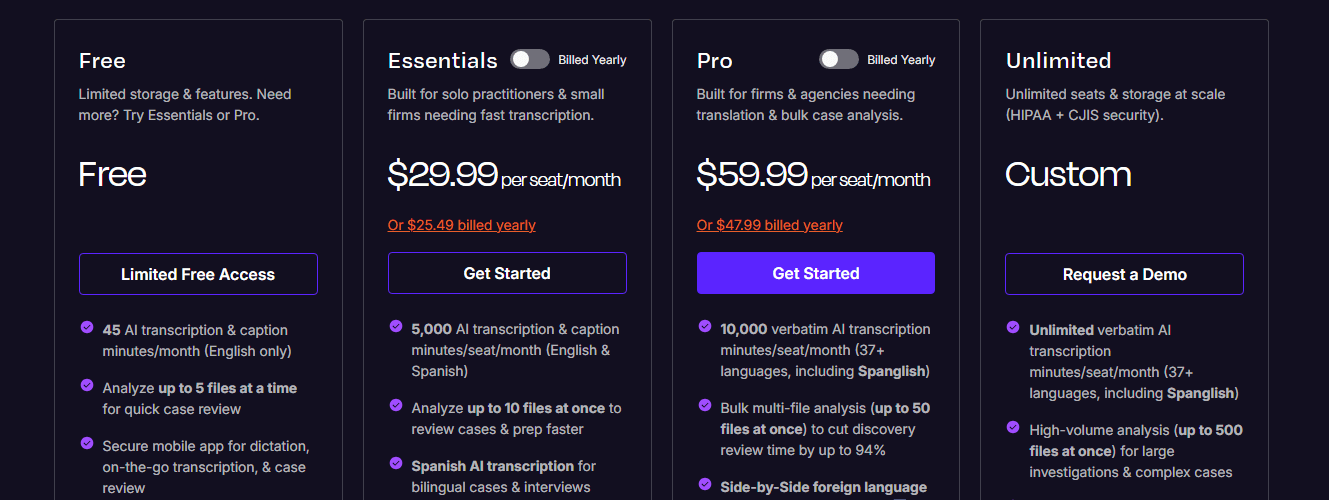
Essentials ($29.99/siège/mois) : 5 000 minutes de transcription IA & sous-titrage par siège/mois (Anglais & Espagnol)
Pro ($59.99/siège/mois) : 10 000 minutes de transcription IA & sous-titrage par siège/mois (37+ langues dont l'Espagnol)
Unlimited (Sur devis) : Minutes illimitées pour la transcription automatique de vos enregistrements.
Note : Ces tarifs s'appliquent aux secteurs standards. Le secteur juridique dispose de structures tarifaires spécifiques.
Avantages
| Inconvénients
|
6. Sonix
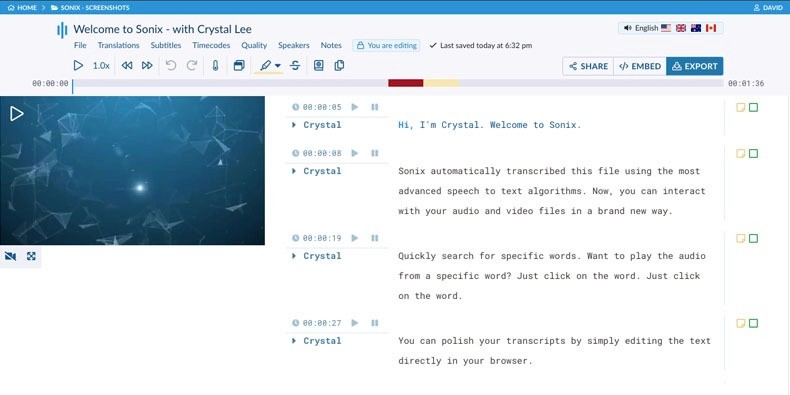
Sonix est un outil de transcription cloud rapide spécialement conçu pour traiter les entretiens professionnels, groupes de discussion et cours magistraux. Avec un support de plus de 40 langues, la plateforme excelle dans le traitement rapide des longs documents audio.
Fonctionnalités clés
Traduction multilingue : Traduit et transcrit vos fichiers audio dans de nombreuses langues.
Bibliothèque connectée : Moteur de recherche global pour retrouver un mot-clé précis parmi l'ensemble de vos textes transcrits.
Outils collaboratifs : Partage d'accès simple pour éditer les comptes rendus à plusieurs.
Tarifs
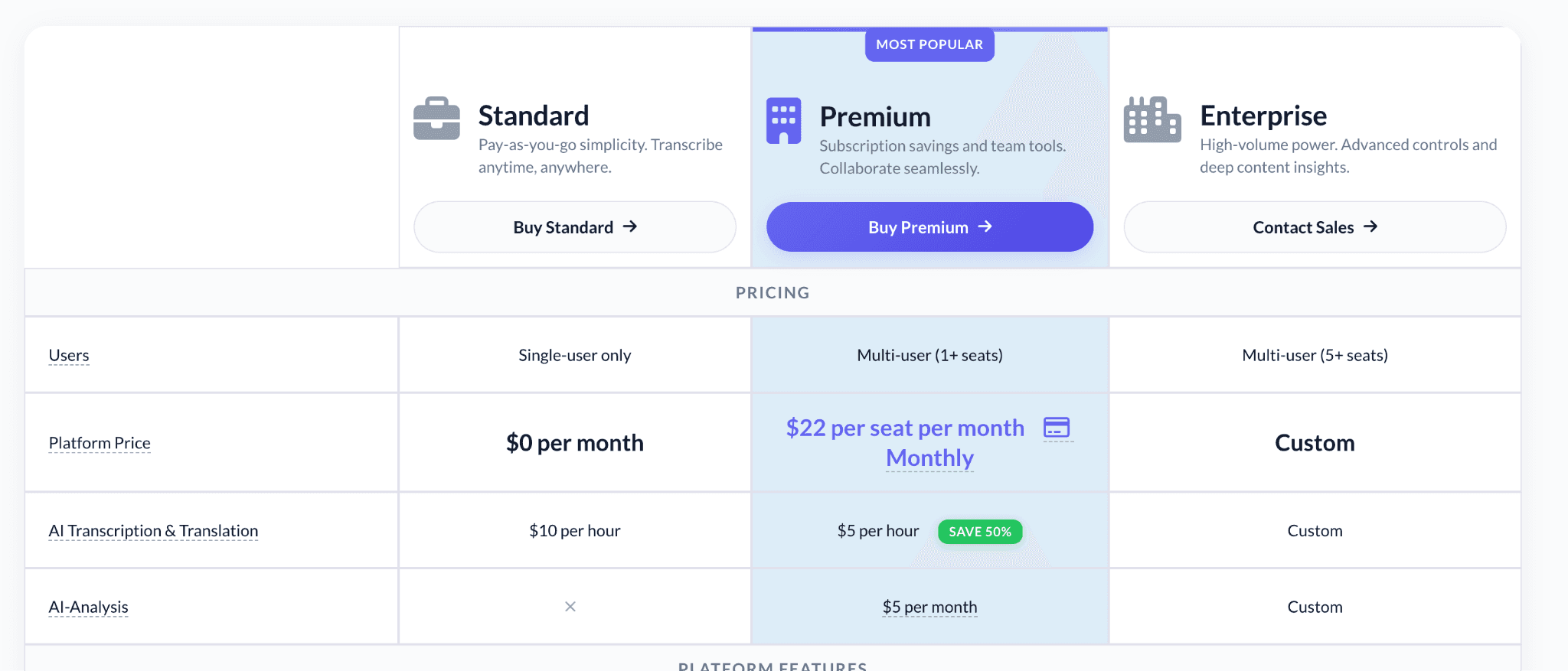
Sonix utilise un modèle de facturation horaire. Retrouvez le détail de leurs offres tarifaires directement sur leur page de prix.
Standard : $10 par heure d'audio transcrit (formule prépayée sans abonnement obligatoire).
Premium : $5 par heure d'audio transcrit avec un coût fixe de $22/siège/mois.
Enterprise : Forfait personnalisé pour les besoins intensifs des entreprises.
Avantages
| Inconvénients
|
7. Fireflies.ai
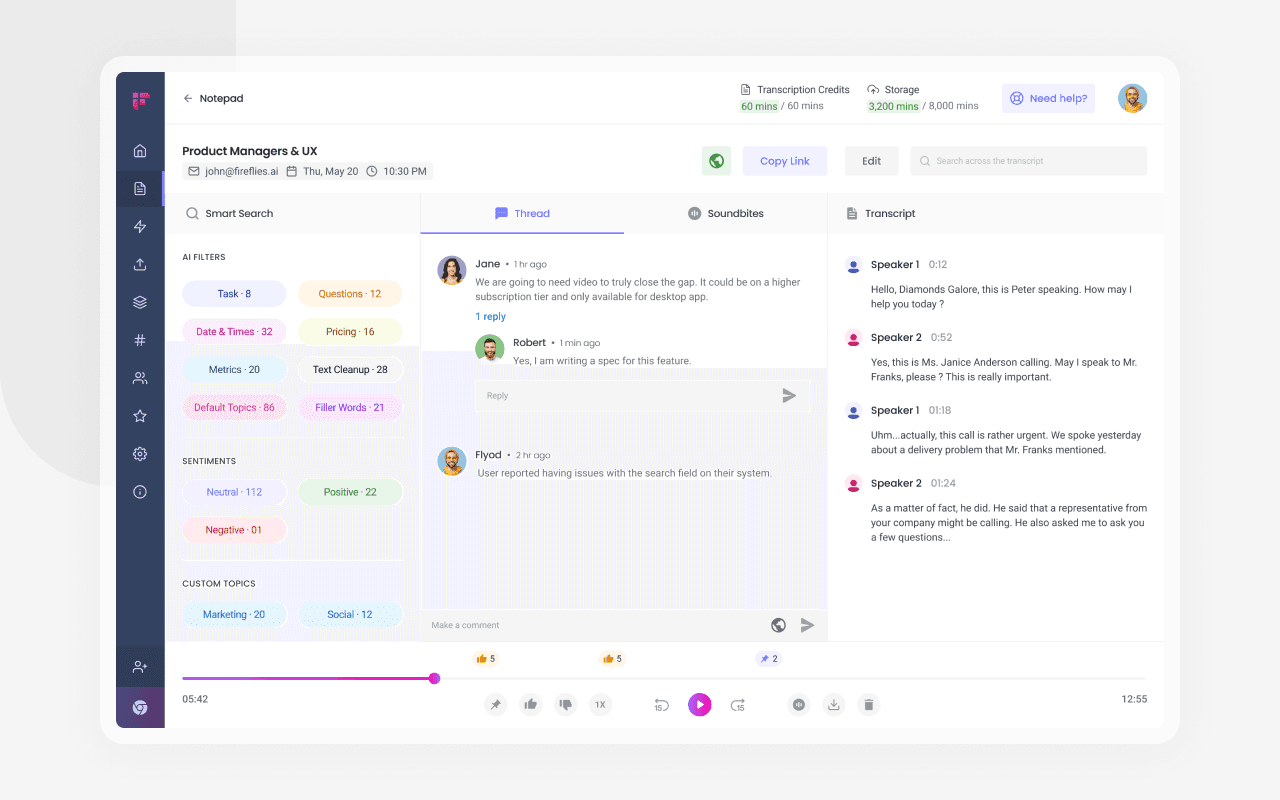
Fireflies.ai est un assistant de réunion IA centré sur l'optimisation des performances des équipes commerciales, customer success et marketing. Il s'invite automatiquement dans vos réunions, rédige l'historique de la conversation et se synchronise avec vos CRM comme Salesforce et HubSpot.
Fonctionnalités clés
Détection automatique des actions : Identifie et regroupe instantanément les tâches à accomplir convenues lors de l'appel.
AskFreed (Chat IA) : Questionnez vos transcriptions de réunions pour extraire des citations ou doutes.
Détection intelligente des voix : Attribue proprement les interventions à chaque collaborateur.
Tarifs
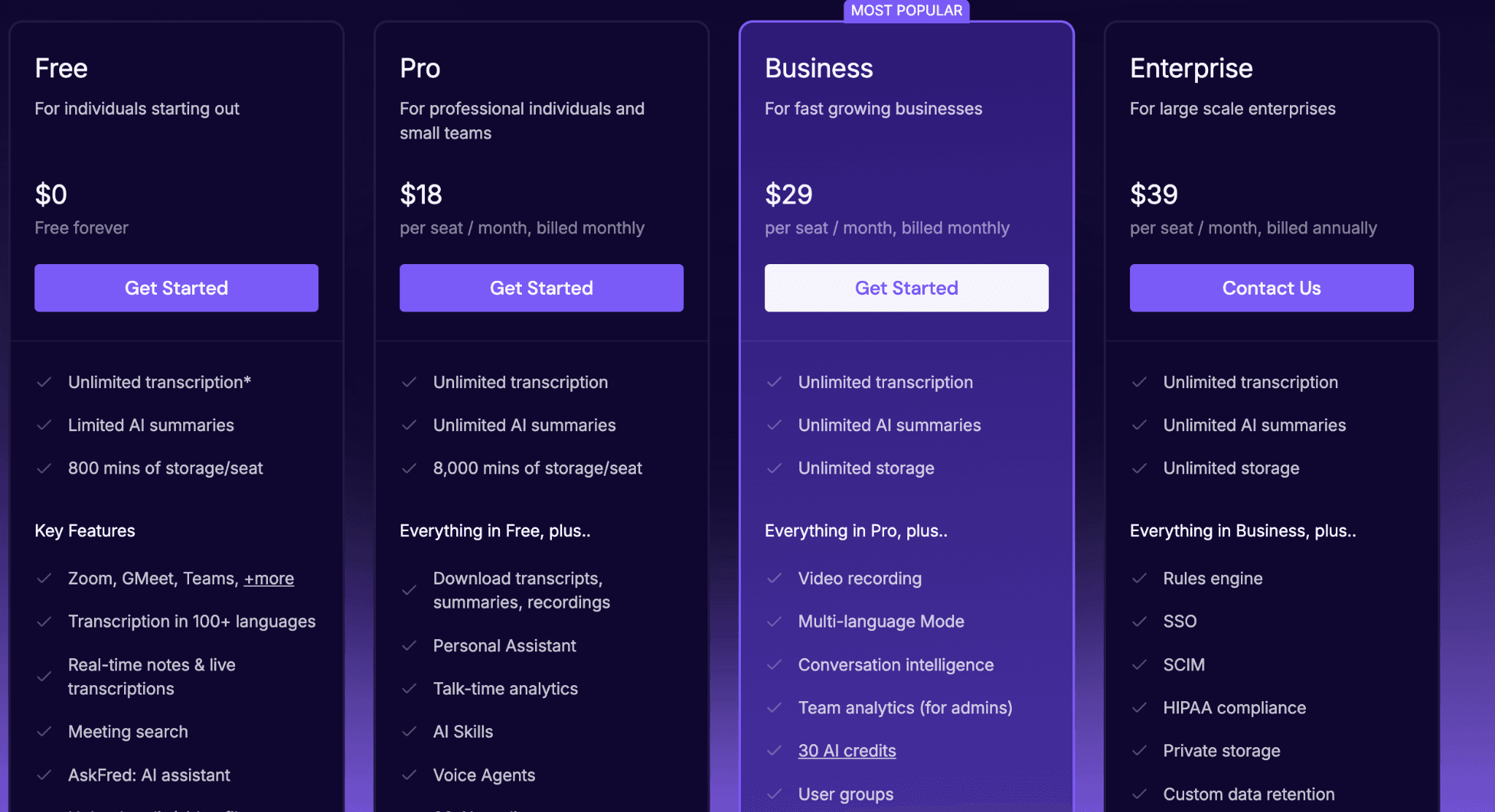
Free : Stockage limité à 800 minutes, résumés de réunion IA basiques.
Pro : $18/utilisateur/mois pour 8 000 minutes de stockage et recherche de mots-clés avancée.
Business : $29/utilisateur/mois avec enregistrement vidéo et analyse globale des réunions.
Enterprise : $39/utilisateur/mois avec SSO de sécurité et contrôle d'administration.
Avantages
| Inconvénients
|
8. Happy Scribe
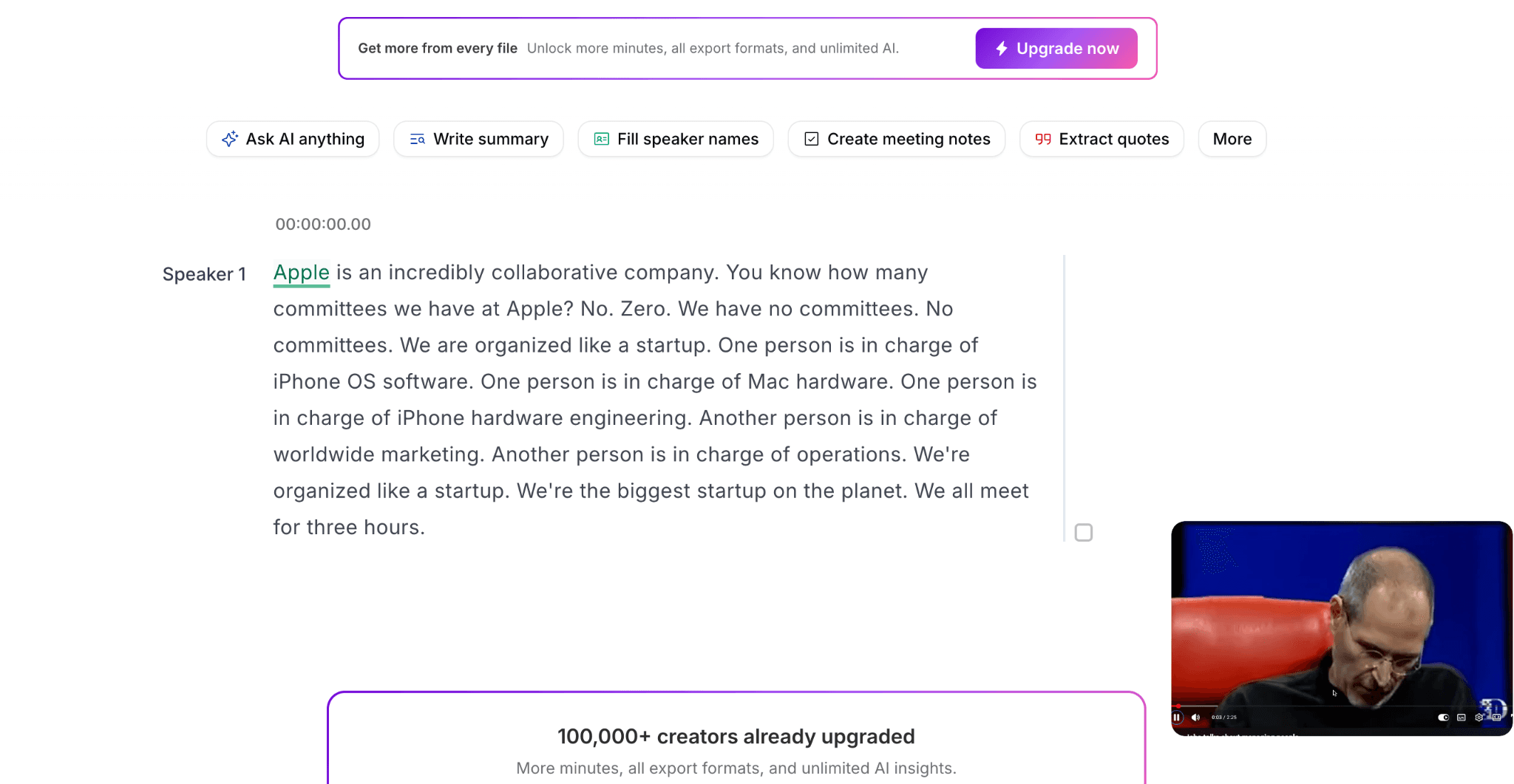
Happy Scribe est une plateforme de transcription de fichiers audio et de création de sous-titres très appréciée par les agences marketing et créateurs de vidéos. Elle mêle avec brio reconnaissance vocale automatique ultra performante et service de traduction et révision par des traducteurs professionnels.
Fonctionnalités clés
Transcription Hybride : Choisissez l'IA pour la vitesse ou le traducteur humain pour garantir 99 % de fiabilité.
Éditeur interactif : Module de lecture synchronisant à la perfection l'audio et le texte rédigé pour une révision rapide.
Éditeur de sous-titres complet : Formatez, stylisez et exportez vos sous-titres aux formats SRT et VTT.
Tarifs
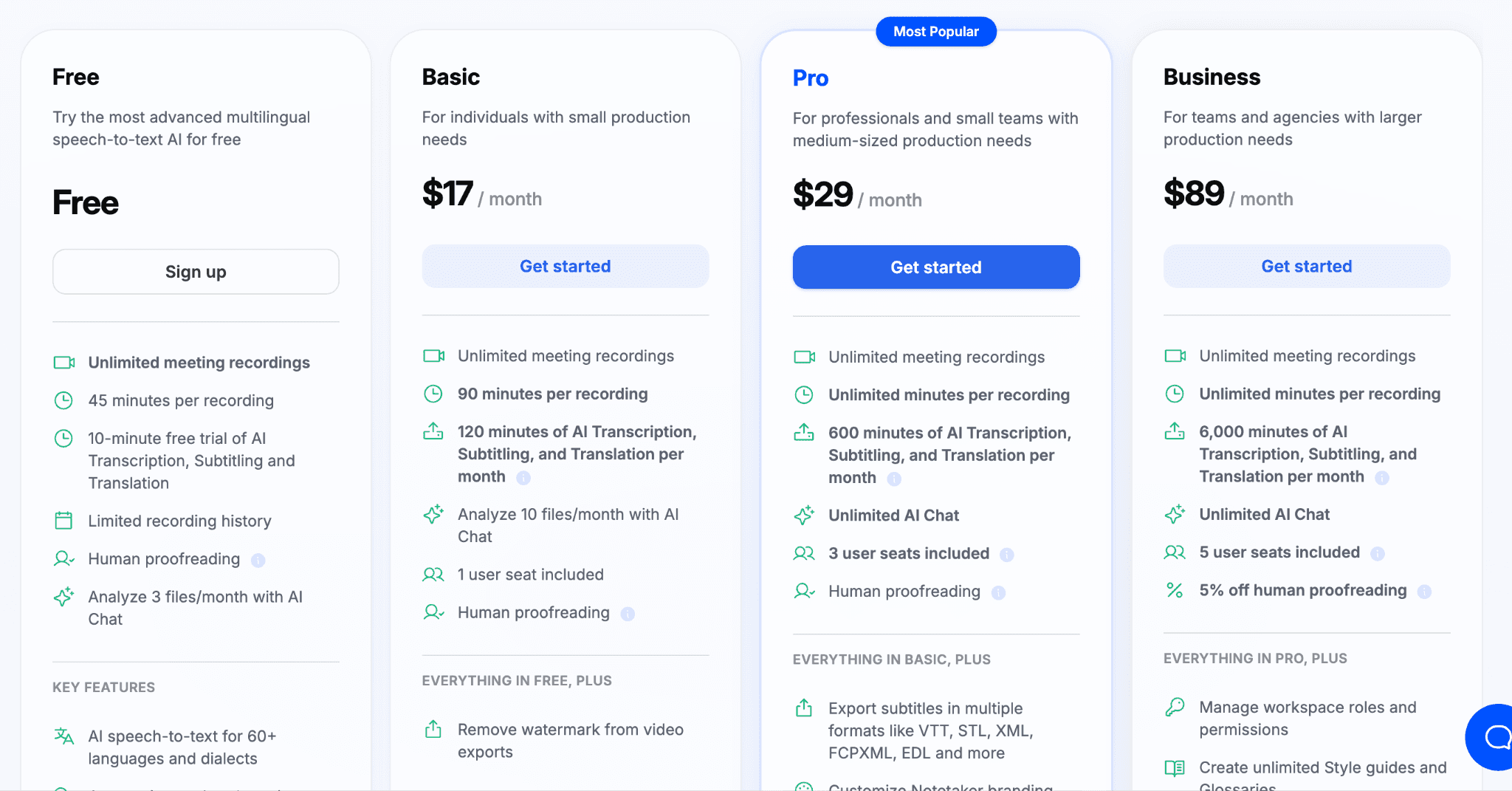
Version gratuite avec un essai limité à 10 minutes d'IA
Basic ($17/mois) : Inclut 120 minutes de transcription IA mensuelle
Pro ($29/mois) : Inclut 5 heures de transcription IA mensuelle
Business ($89/mois) : Inclut 100 heures de transcription IA mensuelle
Avantages
| Inconvénients
|
9. Notta
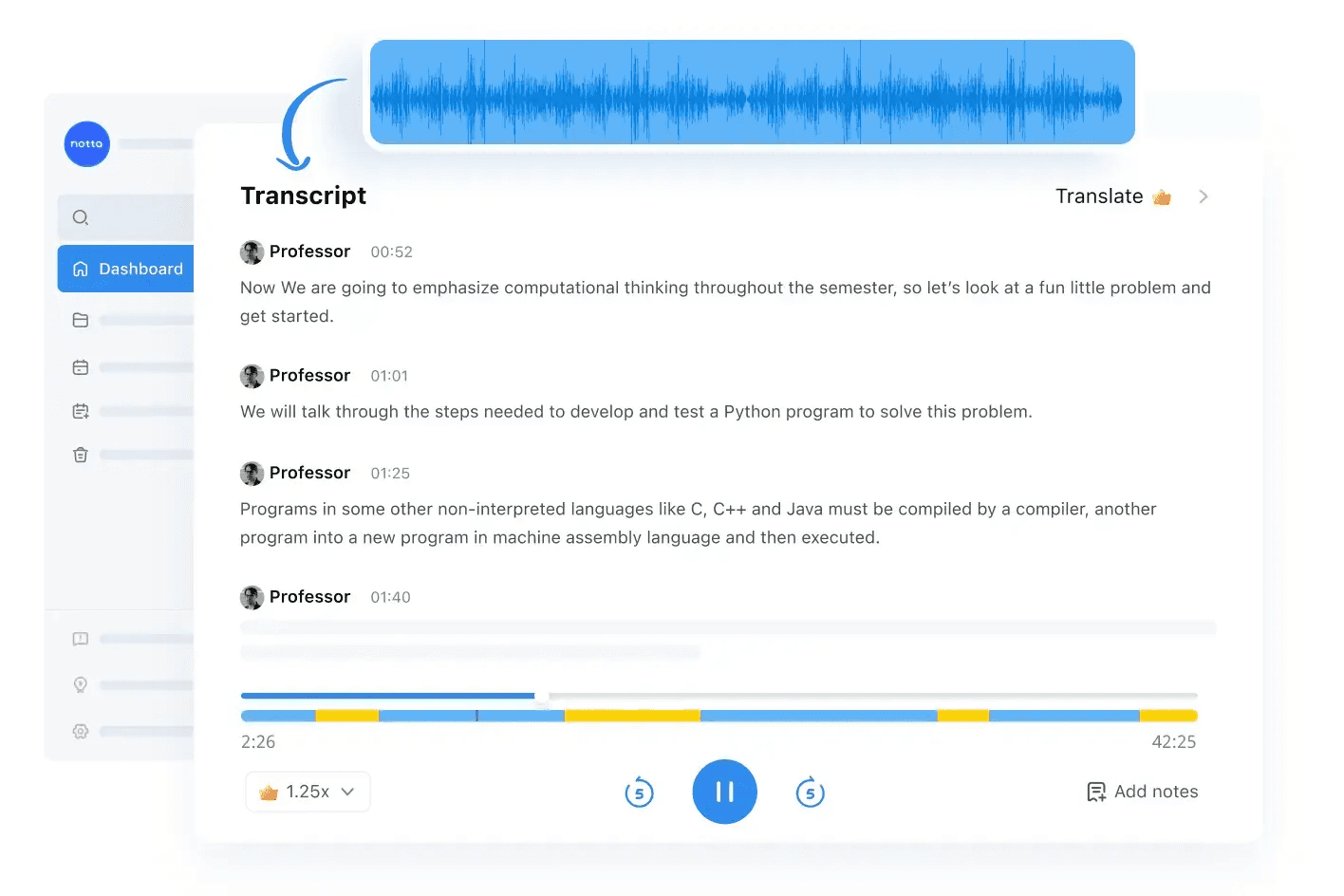
Notta s'adresse principalement aux équipes distantes ou hybrides. Il enregistre vos réunions Zoom, Google Meet et Teams en temps réel, produit l’historique écrit intégrant des étiquettes d'orateurs et génère des résumés automatiques par intelligence artificielle.
Fonctionnalités clés
Compatibilité maximale : Envoi de fichiers simples ou synchronisation de comptes cloud (Google Drive, Dropbox, visuels YouTube).
Transcription bilingue en temps réel : Affiche côte à côte deux langues différentes durant les réunions en visioconférence.
IA de messagerie interactive : Interrogez l'assistant pour résumer le point de vue d'un participant.
Tarifs
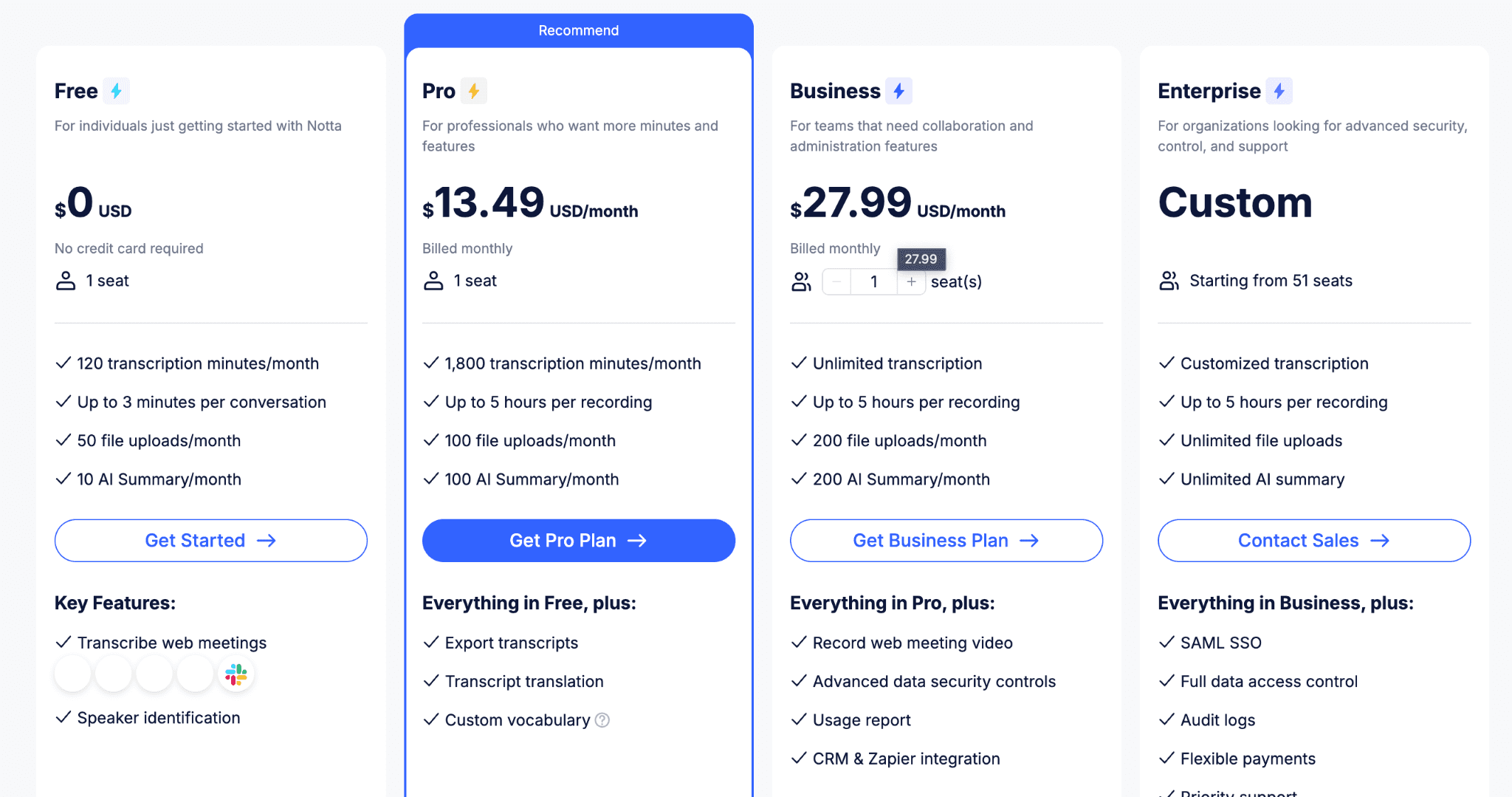
Version d'essai gratuite : 120 minutes par mois pour tester les outils
Pro ($13.49/mois) : 1 800 minutes incluses et toutes les fonctions intelligentes de l'IA
Business ($27.99/utilisateur/mois) : Transcription de réunions d'équipe à haute capacité et panneau administrateur
Enterprise : Sur devis avec protocole SSO et sécurité d'entreprise haut de gamme
Avantages
| Inconvénients
|
10. Castmagic
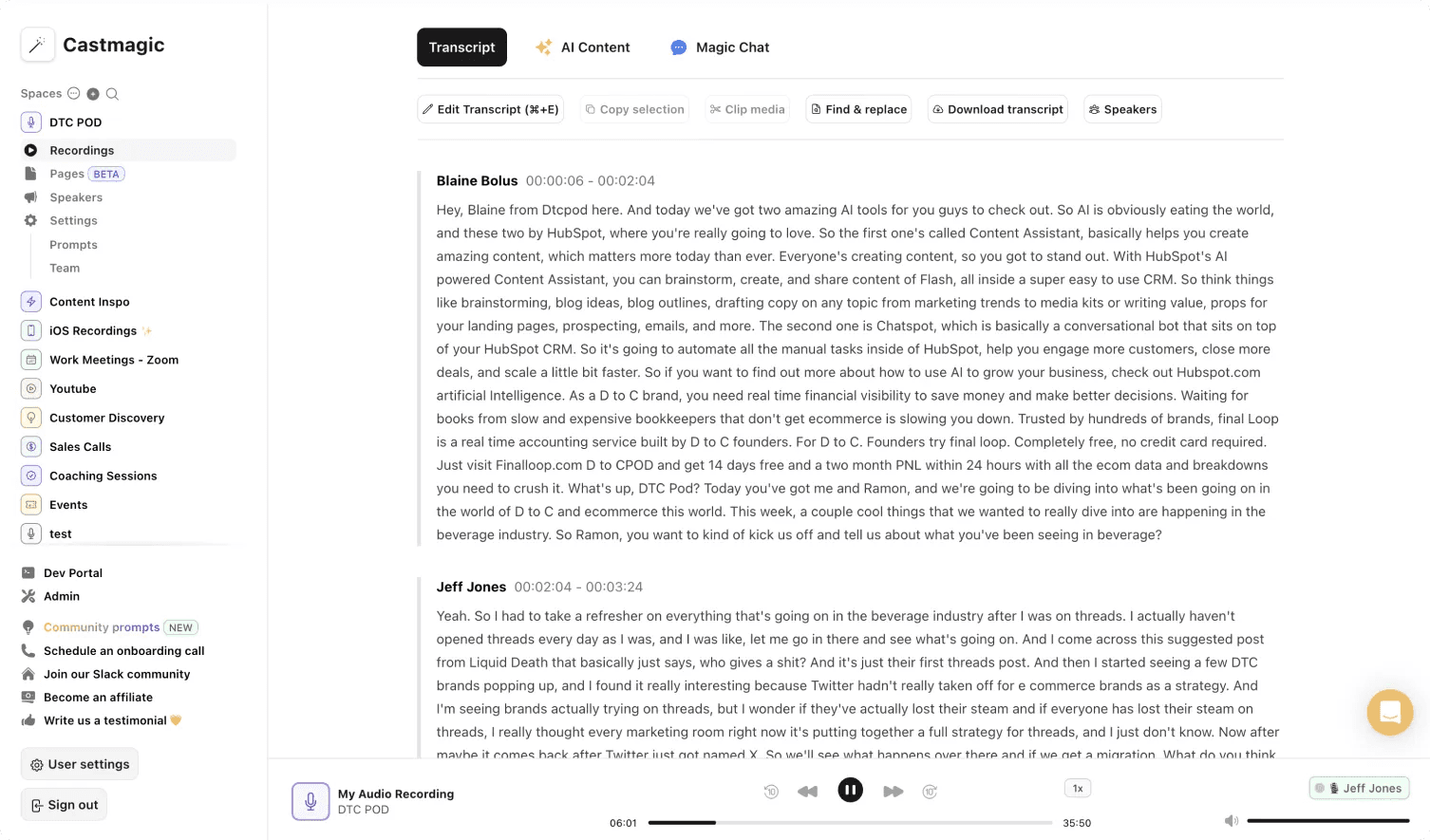
Castmagic est positionné sur le marketing de contenu vidéo et audio. Le logiciel transcrit vos podcasts et fichiers d'entretiens, puis se sert de l'IA pour générer automatiquement des articles web SEO, des emails, des newsletters et des publications accrocheuses pour LinkedIn et Twitter.
Fonctionnalités clés
Prompts IA de marque personnalisés : Créez vos propres instructions pour que les textes rédigés respectent le style éditorial de votre entreprise.
Magic Chat : Générateur de posts sociaux basé sur des invitations conversationnelles.
Espaces de travail cloisonnés : Gérez vos différents clients de façon autonome dans des espaces projets distincts.
Tarifs
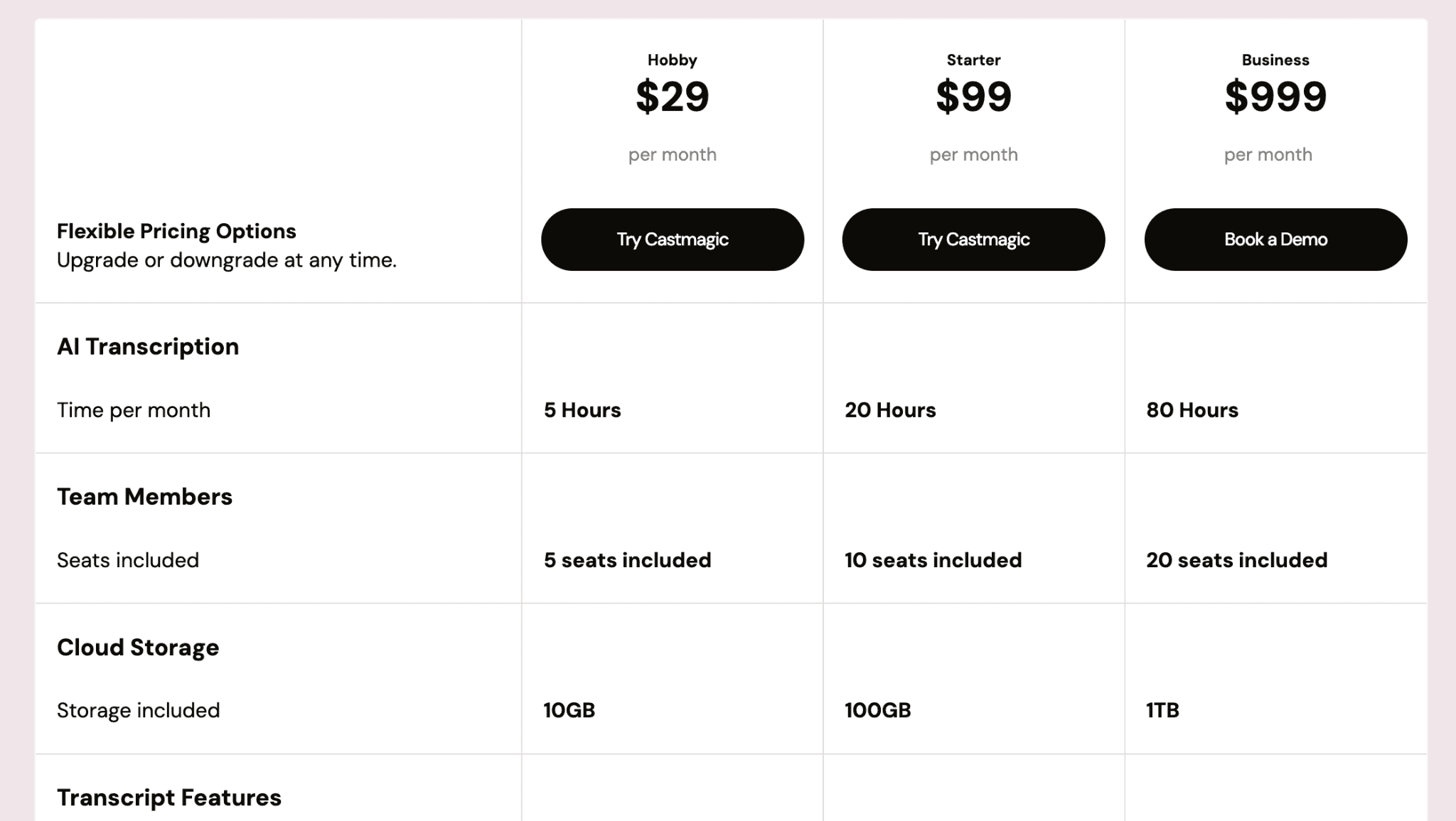
Hobby ($29/mois) : 5 heures de fichiers audio ou vidéo convertis et transcrits par mois
Starter ($99/mois) : 20 heures d'utilisation et plus de fichiers texte rédigés par l'IA
Business ($999/mois) : 80 heures avec accès collaboratif partagé et support premium
Avantages
| Inconvénients
|
Valorisez pleinement vos projets audio et vidéo avec WhisperTranscribe
Le meilleur logiciel de transcription IA doit s'accorder avec les usages de votre entreprise. Si Otter.ai et Fireflies.ai sont magiques pour vos réunions d'affaires, Rev sécurisera vos dépositions légales, alors que Trint et Descript guideront vos productions de médias.
WhisperTranscribe combine brillamment transcription rapide et génération automatique de textes optimisés SEO. Il aide vos collaborateurs à transformer un simple fichier voix en newsletters d'impact, scripts parfaits, articles de blog complets et accroches sociales dans un workflow simple et fluide.
Essayez WhisperTranscribe gratuitement dès aujourd'hui et convertissez vos contenus audio en redoutables leviers de croissance commerciale.