A Nossa Lista das 6 Melhores Ferramentas de Software de Reconhecimento de Voz em 2026
Resumo Rápido
Procurando a ferramenta de reconhecimento de voz ideal para o seu fluxo de trabalho? Este guia compara seis das principais opções do mercado: WhisperTranscribe, Otter.ai, Rev, Descript, Happy Scribe e Google Cloud Speech-to-Text. Continue lendo para comparar a precisão, recursos e preços de cada uma. Explore o blog do WhisperTranscribe para mais dicas práticas sobre transcrição e criação de conteúdo.
Cansado de Digitar a 40 WPM Quando Pensa a 150?
Os nossos dedos simplesmente não conseguem acompanhar o ritmo natural dos nossos pensamentos. Esta enorme lacuna na produtividade é exatamente onde o software de reconhecimento de voz entra, transformando palavras faladas em texto pesquisável, editável e pronto a usar em segundos.
O desafio é que nem todas as ferramentas de reconhecimento de voz são construídas para o mesmo propósito. Algumas destacam-se na transcrição de reuniões ao vivo, enquanto outras são concebidas para ditado, produção de podcasts ou reaproveitamento de conteúdos. Escolher a solução errada pode fazer com que pague por funcionalidades que nunca irá utilizar, enquanto perde as capacidades que mais importam.
Para o ajudar a fazer a escolha certa, este guia do WhisperTranscribe comparou seis das melhores opções de software de reconhecimento de voz em 2026.
Por que Deve Ouvir-nos?
No WhisperTranscribe, criamos ferramentas de transcrição e conteúdo baseadas em IA utilizadas por milhares de criadores, profissionais de marketing e podcasters em todo o mundo. Tendo processado milhões de minutos de áudio, sabemos exatamente o que separa uma excelente plataforma de reconhecimento de voz de uma mediana. Esta experiência prática diária dá-nos a visão única necessária para o ajudar a escolher a ferramenta perfeita para o seu fluxo de trabalho.
O Que É um Software de Reconhecimento de Voz?
O software de reconhecimento de voz converte a linguagem falada em texto escrito de forma automática. Utiliza modelos de aprendizagem automática para identificar palavras, pontuação e, por vezes, diferentes interlocutores numa gravação de áudio ou numa conversa ao vivo.
Embora a função principal seja a transcrição, muitas ferramentas modernas vão mais longe, gerando resumos, extraindo itens de ação, criando legendas ou transformando gravações noutros formatos de conteúdo. O software de reconhecimento de voz é utilizado em vários setores, desde a documentação de reuniões e ditado médico até à produção de podcasts e marketing de conteúdo.
Por que o Software de Reconhecimento de Voz É Importante
Preserva Detalhes Importantes: Informações importantes de reuniões, entrevistas e apresentações são capturadas com precisão, criando um registo pesquisável ao qual as equipas e indivíduos podem recorrer sempre que necessário.
Poupa Tempo Valioso: Como as pessoas falam muito mais rápido do que digitam, o software de reconhecimento de voz reduz significativamente o tempo gasto na criação de transcrições, notas e documentação escrita.
Melhora a Acessibilidade: Os fluxos de trabalho ativados por voz apoiam utilizadores com problemas de mobilidade, lesões por esforço repetitivo ou qualquer pessoa que prefira falar a digitar para concluir tarefas de forma eficiente.
Alarga o Valor do Conteúdo: Uma única gravação pode ser transformada em transcrições, publicações de blogue, legendas, resumos e conteúdos para redes sociais, maximizando o retorno de cada faixa de áudio.
Reforça o Alinhamento da Equipa: Transcrições partilhadas e resumos gerados por IA ajudam as equipas a manterem-se informadas, a acompanhar decisões e a reduzir mal-entendidos após reuniões e discussões colaborativas.
As Nossas Escolhas para o Melhor Software de Reconhecimento de Voz
WhisperTranscribe
Otter.ai
Rev
Descript
Happy Scribe
Google Cloud Speech-to-Text
1. WhisperTranscribe
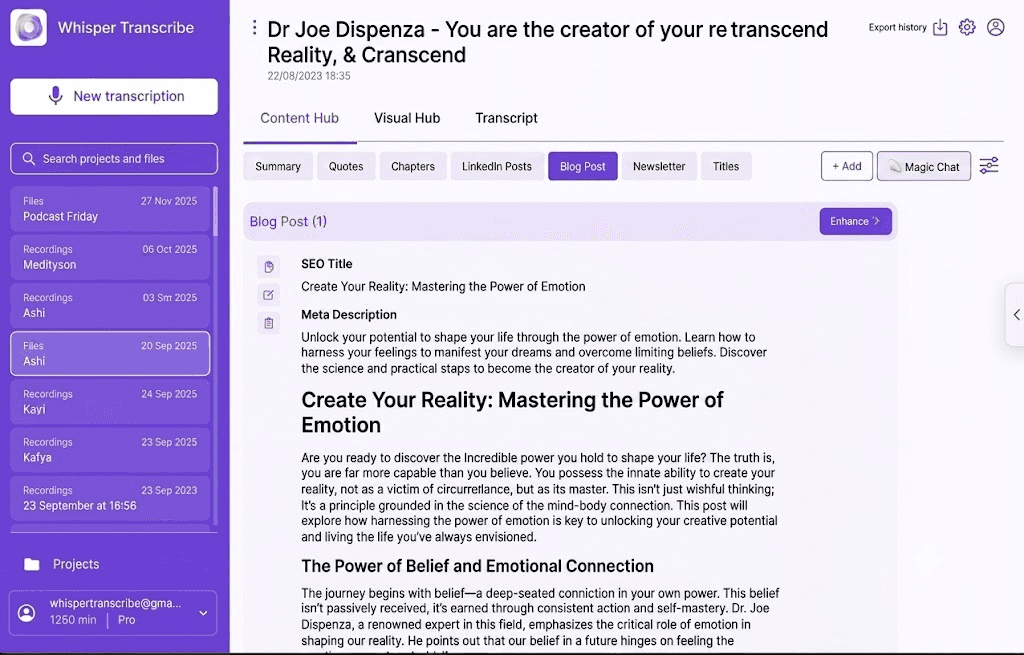
O WhisperTranscribe é uma plataforma de transcrição e geração de conteúdo baseada em IA, construída sobre o modelo Whisper da OpenAI. Transcreve áudio e vídeo com precisão e, em seguida, gera automaticamente mais de 57 tipos de conteúdo a partir da mesma gravação, incluindo publicações de blogue, notas de episódios, clipes para redes sociais, resumos e newsletters.
Alcança uma taxa de precisão de palavras de 95%, que é o padrão da indústria, mesmo ao lidar com padrões de fala rápidos, distorção acentuada de fundo ou sotaques regionais fortes.
Principais Funcionalidades
Deteção de Interlocutores: Identifica e rotula automaticamente múltiplos interlocutores numa gravação.
Magic Chat: Faça perguntas diretamente sobre a sua transcrição para extrair informações importantes sem ter de ouvir novamente.
Localizador de Clipes IA: Analisa gravações para identificar os momentos mais envolventes para vídeos curtos.
Opções de Exportação: Descarregue transcrições nos formatos SRT, VTT, TXT e Word.
Flexibilidade de Origem: Aceita carregamentos de ficheiros, links do YouTube, links do Vimeo e feeds RSS de podcasts.
Privacidade e Propriedade: Mantém a propriedade de todo o conteúdo; os dados nunca são utilizados para treinar modelos de IA.
Preços
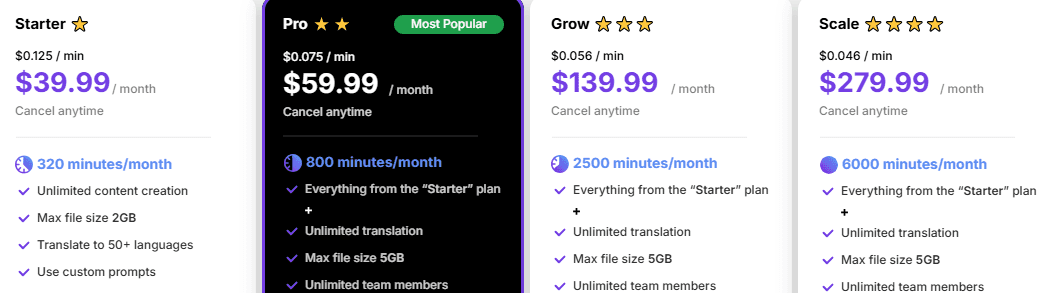
Starter ($39.99/mês): 320 minutos, ficheiros com limite de 2GB, funcionalidades principais.
Pro ($59.99/mês): 800 minutos, acesso para equipas, todas as funcionalidades incluídas.
Grow ($139.99/mês): 2.500 minutos, suporte prioritário.
Scale ($279.99/mês): 6.000 minutos, suporte prioritário, modelos personalizados.
Prós
Transcrição precisa mesmo com ruído de fundo ou sotaques
Gera textos prontos a publicar sem necessidade de copiar/colar manualmente
Sem necessidade de configuração de API, equipas não técnicas podem começar imediatamente
Fluxos de trabalho que respeitam a privacidade com opções de armazenamento local
Contras
Gravações feitas diretamente com o microfone na aplicação não isolam nativamente faixas multicanal distintas
Ideal Para: Podcasters, criadores de conteúdo, profissionais de marketing e profissionais que necessitam de transcrição e geração automatizada de conteúdo num único fluxo de trabalho.
2. Otter.ai
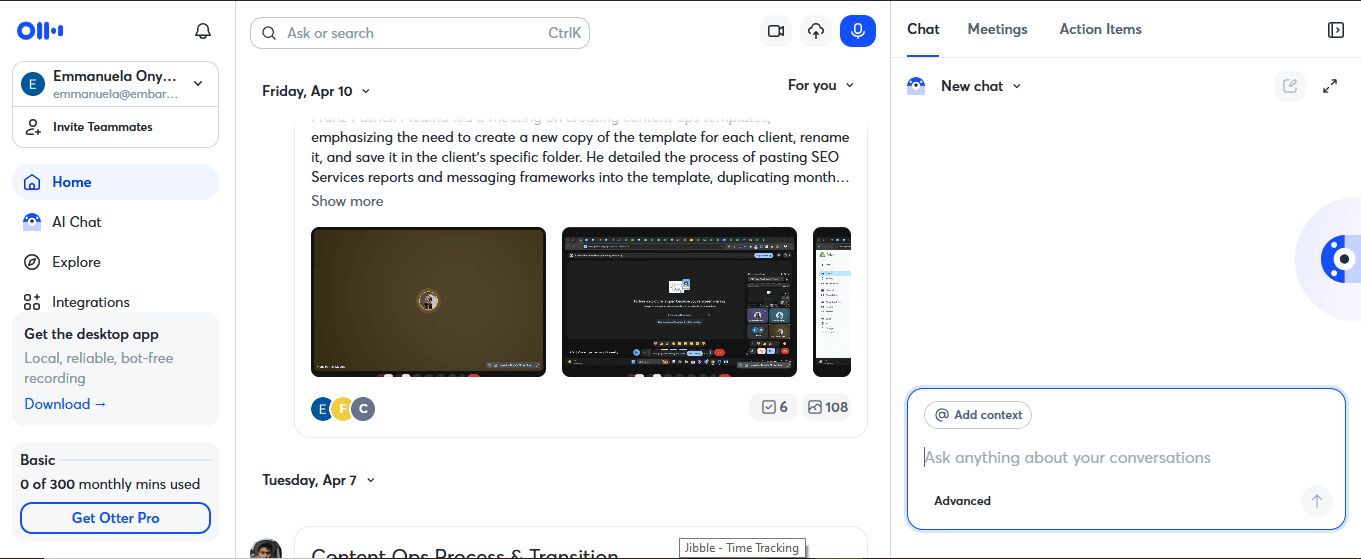
O Otter.ai funciona como um assistente virtual automatizado para reuniões. A sua principal força é a transcrição de reuniões ao vivo, integrando-se diretamente com o Zoom, Google Meet e Microsoft Teams para se juntar às chamadas automaticamente, tomar notas e resumir as discussões em tempo real. É muito apreciado pelas suas profundas integrações com calendários, embora receba frequentemente críticas dos utilizadores devido ao comportamento agressivo dos seus bots.
Principais funcionalidades
Transcrição ao Vivo: Transcreve reuniões em tempo real à medida que acontecem, capturando cada palavra sem necessidade de gravação manual.
Identificação de Interlocutores: Rotula automaticamente quem disse o quê ao longo da conversa.
Resumos de Reuniões: Gera resumos baseados em IA e itens de ação no final de cada reunião.
Arquivo Pesquisável: Armazena todas as transcrições numa biblioteca pesquisável para consulta fácil mais tarde.
Chat IA: Faça perguntas sobre transcrições de reuniões anteriores para encontrar detalhes específicos rapidamente.
Preços
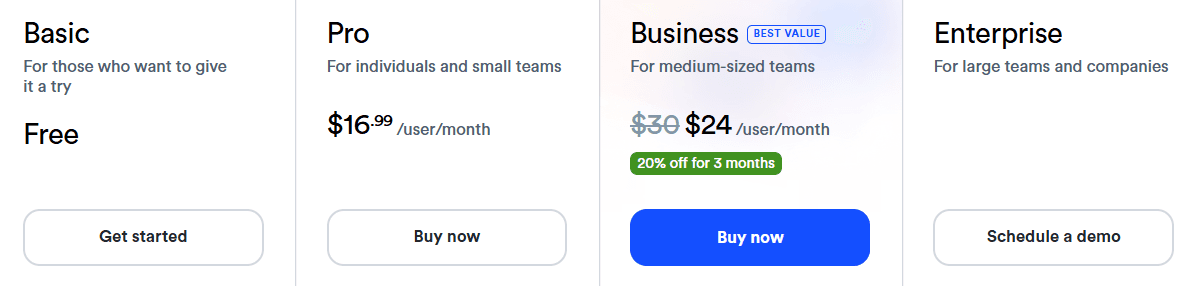
Basic: Gratuito
Pro: $16.99/mês
Business: $30/utilizador/mês
Prós
Documenta perfeitamente o fluxo de conversa ao vivo, itens de ação e decisões estruturais
A transcrição em tempo real é fiável para falantes de inglês padrão
As integrações com calendários ligam-se facilmente às principais plataformas de reuniões
As palavras-chave tornam instantânea a pesquisa de declarações passadas em registos antigos
Contras
A precisão diminui visivelmente com idiomas que não o inglês e sotaques
Limites mensais rigorosos forçam atualizações se precisar de importar ficheiros pré-gravados
O bot do Otter aparece visivelmente nas chamadas, o que alguns clientes notam
Ideal Para: Equipas que realizam reuniões frequentes em inglês e que precisam de notas, resumos e itens de ação automatizados.
3. Rev
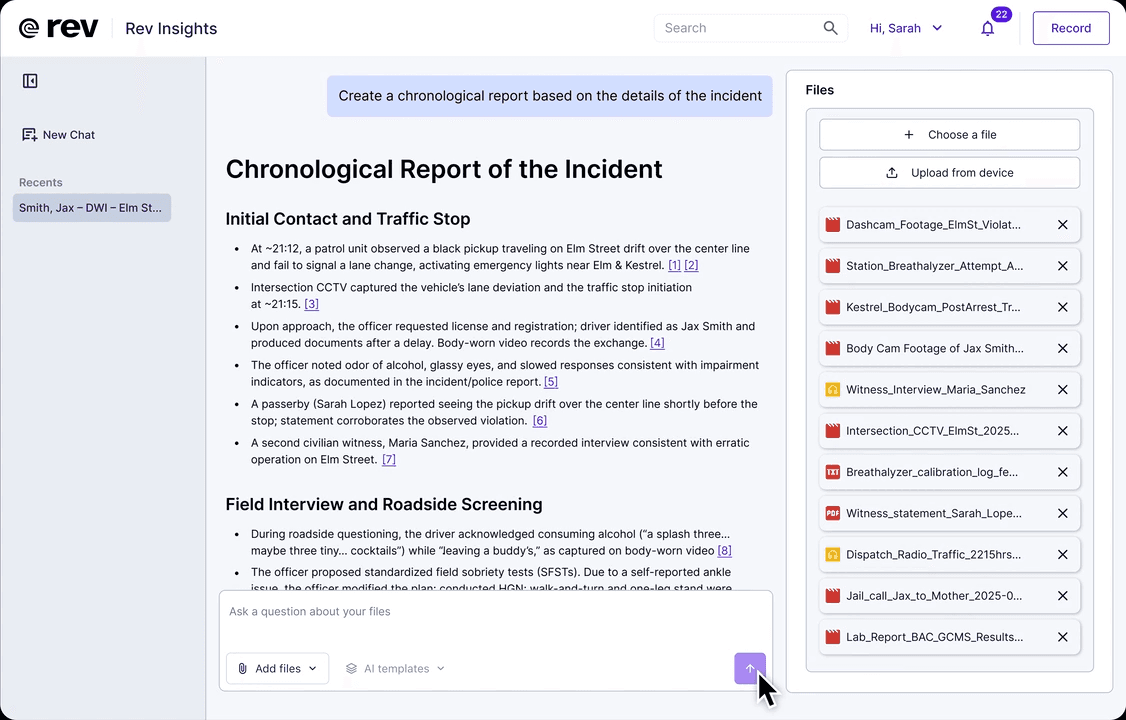
A Rev combina a transcrição por IA com a revisão humana opcional, uma referência em termos de precisão. A sua transcrição por IA atinge mais de 96% de precisão, e o serviço de transcrição humana garante mais de 99% com um tempo de entrega medido em horas. A Rev reposicionou a sua plataforma de consumo como VoiceHub e adquiriu a SmartDepo em 2025, aprofundando o seu foco em fluxos de trabalho de transcrição jurídica.
Principais Funcionalidades
Transcrição Humana: Oferece transcrição revista por humanos com elevada precisão.
Suporte de Idiomas: Cobre mais de 53 idiomas para transcrição automatizada.
Legendas: Gera legendas para conteúdo de vídeo com exportação em SRT e VTT.
Ferramentas Jurídicas: A integração com a SmartDepo adiciona análise de depoimentos e testemunhos jurídicos assistida por IA.
Fluxo de Trabalho Híbrido: Encaminha conteúdo entre a IA e a revisão humana a partir de uma única plataforma.
Preços
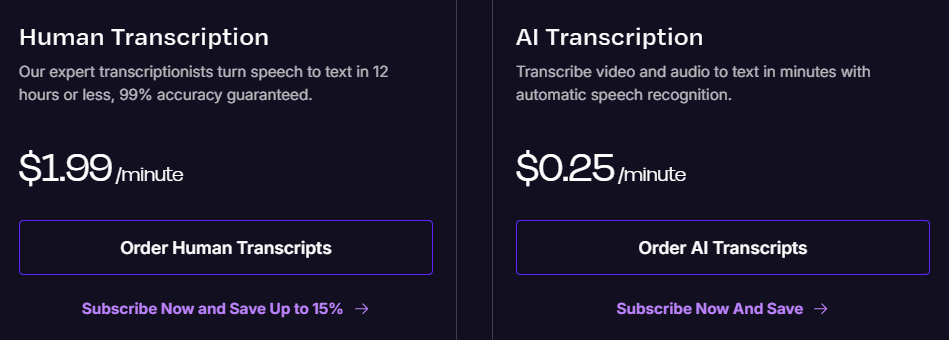
AI Pay-As-You-Go: $0.25 por minuto de áudio.
Transcrição Humana: $1.99 por minuto de áudio
Descontos por volume disponíveis para o plano empresarial.
Prós
A opção híbrida de transcrição por IA e humana é incrivelmente valiosa
A precisão em áudio limpo está entre as melhores disponíveis
O tempo de entrega da transcrição humana é rápido para projetos urgentes
Entrega documentação certificada e pronta para tribunal que cumpre normas rigorosas de conformidade legal
Contras
Mais caro do que as ferramentas puramente baseadas em IA, especialmente em grandes volumes
Os custos da transcrição humana acumulam-se rapidamente para utilizadores frequentes
Os freelancers ocasionalmente deixam passar palavras homófonas quando confiam demasiado nas primeiras passagens de texto da IA
Ideal Para: Profissionais jurídicos, jornalistas e equipas sensíveis à conformidade que necessitam de transcrições verificadas e de alta precisão.
4. Descript
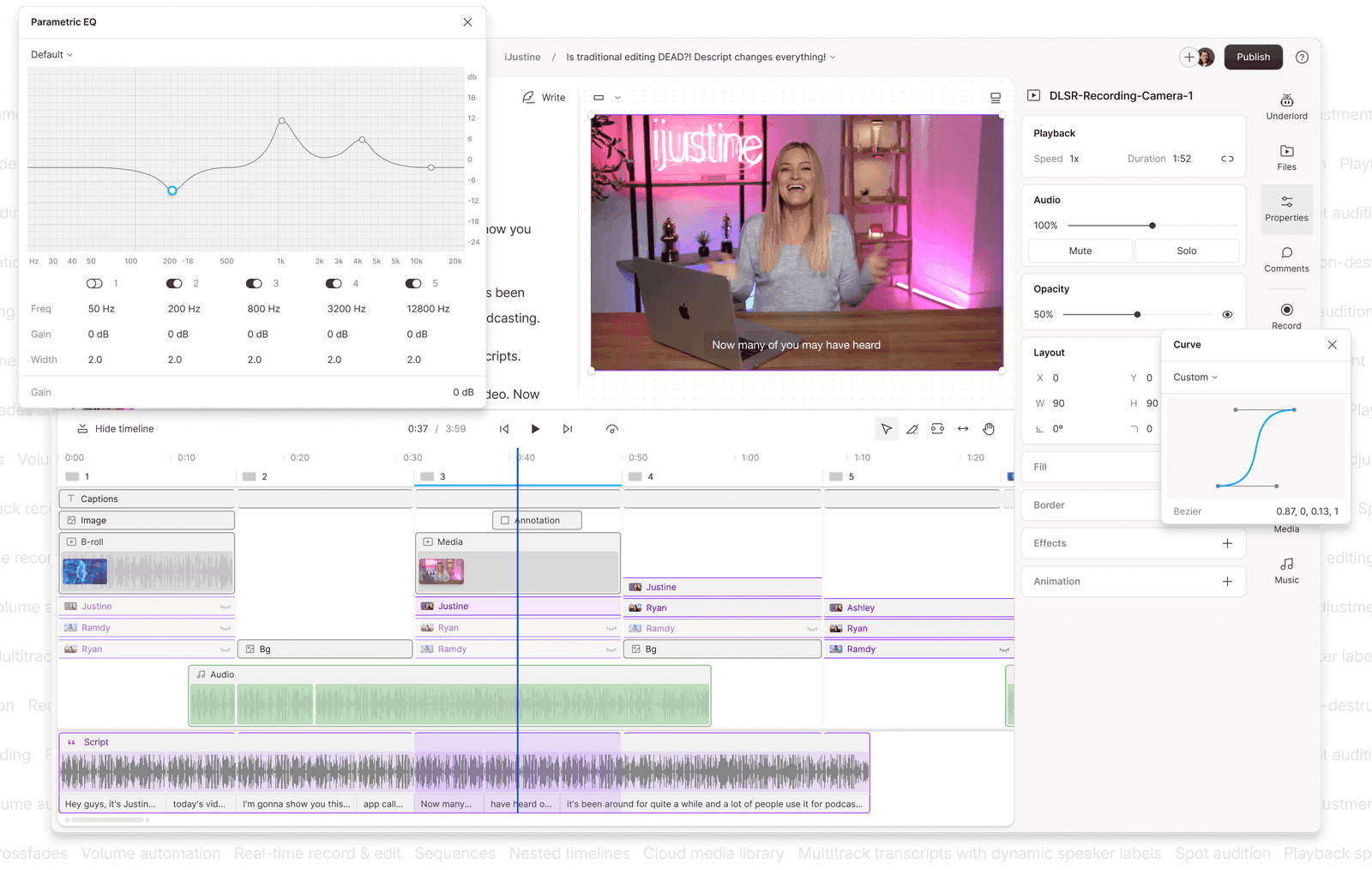
O Descript adota uma abordagem diferente para a edição de áudio e vídeo, tratando a transcrição do texto como uma linha de tempo de vídeo. Em vez de cortar faixas de onda manualmente, edita o ficheiro multimédia diretamente ao manipular as palavras no painel do texto. Elimine uma frase do texto e a secção correspondente é automaticamente removida da gravação, tornando o processo de edição muito mais rápido e intuitivo.
Principais Funcionalidades
Remoção de Palavras de Preenchimento: Deteta e remove palavras de preenchimento como "hum" e "tipo" em toda a gravação com um único clique.
Overdub: Funcionalidade de clonagem de voz que permite gerar novas faixas de áudio a partir de texto utilizando um clone da sua própria voz.
Localizador de Clipes IA: Identifica os momentos mais partilháveis de gravações mais longas para criar conteúdos curtos.
Gravação de Ecrã: Gravador de ecrã integrado para tutoriais, demonstrações e conteúdos de formação.
Publicação: Publicação direta no YouTube, plataformas de podcasts e outros canais a partir da própria aplicação.
Preços
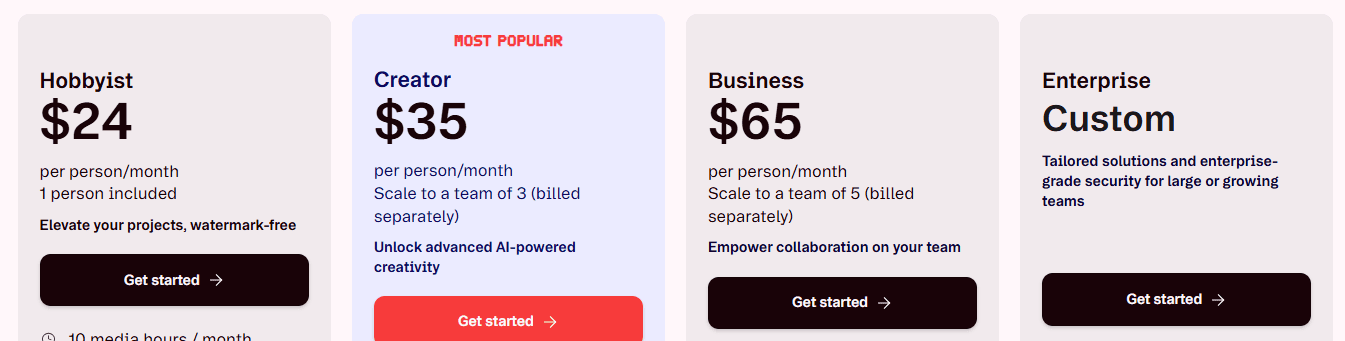
Plano Gratuito
Hobbyist: $24/mês
Creator: $35/mês
Business: $65/mês
Enterprise: Preços Personalizados
Prós
A edição baseada em texto acelera drasticamente a produção de vídeos falados
Diminui a barreira de entrada para criadores que não têm formação tradicional em edição de vídeo
Sincroniza correções de transcrição entre os espaços de edição da equipa em tempo real
Gera legendas ocultas e de vídeo sincronizadas com precisão de frame diretamente ao ritmo da faixa de voz
Contras
O desempenho abranda visivelmente em projetos maiores ou mais complexos
O sistema de créditos de IA introduzido em 2025 torna os custos mais difíceis de prever
A identificação de interlocutores pode ser pouco fiável em gravações de podcasts com várias pessoas
Ideal Para: Podcasters, YouTubers e equipas de conteúdo que desejam editar áudio e vídeo editando o texto, sem terem de alternar entre várias ferramentas.
5. Happy Scribe

O Happy Scribe suporta transcrição por IA em vários idiomas, uma das seleções mais amplas disponíveis, e combina isso com um editor integrado intuitivo para refinar transcrições e legendas antes de exportar. Para equipas de vídeo que trabalham em diferentes mercados, a capacidade de ir de uma filmagem em bruto a legendas publicadas em vários idiomas, sem mudar de ferramenta, é onde o Happy Scribe conquista o seu lugar.
Principais Funcionalidades
Biblioteca Alargada de Idiomas: Processa voz para texto em mais de 150 idiomas internacionais e dialetos locais.
Editor de Legendas: O editor integrado permite refinar as legendas e exportá-las diretamente como ficheiros SRT ou VTT.
Identificação de Interlocutores: Identifica diferentes interlocutores na transcrição com marcas temporais.
Colaboração em Equipa: Vários utilizadores podem rever e editar transcrições juntos no mesmo espaço de trabalho.
Formatos de Vídeo Profissionais: Suporta exportações de legendas para transmissão de alto nível, incluindo STL, XML, EBU-STL, VTT e SRT.
Preços
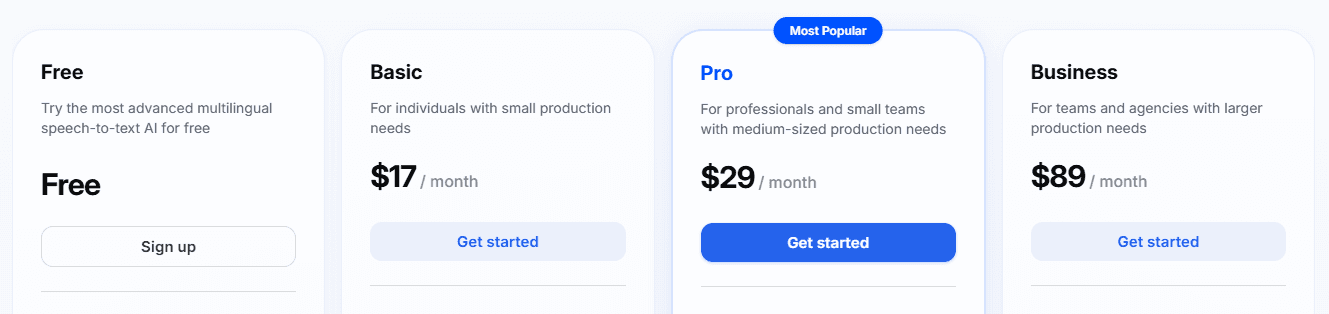
Gratuito: Utilização limitada
Basic: $17/mês
Pro: $29/mês
Business: $89/mês
Prós
O suporte de idiomas está entre os mais amplos de qualquer ferramenta apresentada aqui
O fluxo de trabalho de legendagem funciona sem problemas, da transcrição às legendas exportadas
Os preços são mais simples e previsíveis do que os da Rev para trabalhos multilingues
Funciona inteiramente dentro de um painel estável no navegador web, sem forçar instalações pesadas de aplicações de desktop.
Contras
A precisão da IA é inferior à do WhisperTranscribe ou da Rev em inglês
A deteção de interlocutores tem dificuldades quando várias pessoas falam ao mesmo tempo
A transcrição humana está disponível apenas em inglês e espanhol
Ideal Para: Produtores de vídeo, equipas de media e criadores de conteúdo internacional que necessitam de transcrição multilingue e exportação de legendas num único fluxo de trabalho.
6. Google Cloud Speech-to-Text
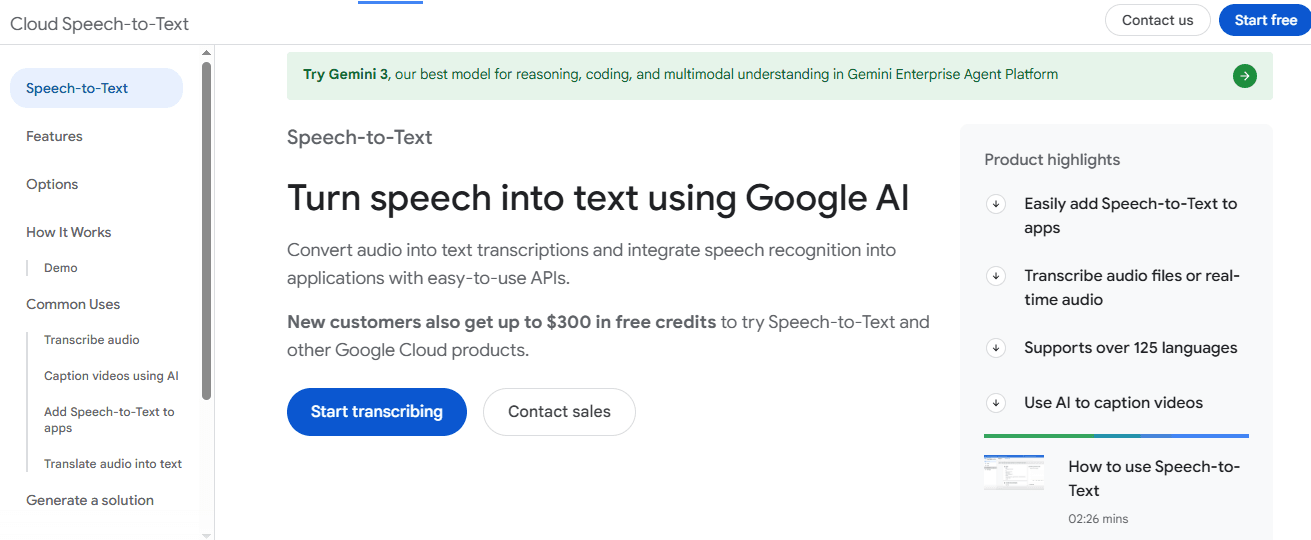
O Google Cloud Speech-to-Text é um serviço de reconhecimento de voz focado em APIs, concebido para programadores que necessitam de integrar o reconhecimento de voz diretamente em aplicações personalizadas. Funcionando inteiramente como uma camada de infraestrutura na nuvem, processa streaming de áudio ao vivo em tempo real ou ficheiros históricos em lote através de endpoints na nuvem, sem oferecer uma interface visual, linha de tempo de vídeo ou editor de texto.
Principais Funcionalidades
Ingestão de Stream Dupla: Processa feeds de áudio em tempo real multicanal e ficheiros de gravações em lote históricos através de endpoints de API idênticos.
Pontuação Automática: Adiciona automaticamente pontuação e formatação a transcrições em bruto.
Diarização de Interlocutores: Identifica e separa diferentes interlocutores em áudios com várias pessoas.
Modelos Personalizados: Treine modelos de voz específicos para domínios com vocabulário especializado ou terminologia do setor.
Integração com Google Cloud: Liga-se nativamente com o armazenamento, registo de dados e serviços de dados do Google Cloud.
Preços
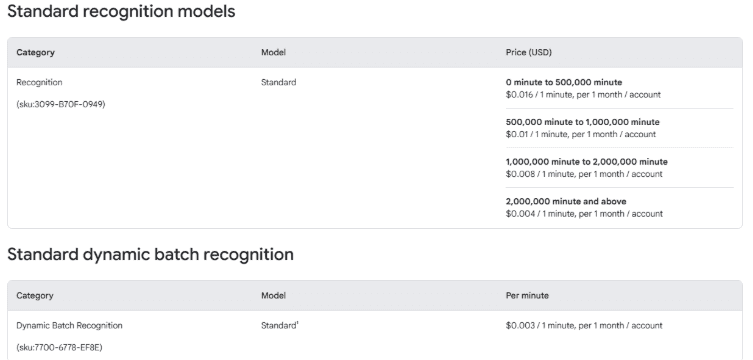
A Google categoriza os seus preços com base na versão do sistema (V1 e V2 referem-se a versões da API do programador). Os modelos V2 são os padrões modernos, enquanto o V1 representa o processamento legado.
V1 Escalão Gratuito: Primeiros 60 minutos gratuitos/mês
V2 Standard: $0.016/minuto (desce para $0.004/minuto para volumes superiores a 500 mil minutos)
V2 Dynamic Batch: $0.003/minuto
V1 Standard: $0.024/minuto ($0.016/minuto se optar pela partilha de dados)
Modelos Médicos: $0.078/minuto (para ditado clínico especializado)
Prós
Lida com grandes volumes de áudio sem problemas de desempenho
Integra-se sem esforço em fluxos de trabalho de software automatizados complexos e sistemas telefónicos ativos
Amplo suporte de idiomas e dialetos em mais de 125 línguas e variantes
Minimiza as taxas de transferência de dados externos quando ligado diretamente à arquitetura ativa do Google Cloud Storage
Contras
Requer conhecimentos técnicos e recursos de desenvolvimento para ser utilizado
Focado em API, com interface de utilizador limitada para utilizadores não técnicos
Não inclui funcionalidades de geração ou edição de conteúdos integradas
Ideal Para: Programadores e equipas técnicas que integram reconhecimento de voz em aplicações, plataformas de análise de chamadas ou pipelines de transcrição em grande escala.
Transforme Cada Gravação em Mais do Que Uma Transcrição
O melhor software de reconhecimento de voz depende dos seus objetivos. O Otter.ai destaca-se na transcrição de reuniões, a Rev é ideal quando a precisão é crítica e o Google Cloud Speech-to-Text oferece a flexibilidade de que os programadores necessitam para aplicações em grande escala.
No entanto, se é um criador de conteúdo, podcaster, profissional de marketing ou profissional que procura maximizar o valor de cada gravação, o WhisperTranscribe oferece a solução mais completa. Em vez de parar na transcrição, ajuda-o a transformar uma única gravação em artigos de blogue, publicações para redes sociais, notas de episódios, resumos e muito mais, tudo adaptado à identidade da sua marca.
Experimente o WhisperTranscribe gratuitamente e veja quanto mais pode criar a partir de cada conversa. Não é necessário cartão de crédito.