Our List of the 6 Best Speech Recognition Software Tools in 2026
Quick Summary
Looking for the right speech recognition tool for your workflow? This guide compares six of the top options on the market: WhisperTranscribe, Otter.ai, Rev, Descript, Happy Scribe, and Google Cloud Speech-to-Text. Read on to compare their accuracy, features, and pricing. Explore the WhisperTranscribe blog for more practical tips on transcription and content creation.
Tired of Typing at 40 WPM When You Think at 150?
Our fingers simply cannot keep up with the natural pace of our thoughts. This massive gap in productivity is exactly where speech recognition software steps in, turning spoken words into text that is searchable, editable, and ready to use in seconds.
The challenge is that not all speech recognition tools are built for the same purpose. Some excel at live meeting transcription, while others are designed for dictation, podcast production, or content repurposing. Choosing the wrong solution can leave you paying for features you'll never use while missing the capabilities that matter most.
To help you make the right choice, this WhisperTranscribe guide has compared six of the best speech recognition software options in 2026.
Why Listen to Us?
At WhisperTranscribe, we build AI-powered transcription and content tools used by thousands of creators, marketers, and podcasters worldwide. Having processed millions of minutes of audio, we know exactly what separates an excellent speech recognition platform from an average one. This daily, hands-on experience gives us the unique insight needed to help you choose the perfect tool for your workflow.
What Is Speech Recognition Software?
Speech recognition software converts spoken language into written text automatically. It uses machine learning models to identify words, punctuation, and sometimes different speakers within an audio recording or live conversation.
While the core function is transcription, many modern tools go further by generating summaries, extracting action items, creating subtitles, or repurposing recordings into other content formats. Speech recognition software is used across industries, from meeting documentation and medical dictation to podcast production and content marketing.
Why Speech Recognition Software Is Important
Preserves Key Details: Important information from meetings, interviews, and presentations is captured accurately, creating a searchable record that teams and individuals can revisit whenever needed.
Saves Valuable Time: Since people speak much faster than they type, speech recognition software significantly reduces the time spent creating transcripts, notes, and written documentation.
Improves Accessibility: Voice-powered workflows support users with mobility challenges, repetitive strain injuries, or anyone who prefers speaking over typing to complete tasks efficiently.
Extends Content Value: A single recording can be transformed into transcripts, blog posts, subtitles, summaries, and social media content, maximizing the return on every piece of audio.
Strengthens Team Alignment: Shared transcripts and AI-generated summaries help teams stay informed, track decisions, and reduce misunderstandings after meetings and collaborative discussions.
Our Picks for the Best Speech Recognition Software
WhisperTranscribe
Otter.ai
Rev
Descript
Happy Scribe
Google Cloud Speech-to-Text
1. WhisperTranscribe
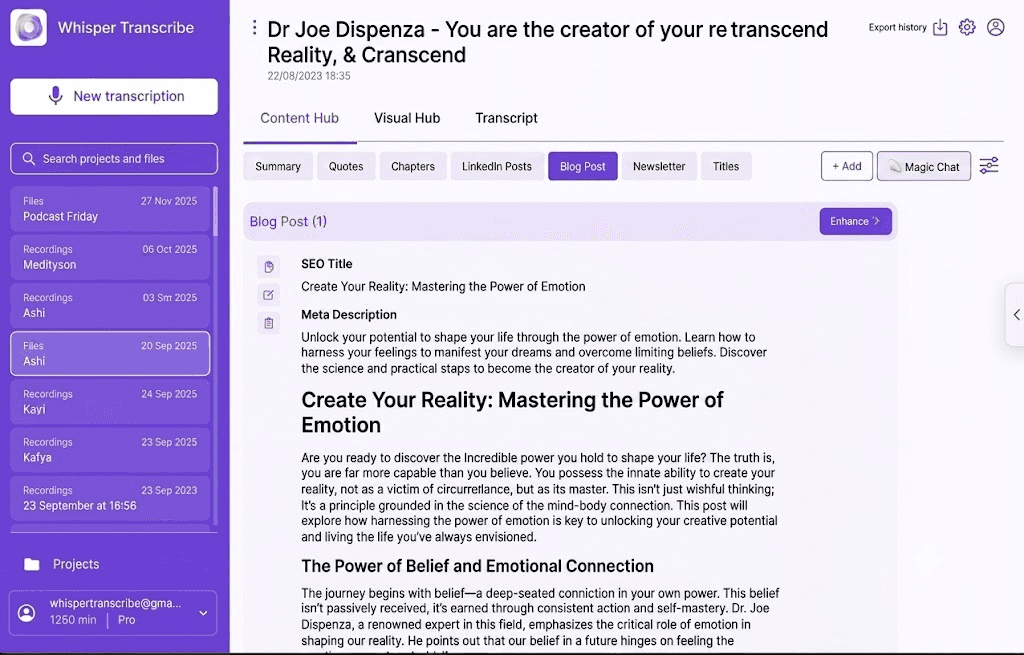
WhisperTranscribe is an AI-powered transcription and content generation platform built on OpenAI's Whisper model. It transcribes audio and video with accuracy, then automatically generates 57+ content types from the same recording, including blog posts, show notes, social media clips, summaries, and newsletters.
It achieves an industry-standard 95% word accuracy rate even when dealing with rapid speech patterns, heavy background distortion, or thick regional accents.
Key Features
Speaker Detection: Automatically identifies and labels multiple speakers in a recording.
Magic Chat: Ask questions directly about your transcript to extract insights without re-listening.
AI Clip Finder: Scans recordings to identify the most engaging moments for short-form video.
Export Options: Download transcripts in SRT, VTT, TXT, and Word formats.
Source Flexibility: Accepts uploads, YouTube links, Vimeo links, and podcast RSS feeds.
Privacy and Ownership: You retain ownership of all content; data is never used to train AI models.
Pricing
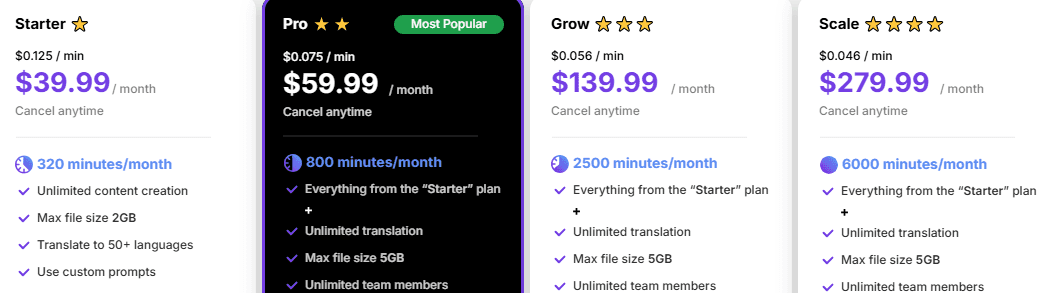
Starter ($39.99/month): 320 minutes, 2GB max files, core features.
Pro ($59.99/month): 800 minutes, team access, all features included.
Grow ($139.99/month): 2,500 minutes, priority support.
Scale ($279.99/month): 6,000 minutes, priority support, custom templates.
Pros
Accurate transcription even with background noise or accents
Generates ready-to-publish copy without manual copy/paste
No API setup, non-technical teams can start immediately
Privacy-friendly workflows with local-storage options
Cons
Live, in-app mic recordings do not natively isolate distinct multi-channel tracks
Best For: Podcasters, content creators, marketers, and professionals who need transcription plus automated content generation from a single workflow.
2. Otter.ai
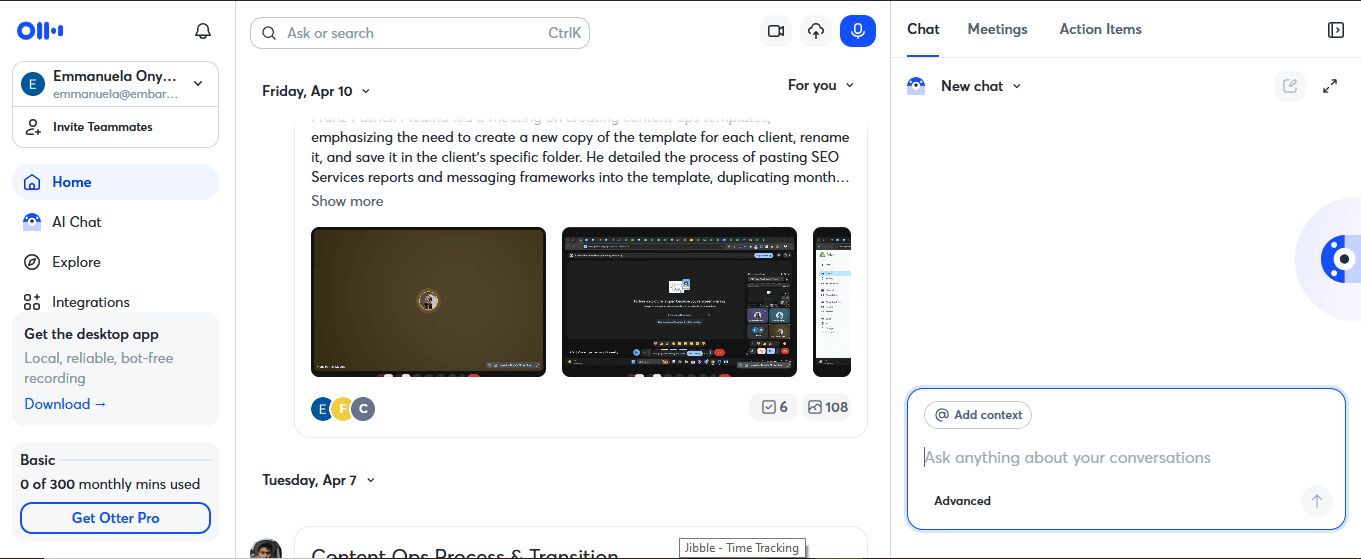
Otter.ai functions as an automated virtual meeting companion. Its core strength is live meeting transcription, integrating directly with Zoom, Google Meet, and Microsoft Teams to join calls automatically, take notes, and summarize discussions in real time. It is highly regarded for its deep calendar integrations, though it frequently receives user pushback for its aggressive bot behaviors.
Key features
Live Transcription: Transcribes meetings in real time as they happen, capturing every word without manual recording.
Speaker Identification: Automatically labels who said what throughout the conversation.
Meeting Summaries: Generates AI-powered summaries and action items at the end of each meeting.
Searchable Archive: Stores all transcripts in a searchable library for easy reference later.
AI Chat: Ask questions about past meeting transcripts to pull up specific details fast.
Pricing
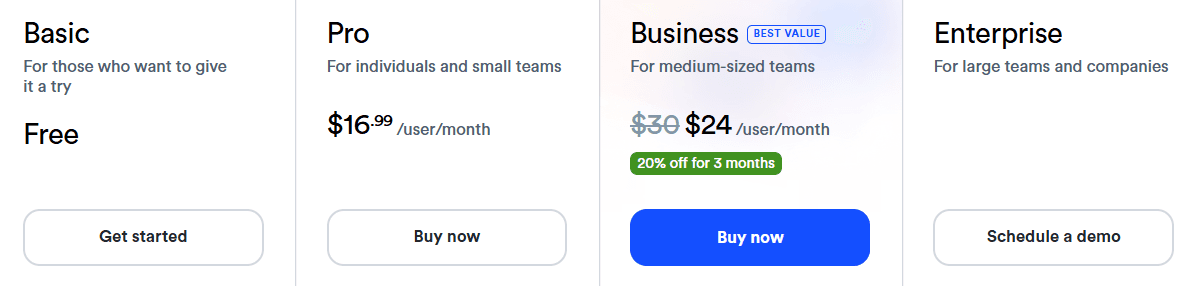
Basic: Free
Pro: $16.99/month
Business: $30/user/month
Pros
Flawlessly documents live conversational flow, action items, and structural decisions
Real-time transcription is reliable for standard English speakers
Calendar integrations connect cleanly with major meeting platforms
Keywords make finding past statements across old logs instant
Cons
Accuracy drops noticeably with non-English languages and accents
Strict monthly caps force upgrades if you import pre-recorded files
Otter bot appears visibly in calls, which some clients notice
Best For: Teams running frequent English-language meetings who need automated notes, summaries, and action items.
3. Rev
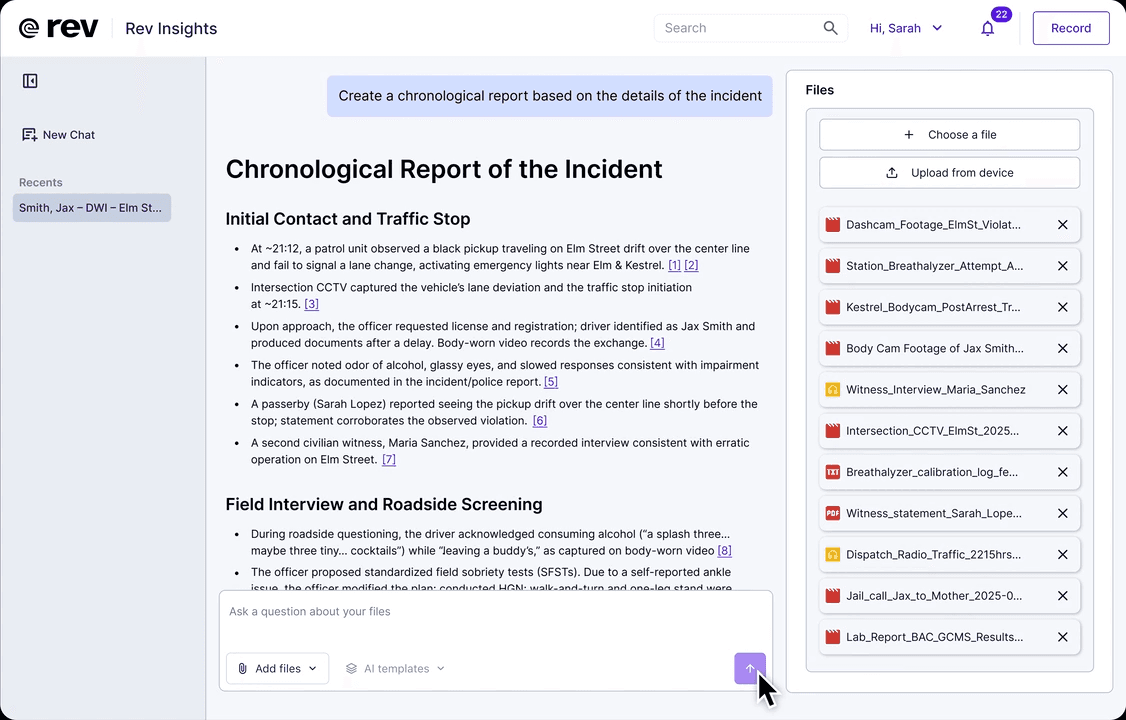
Rev combines AI transcription with optional human review, standard for accuracy. Its AI transcription reaches 96%+ accuracy, and the human transcription service guarantees 99%+ with a turnaround measured in hours. Rev rebranded its consumer platform as VoiceHub and acquired SmartDepo in 2025, deepening its focus on legal transcription workflows.
Key Features
Human Transcription: Offers human-reviewed transcription with a high accuracy.
Language Support: Covers 53+ languages for automated transcription.
Captions and Subtitles: Generates captions and subtitles for video content with SRT and VTT export.
Legal Tools: SmartDepo integration adds AI-assisted deposition and legal testimony analysis.
Hybrid Workflow: Routes content between AI and human review from a single platform.
Pricing
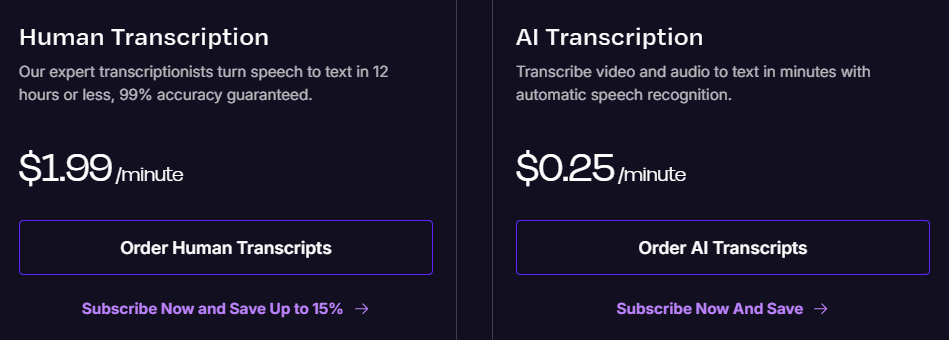
AI Pay-As-You-Go: $0.25 per audio minute.
Human Transcription: $1.99 per audio minute
Volume discounts available for the enterprise plan.
Pros
Hybrid AI and human transcription option is uniquely valuable
Accuracy on clean audio is among the best available
Human transcription turnaround is fast for urgent projects
Delivers certified, courtroom-ready documentation that satisfies strict legal compliance standards
Cons
More expensive than pure AI tools, especially at high volume
Human transcription costs add up quickly for frequent users
Freelancers occasionally overlook sound-alike words when over-relying on initial AI text passes
Best For: Legal professionals, journalists, and compliance-sensitive teams who need verified, high-accuracy transcripts.
4. Descript
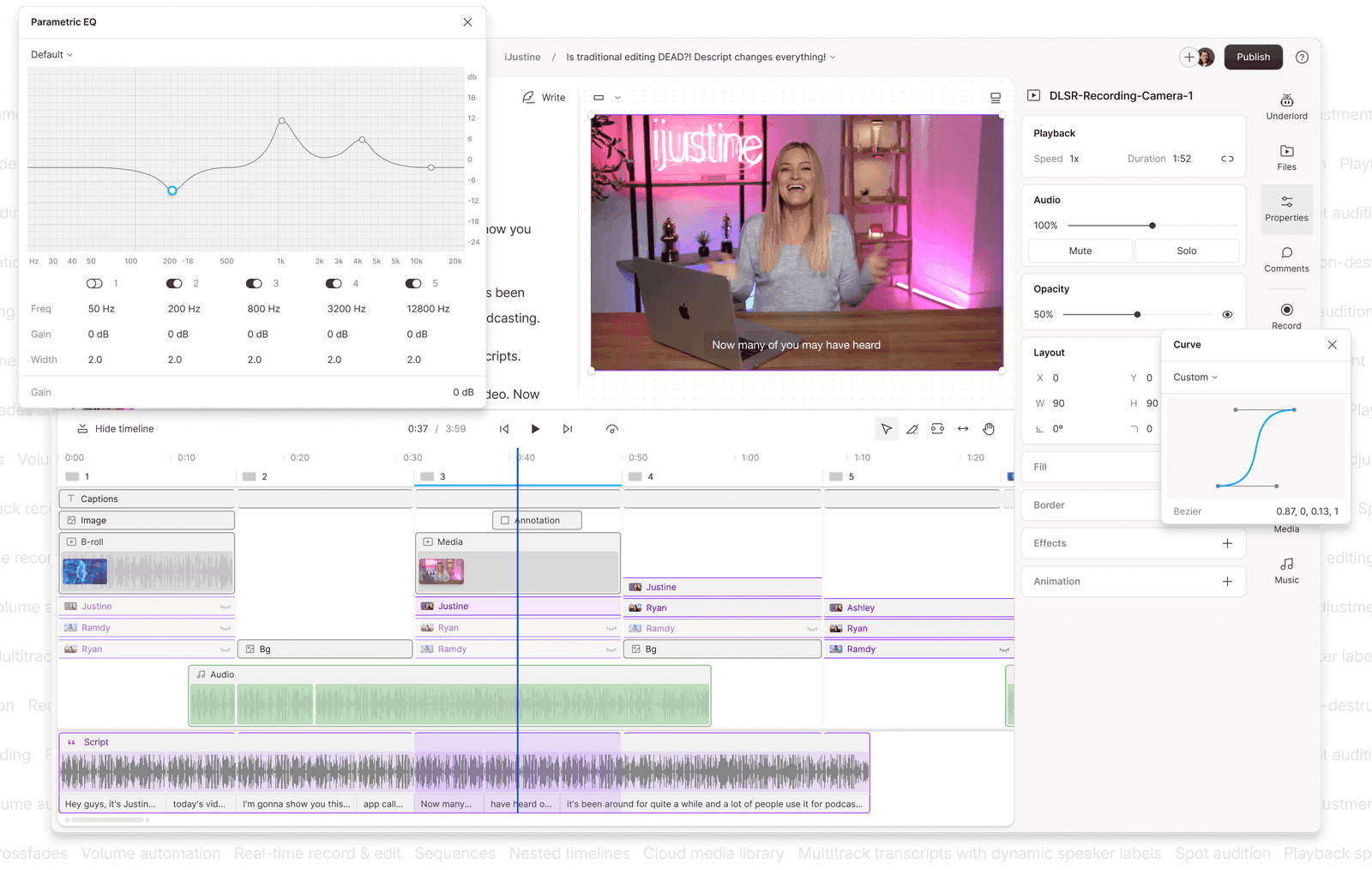
Descript takes a different approach to audio and video editing by treating your text transcript as a video timeline. Instead of cutting waveform tracks manually, you edit the media directly by manipulating words in the script pane. Delete a sentence from the text, and the corresponding section is automatically removed from the recording, making the editing process much faster and more intuitive.
Key Features
Filler Word Removal: Detects and removes filler words like "um" and "uh" across the entire recording in one click.
Overdub: Voice cloning feature that lets you generate new audio from text using a clone of your own voice.
AI Clip Finder: Identifies the most shareable moments from longer recordings for short-form content.
Screen Recording: Built-in screen recorder for tutorials, walkthroughs, and training content.
Publishing: Direct publishing to YouTube, podcast platforms, and other channels from within the app.
Pricing

Free plan
Hobbyist: $24/month
Creator: $35/month
Business: $65/month
Enterprise: Custom Pricing
Pros
Text-based editing dramatically speeds up spoken-word video production
Lowers the entry barrier for creators who lack traditional video timeline training
Syncs transcript corrections across team editing spaces in real time
Generates frame-accurate closed captions and subtitles synced directly to the pacing of the vocal track
Cons
Performance slows down noticeably on larger or more complex projects
AI credit system introduced in 2025 makes costs harder to predict
Speaker labeling can be unreliable on multi-person podcast recordings
Best For: Podcasters, YouTubers, and content teams who want to edit audio and video by editing text, without switching between multiple tools.
5. Happy Scribe

Happy Scribe supports AI transcription in various languages, one of the broadest selections available, and pairs that with a clean built-in editor for refining transcripts and subtitles before export. For video teams working across markets, the ability to go from raw footage to published captions in multiple languages, without switching tools, is where Happy Scribe earns its place.
Key Features
Expansive Language Library: Processes speech-to-text across 150+ international languages and localized dialects.
Subtitle Editor: Built-in editor lets you refine captions and export directly as SRT or VTT files.
Speaker Identification: Labels different speakers in the transcript with timestamps.
Team Collaboration: Multiple users can review and edit transcripts together in the same workspace.
Professional Video Formats: Supports high-level broadcast caption exports including STL, XML, EBU-STL, VTT, and SRT.
Pricing
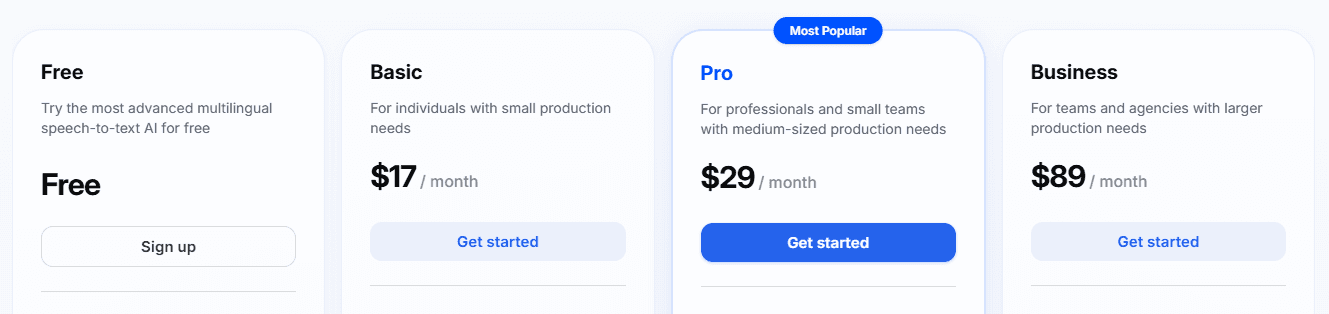
Free: Limited usage
Basic: $17/month
Pro: $29/month
Business: $89/month
Pros
Language support is among the broadest of any tool here
Subtitle workflow runs smoothly from transcript to exported captions
Pricing is cleaner and more predictable than Rev for multilingual work
Operates entirely within a stable web browser dashboard without forcing heavy desktop application installations.
Cons
AI accuracy is lower than WhisperTranscribe or Rev on English
Speaker detection struggles when multiple speakers talk over each other
Human transcription is only available in English and Spanish
Best For: Video producers, media teams, and international content creators who need multilingual transcription and subtitle export in one workflow.
6. Google Cloud Speech-to-Text
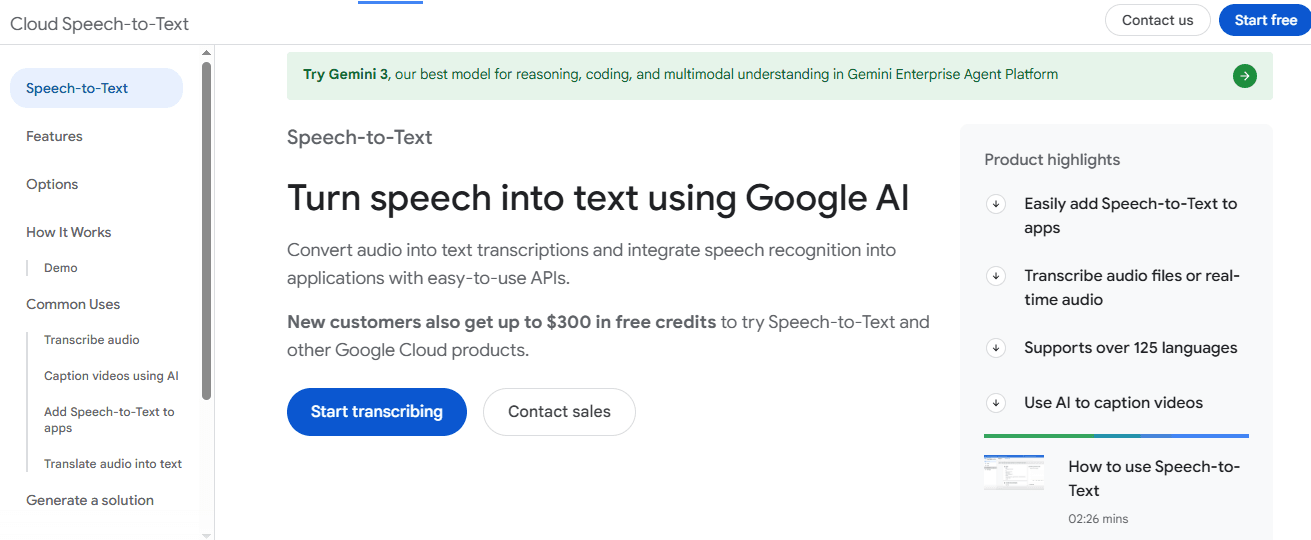
Google Cloud Speech-to-Text is an API-first speech recognition service designed for developers who need to build speech recognition directly into custom applications. Operating entirely as a cloud infrastructure layer, it processes real-time live streaming audio or historical batch files through cloud endpoints without offering a visual interface, video timeline, or text editor.
Key Features
Dual Stream Ingestion: Processes multi-channel real-time streaming audio feeds and historic batch recording files via identical API endpoints.
Auto Punctuation: Automatically adds punctuation and formatting to raw transcripts.
Speaker Diarization: Identifies and separates different speakers in multi-person audio.
Custom Models: Train domain-specific speech models for specialized vocabulary or industry terminology.
Google Cloud Integration: Connects natively with Google Cloud storage, logging, and data services.
Pricing
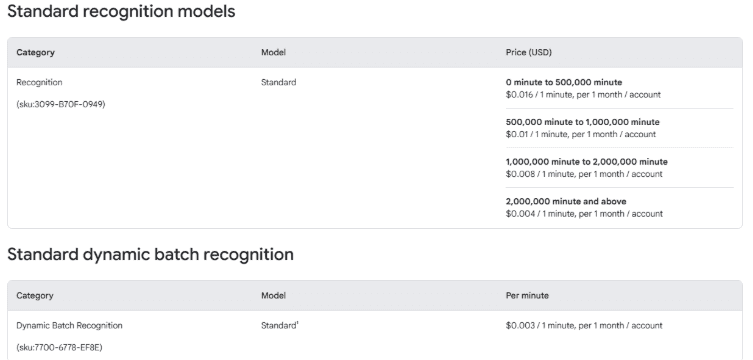
Google categorizes its pricing by its system versioning (V1 and V2 refer to developer API versions). V2 models are the modern defaults, while V1 represents legacy processing.
V1 Free Tier: First 60 minutes free/month
V2 Standard: $0.016/minute (drops to $0.004/minute for volume over 500k minutes)
V2 Dynamic Batch: $0.003/minute
V1 Standard: $0.024/minute ($0.016/minute if you opt into data logging)
Medical Models: $0.078/minute (for specialized clinical dictation)
Pros
Handles large audio volumes without performance issues
Integrates effortlessly into complex automated software workflows and active phone systems
Broad language and dialect support across 125+ languages and variants
Minimizes external data egress fees when connected directly to active Google Cloud Storage architecture
Cons
Requires technical setup and development resources to use
API-first with limited non-technical UI
No built-in content generation or editing features included
Best For: Developers and technical teams building speech recognition into applications, call analytics platforms, or large-scale transcription pipelines.
Turn Every Recording Into More Than a Transcript
The best speech recognition software depends on your goals. Otter.ai stands out for meeting transcription, Rev is ideal when accuracy is critical, and Google Cloud Speech-to-Text offers the flexibility developers need for large-scale applications.
However, if you're a content creator, podcaster, marketer, or professional looking to maximize the value of every recording, WhisperTranscribe offers the most complete solution. Instead of stopping at transcription, it helps you transform a single recording into blog posts, social media content, show notes, summaries, and more, all tailored to your brand voice.
Try WhisperTranscribe for free and see how much more you can create from every conversation. No credit card required.