Our Expert Guide on How to Transcribe Podcasts (+ the Best Methods for Creators)
Quick Summary
This guide explores how to transcribe podcasts via two methods, detailing when each is ideal:
Manual transcription excels in accuracy, handling complex jargon, and dealing with poor audio.
Automated transcription is best for high-volume, tight-budget, and fast-turnaround projects.
When done properly, transcripts enhance accessibility and SEO and offer repurposing opportunities for blogs, guides, and marketing materials. For more practical guides, visit the WhisperTranscribe blog.
Finding it Difficult to Transcribe a Podcast?
With millions of new podcast episodes rolling out daily, creators must find ways to increase visibility and deliver more value to stand out. And that’s where transcribing a podcast comes in.
Transcribing your podcast episodes from static audio into searchable, formattable text opens up a whole new world of possibilities. It’s an effective way to create a content engine that delivers ROI far beyond simple audio and video.
But how do you achieve that? This WhisperTranscribe guide takes you through the process of transcribing a podcast. See the available transcription methods, how they work, when to use them, and how to get the most out of your transcriptions.
But first…
Why Listen to Us
As a creator of an AI-powered podcast transcript generator serving thousands of podcasters, we’re not new to the process of transcribing a podcast. We understand the different methods and how podcasters can take full advantage of them to transform their episodes from basic audio/video to other valuable content formats. These insights and more are what we’ve shared in this guide.
Wondering Why Creators Transcribe Podcasts?
If you believed creators transcribe podcasts just to improve accessibility, you would be right. But that’s not the only reason. Let’s see the key reasons creators transcribe podcasts.
Improved Accessibility and Inclusiveness
Podcast listenership continues to grow, with more than half a billion listeners worldwide. What does this mean? It means more people are demanding accessible content.
Transcribing your podcast helps you meet this demand. It makes your content accessible to more people. Young and old listeners, hobbyists and real fans, and even people with hearing impairments. It ensures no one is left behind.
Content Repurposing for More Output
Being a content creator shouldn’t be limited to just podcasts. Even if you produce only podcasts, transcription can help you repurpose the podcast content for accessibility across many other channels.
Your podcast transcript can serve as raw material for blog posts, social media snippets, newsletter content, and even ad scripts to attract leads to your lead magnets. You can go from just having listeners to creating a community of consumers interested in your content across the board.
Better Discovery on Search Engines and LLMs
Streaming platforms like Spotify, Apple Podcasts, YouTube Music, and Amazon Music/Audible offer massive libraries and wide accessibility. But not all listeners rely on them to find new and refreshing content.
Some (or most) of your potential listeners still rely on search engines like Google and AI engines like ChatGPT and Claude to find new content. Transcribing your podcasts unlocks this potential. It makes it easy for these engines to index your episodes so that potential listeners can find them in search results.
Improved Listener Engagement and Retention
Podcast episodes, especially the lengthy ones, are great for one-time listening (or maybe twice). Any more and it gets tiring for listeners.
However, creators who transcribe podcasts can give their listeners a convenient way to revisit the key talking points of any episode without having to re-listen to the entire episode. Listeners can quickly scan the text, find specific information, and even copy and share quotes.
This level of convenience encourages engagement and keeps listeners coming back for more.
What Methods do Creators Use to Transcribe Podcasts?
When it comes to podcast transcription, the options are pretty straightforward for creators.
Manual podcast transcription
Automated podcast transcription
Interestingly, it’s not always an easy choice. That’s why we’ve explained each method in detail in this section of our guide.
1. Manual Podcast Transcription
In simple terms, manual transcription means you or another real person listens to your podcast and types or writes out every single word spoken in the episode. You can either DIY or contract the work to a professional or freelance transcriber for a fee.
When Is Manual Podcast Transcription Ideal?
For recordings with heavy background noise, distortion, or low volume.
For podcasts with specialized vocabulary or technical terms that require high precision.
For episodes with multiple speakers or voices that are difficult to distinguish.
For challenging audio situations like overlapping speech or difficult accents
What are the Pros and Cons of Manual Podcast Transcription?
Manual transcription have their strengths and limitations, as outlined below:
Pros
Offers the highest accuracy, usually reaching over 99%
Handles even difficult or niche audios easily
Gives you complete control over the accuracy
Cons
Takes more time (hours or days), whether it’s DIY or contracted.
Can be very expensive if you hire a transcriber or use a transcription service.
Leaves room for human error in the process.
2. Automated Podcast Transcription
Automated transcription uses Artificial Intelligence (AI) to turn your audio into text. These services are much faster and cheaper than manual transcription.
An hour-long podcast can be transcribed in minutes. You also get to use features such as speaker identification, timestamps, and translations in multiple languages.
When is Automated Podcast Transcription Ideal?
For quick transcription, especially when you need results within minutes.
For large volumes of episodes that will take too long to transcribe manually.
For lower-budget or cost-sensitive projects, where you can’t afford to hire a transcriber.
For recordings with good audio and minimal overlapping speech.
What are the Pros and Cons of Automated Podcast Transcription?
Here are the strengths and weaknesses of podcast transcription done with AI:
Pros
Faster and more efficient than manual methods
Free or usually cheaper than hiring a professional transcriber
Convenient workflows - most work with podcast platforms
Cons
Lower accuracy than humans
May require proofreading to correct errors
Tools may miss nuances, emotional cues, or contextual meaning
Manual vs Automated Transcription: Choosing the Right Method for Your Show
To make it even easier to transcribe podcasts, we’ve compared both options below:
Factor | Manual Transcription | Automated (AI) Transcription |
Accuracy | Highest | Moderate to High (improving) |
Speed | Slowest | Fastest |
Cost | Highest | Lowest |
Flexibility (Accents, Jargon) | Best | Improving, but can still struggle |
Time Investment | Significant | Minimal |
Editing Requirements | Minimal | Potential for moderate editing |
The best transcription method depends on your specific needs and what matters most to you. Think about your budget, how long and complex your episodes are, and how accurate you need your transcripts to be.
For example, if you're on a tight budget and your podcast has clear audio, automated transcription might be a great place to start. If perfect accuracy is a must-have and you have more complex content, manual transcription or a mix of AI and human editing might be better.
How to Transcribe Podcasts Manually
If you’ve decided to transcribe podcasts manually, this means you’re prepared to listen to the audio and type every word yourself. It’s hands-on and gives you full control over accuracy.
Here’s a clear five-step process to do it effectively.
Step 1: Prepare Your Tools
DIY podcast transcription is ordinarily labor-intensive and time-consuming. But you can speed things up a bit with the right setup.
In addition to your podcast audio in a clean and playable format (like MP3, M4A, WAV, or OPUS), here are the other things you need:
A quality pair of headphones to listen to your podcast audio clearly.
A computer with a text editor or word processor to write what you hear. For Macs, this can be Pages or Notes. For Windows computers, it can be Word or Notepad.
One or more media players that let you pause, rewind, and slow down the audio easily. The built-in media player on your computer can work here.
Once you have these in place, you can proceed to the next step.
Step 2: Set Up in a Comfortable Workspace
Manual transcription requires maximum attention and focus. So, you need to choose a quiet, distraction-free area to set up.
Close unrelated applications to limit distractions and interruptions while working on your computer. Also, ensure the lighting is good for you to see and that the typing setup is comfortable.
Step 3: Listen Through Before You Begin
Despite being a producer, you shouldn’t transcribe your podcast on the first listen. Instead, your first listen is to help you get familiar with the conversation flow.
While at it, note speaker voices, difficult accents, or technical terms you may need to research. This anticipation you build helps you reduce errors when the actual transcription begins.
Step 4: Transcribe the Audio
Start playing the episode and type what you hear. This usually follows a chronological order that helps you avoid mistakes:
Listen to the audio in 10-30 second sections.
Type what you hear for each section.
If you're unsure of a word or part of the audio, pause, rewind, and replay until you’re confident.
Once you’re done with that section, move on to the next.
It helps to use consistent speaker labels throughout (e.g., Host: or Guest:) to indicate who’s speaking. Also, try shortcuts (abbreviations) if that helps with accuracy and speed.
Step 5: Proofread and Format Your Podcast Transcript
Carefully review the text to catch typos, missing words, or misattributed speakers. This helps you catch common mistakes before it makes it to the final draft.
Then, format your transcript with paragraphs, clear speaker tags, timestamps, and chapters, where applicable. Finally, clean it up for readability by introducing speaker breaks where needed.
By following these five steps, you’ll have a clean, accurate manual transcript of your podcast ready for publishing, SEO, accessibility, or repurposing into blog content.
Hiring a Professional Transcriber?
Alternatively, if you'd prefer to transcribe podcasts with the help of professionals, here’s a simple outline of the process:
Prepare Audio: Ensure your podcast is in the correct format(s).
Send Audio to Transcriber: Send the audio file to your chosen transcriber with any specific instructions.
Review First Draft: Receive the first draft of your podcast transcript for review.
Request Corrections: Provide feedback for corrections or editing.
Final Draft: Once all revisions are made, receive the final transcript.
This method allows you to focus on other tasks while still ensuring high-quality transcription for your podcast.
How to Transcribe Podcasts Using Automated Transcription Tools
Unlike the manual podcast option, the bulk of work here is handled by the automated transcription tools. They use artificial intelligence (AI) or speech-to-text software to quickly convert your podcast audio into written text.
Here’s a simple step-by-step guide to using them effectively:
Step 1: Choose an Automated Transcription Tool
The first step is to select a transcription service or software that fits your needs. There are quite a lot of options out there, each offering different features suited for various podcasting styles or transcription needs.
For example:
Tool | Accuracy Rate | Special Features | Best For |
WhisperTranscribe | High | Custom vocabulary, speaker identification | Accuracy, Content Creation |
Descript | Medium | Video/Audio Editing | Video podcasters |
Otter.ai | Medium | Collaboration features | Meetings, Interviews |
Trint | High | Enterprise-grade features | Professional use |
HappyScribe | Medium | Translation services | Multilingual podcasts |
Once you make a pick, you can proceed to the next step.
Step 2: Prepare Your Audio or Video File(s)
Your chosen podcast transcription software relies solely on the podcast audio or video you provide it to produce a transcript. So, make sure your podcast episode is in a supported format (such as MPEG, MP4, WAV, MP3, or M4A).
If you’re using WhisperTrancribe, for example, we specifically support both audio and video files. You can upload in the following formats:
Video formats: 3GP, MKV, MP4, WMV, MOV, AVI, FLV, MPEG
Audio formats: AAC, AMR, FLAC, M4A, M4B, MP3, OPUS, WAV
Is your podcast episode not recorded already? Not a problem! You can use our built-in microphone to quickly record your podcast and upload it immediately. Then, our transcription AI will transcribe it in minutes.
TIP: You don’t have to clean up background noise if you’re using WhisperTranscribe. Our transcription AI delivers up to 95% accuracy, even in the presence of background noise and overlapping speech. Otherwise, consider cleaning up the audio before uploading.
Step 3: Upload Your Podcast File
Open your chosen transcription software and upload your podcast audio or video file. Most tools let you drag and drop the file. Alternatively, you can access your computer storage from the upload page and pick your file directly.
The process is a lot easier on WhisperTranscribe, with features like:
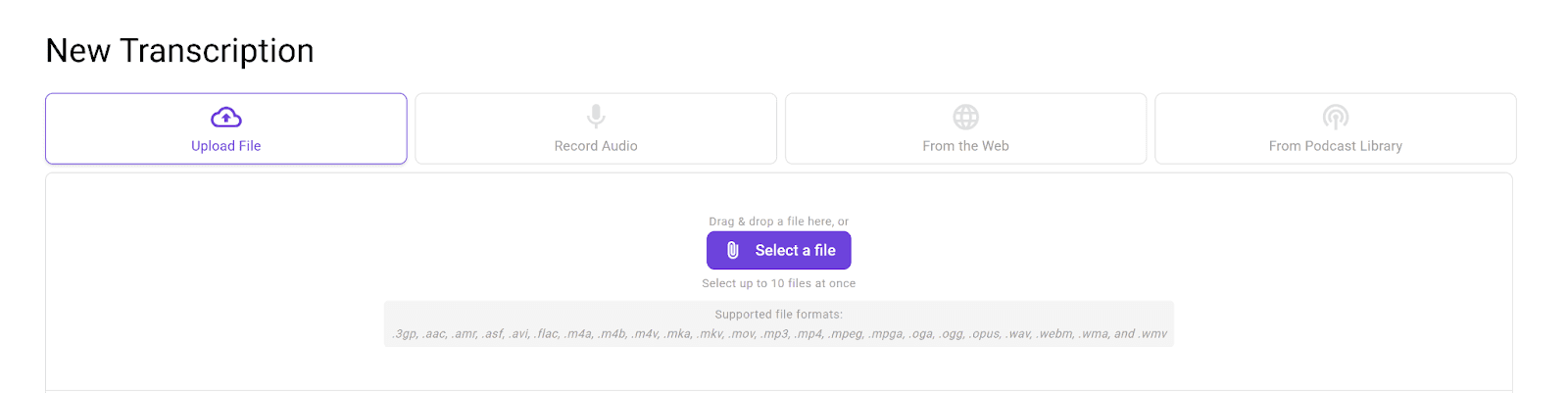
Drag-and-drop for fast uploads, even for files up to 5 GB.
Multiple file uploads (up to 10) at once if you're working on more than one episode.
Direct uploads from platforms like YouTube, Vimeo, or any other website.
Integration with podcastindex.org to search for and upload your already-indexed podcast episodes.
Step 4: Let the Tool Transcribe
Once uploaded, the AI transcription tool will process the audio and generate a transcript. This usually takes just a few minutes, depending on the length of your episode.
Platforms like WhisperTrancribe and HappyScribe even show you the real-time progress of the process, so you can see how long it’ll take for the transcription to be completed.
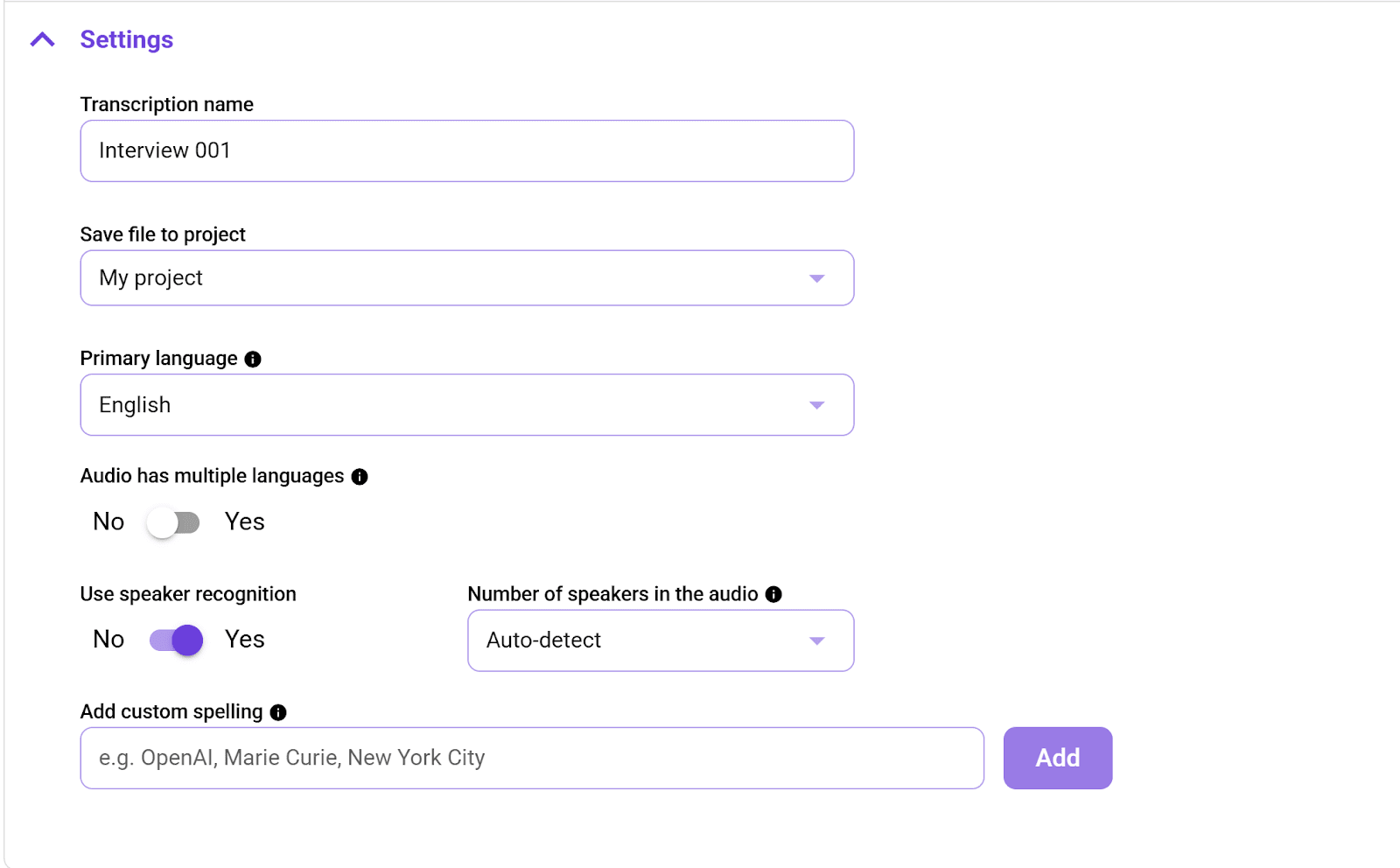
Plus, if you’re using WhisperTranscribe, you can choose the language of your audio, the number of speakers, and speaker labeling to fine-tune your final transcript even better.
Step 5: Review and Edit
After the tool generates the automated transcript, you can review it for errors. That’s because AI isn’t perfect and may misinterpret accents, jargon, or overlapping speech. However, the chances of these are low if WhisperTranscribe is your AI transcription tool.
WhisperTranscribe delivers up to 95% accuracy even with the most difficult audio. You can also access a built-in editor where you can:
Listen to sections of the audio while reading the transcript.
Correct typos and misinterpreted words.
Highlight key moments for later use.
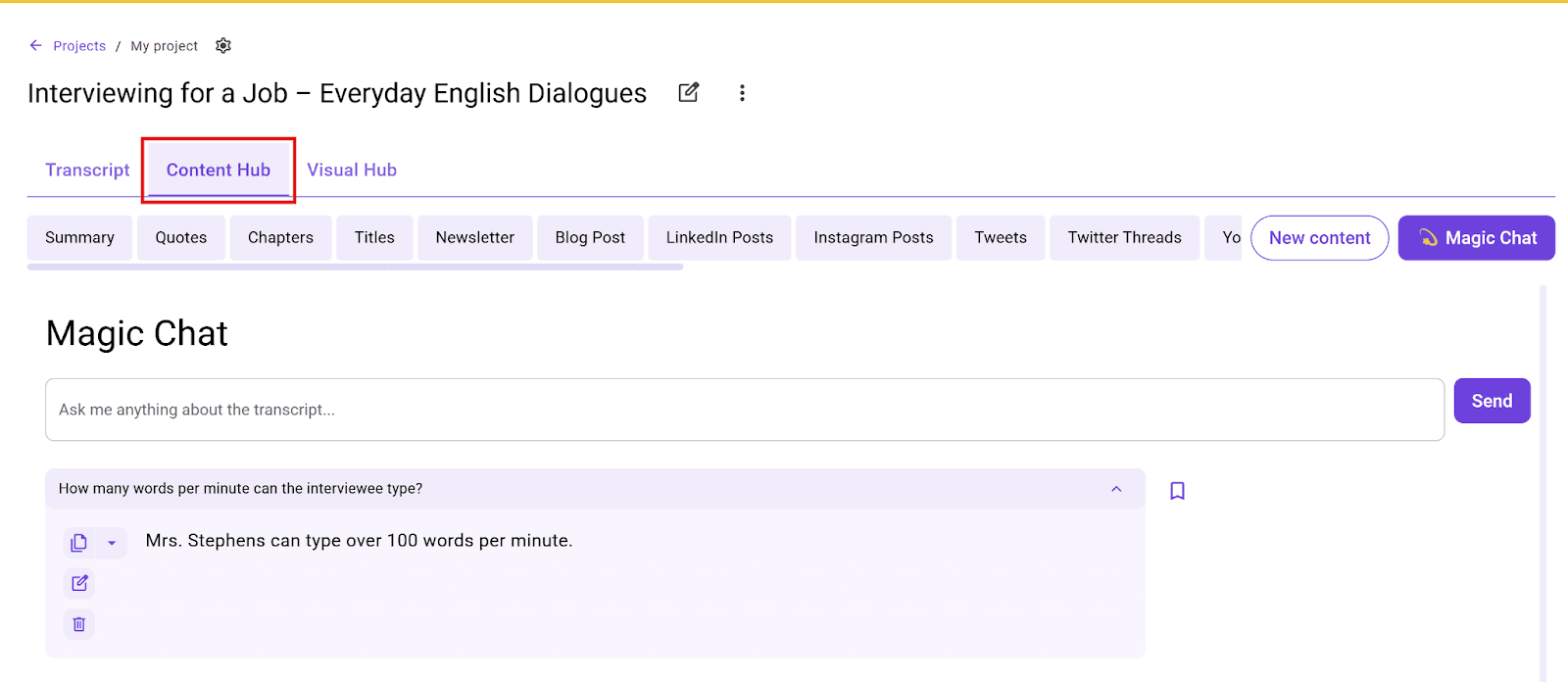
Additionally, you can use the “Magic Chat” feature to ask the AI questions about the transcript, or repurpose it into different content formats, such as blog posts, social media snippets, and AI-generated clips, through the Content Hub feature.
Step 6: Export Final Transcript
Once you’re satisfied with the transcript, export it in your preferred format. Most tools support many export formats, including DOC, TXT, PDF, or even SRT for video captions.
This ensures you have the flexibility to use your transcript across different media, from text-based content to video captions.
Best Practices for Podcast Transcription (Manual and AI-Generated)
Whether you’re transcribing your podcast manually or using AI-powered tools, following these best practices can improve the process and ensure you produce high-quality results.
Plan for Efficient Workflow
Podcast transcription is not much different from other tasks. You need to create a plan for the entire process. Break it into manageable steps and set specific time blocks for each segment. This helps you stay focused and reduce burnout, especially if you follow the DIY path for longer episodes.
Choose the Right Tool/Provider for Your Needs
Whether you’re using an AI tool or a professional transcriber, the quality of your podcast transcript significantly depends on where it came from.
If you’re going the automated route, you must use AI tools with the right features, such as high accuracy, multi-speaker identification, and multilingual support.
If you’re working with a manual transcriber, ensure you choose one with a proven track record and rich experience in your niche or industry. You don’t want a sermon transcription service provider handling your legal podcasts.
Handle Difficult Audio With Care
When dealing with challenging audio, such as one with overlapping speech or poor quality, consider cleaning it up with audio enhancement tools to make it clearer. This is applicable, whether you’re handling the transcription yourself, hiring a professional, or uploading it to an AI transcription platform.
It can also be helpful to compress your podcast audio files to sizes your AI transcription tool can handle. Having a 5 GB file for a platform that supports a max file size of 2 GB just won’t work.
Prepare Your Transcript for Multipurpose Use
Think beyond just the transcript. Use it to create additional content, such as blog posts, summaries, or social media posts. With tools like WhisperTranscribe, you can easily repurpose your transcripts into clips, allowing you to turn audio moments into materials for effective content distribution strategies.
Edit With Purpose
You must take editing seriously once you have your transcript draft, whether typed manually or generated by the AI transcription tool. Don’t rush the process. Instead, focus on identifying key moments and correcting errors that may impact the transcript’s meaning.
You’re not just fixing typos. Ensure the text flows naturally, especially if you’re manually repurposing the transcript into other content.
Format the Transcript for Different Platforms
Consider how your transcript will be consumed. Whether it’s for a website, PDF, or video captions, adjust the formatting accordingly. This could involve using specific styles or file types (like SRT for captions or DOC for web articles) to make the transcript more accessible.
What's Next After Podcast Transcription?
Once you have your podcast transcripts ready, you're sitting on a potential content engine waiting to be deployed properly. Instead of letting them sit idle, creators have found so many creative ways to use them. We’ve shared some of them below.
Create a Searchable Web Page
You can publish your podcast transcript on your website. This makes it easy for listeners to read along and gives search engines more context to index. You’ll be surprised at how much this can improve your podcast’s SEO, with more people discovering your episodes quickly.
Repurpose into Blog Posts or Articles
The topics discussed in podcasts are hardly meant for audio consumption alone. They are also suitable for blog posts and articles. But instead of starting from scratch, you can easily turn your transcript into these pieces.
You’re already putting in the effort to create great content. So why not use the transcript to get more mileage out of each episode?
Create Social Media Content
Social media loves bits of great information. An entire podcast episode is almost always too long to feature on TikTok and Instagram. But your podcast transcripts now give you the power to create those scroll-stopping reels and posts your audience wants to see.
You can pull out catchy quotes or key moments to share on social media. You can even make quick, short videos and memes with tools like WhisperTranscribe to drive traffic back to your podcast.
Generate Show Notes and Episode Summaries
Writing show notes can be tedious. But with your transcript, you can quickly extract the key points and episode highlights. It’s a huge time-saver and ensures you don’t miss important details. Once you get your summaries right, you can pull in more listeners who love what they read and want to listen to more.
Support Language Learning or Research
Your transcript can also be a handy tool for listeners who want to learn new vocabulary, revisit key terms, or research the topics discussed in your podcast. In that case, they won’t have to listen and re-listen to hours of audio. Instead, they will just reference your transcript to get exactly what they need.
Use in Marketing and Email Campaigns
You can pull quotes, insights, or episode highlights from your transcript to feature in your podcast marketing materials or email campaigns. It’s an easy way to promote your episodes and keep your audience engaged always.
Unlock More Possibilities When You Transcribe Podcasts with WhisperTranscribe
Transcribing your podcast can open up new ways to engage your audience, enhance accessibility, and repurpose content. Whether you're using manual methods or AI tools, having a clear transcription process is key.
Now, with WhisperTranscribe, you can take your podcast transcription to the next level with advanced features and accuracy. Our tool transforms your audio into various content formats, including transcripts, summaries, show notes, and social media posts. Our goal is to save you time so you can focus on creating amazing content.
Try WhisperTranscribe for free today to unlock the full potential of your podcasts.